
Solution
FBT car logbook
A car logbook for the FBT operating cost method, built from your work cars' trackers: trips marked business or private by rules you set, for drivers and the office to check, then locked.
Included in Telematics, from $21.90 / asset / month + GST.
The car logbook is part of the Teletrack Telematics subscription, from $21.90 / asset / month + GST on the Track tier. Month-to-month, no lock-in contracts. Every Telematics account already has the Logbook menu item: enrol a car and its trips start coming in. There's no separate FBT price, no add-on to buy and no charge per driver, because every Telematics tier includes unlimited platform users. Tracker hardware is sold separately.
The pain
A logbook written from memory in week twelve.
An FBT logbook asks for twelve continuous weeks of detail. On paper, it usually goes like this.
- Week 1, Monday. A paper logbook goes in every glovebox. By Thursday, the first ute out each morning has a page of blank lines.
- Week 12, Friday, 4 pm. Someone rebuilds three weeks of trips from calendars, fuel receipts and memory, in one sitting.
- The odometer moved 5,000 km in twelve weeks. The trips written down add up to 3,800. Nobody knows where the other 1,200 went.
- Page after page of purposes that just say "business". The ATO says that on its own isn't enough.
- Tuesday, 7 am. The ute changes hands for the week. Nobody writes it down; three weeks later nobody knows whose trips were whose.
Fit
Who it's for, and who it's not.
Built around the fringe benefits tax (FBT) year and employer fleets: cars your organisation provides that staff also use privately.
For
- Employers whose cars, including utes that count as cars for FBT, are also used privately, and who want an FBT operating cost method logbook.
- Cars with a Teletrack-connected tracker, or ready to have one fitted.
- Fleets that know who's driving. A driver ID tag scan or PROSTART® pre-start sign-in (priced separately) in the 12 hours before a trip names the driver; otherwise it's the car's default driver, if one is set.
- Teams where drivers can check their own trips on a phone and the office reviews the rest.
Not for
- An individual's own tax return. The income-tax logbook method runs on different dates and rules.
- Working out FBT, a car's taxable value, operating costs or business use for the FBT year, or deciding which vehicles need a logbook. Those stay with you and your adviser.
- A hands-off logbook. The rules make a first guess, but business trips away from known places need a purpose, and someone has to check the trips.
How it works
From the tracker to a locked logbook.
Every step happens in Teletrack, starting from the trips your trackers already record.
-
1
Enrol
Add every asset in a Passenger vehicle category in one click, or any other car or ute. Up to about three months of earlier trips are copied in.
-
2
Record and classify
Trips are copied from the car's tracker, built the same way as the live map's, and four rules mark each Business or Private and say why.
-
3
Check
Drivers can check their own trips and add purposes on a phone; the office can review every trip and fill the gaps. Nothing sends reminders, so build it into your week.
-
4
Set the period
At least 12 continuous weeks (84 days) for the car, with opening and closing odometer readings typed in or read from the car where its tracker supports it.
-
5
Lock and download
Once the period is complete, an Administrator locks it and the figures freeze. Administrators and Editors download the logbook as PDF or Excel.
For drivers
Their own trips, on their phone.
Drivers open My trips in their phone's browser with their own Teletrack login. Nothing to install; it needs a data connection.
- A trip reaches a driver's page when it's matched to their login: a tag scan or pre-start sign-in in that car in the 12 hours before it, the car's default driver, the office's choice, or their own claim.
- My trips shows the last 14 days, with the trips that need something first, and goes back up to 120 days.
- Each card says where the trip went, when, how far and in which car, and why it was marked that way, such as "Why private? Commute: home to Depot".
- One tap switches a trip between Business and Private. The purpose box suggests "Travel to <site>" for job sites and, room permitting, purposes used before. A business trip with no purpose is flagged in red.
- A driver the office lists as the car's default or a regular driver can claim a trip with no driver recorded ("I drove this"); otherwise only the office changes the driver.
- The page tells drivers that their employer's administrators can see all trips, including private ones. Others can too (see Privacy and access).
Screens shown with demonstration data.
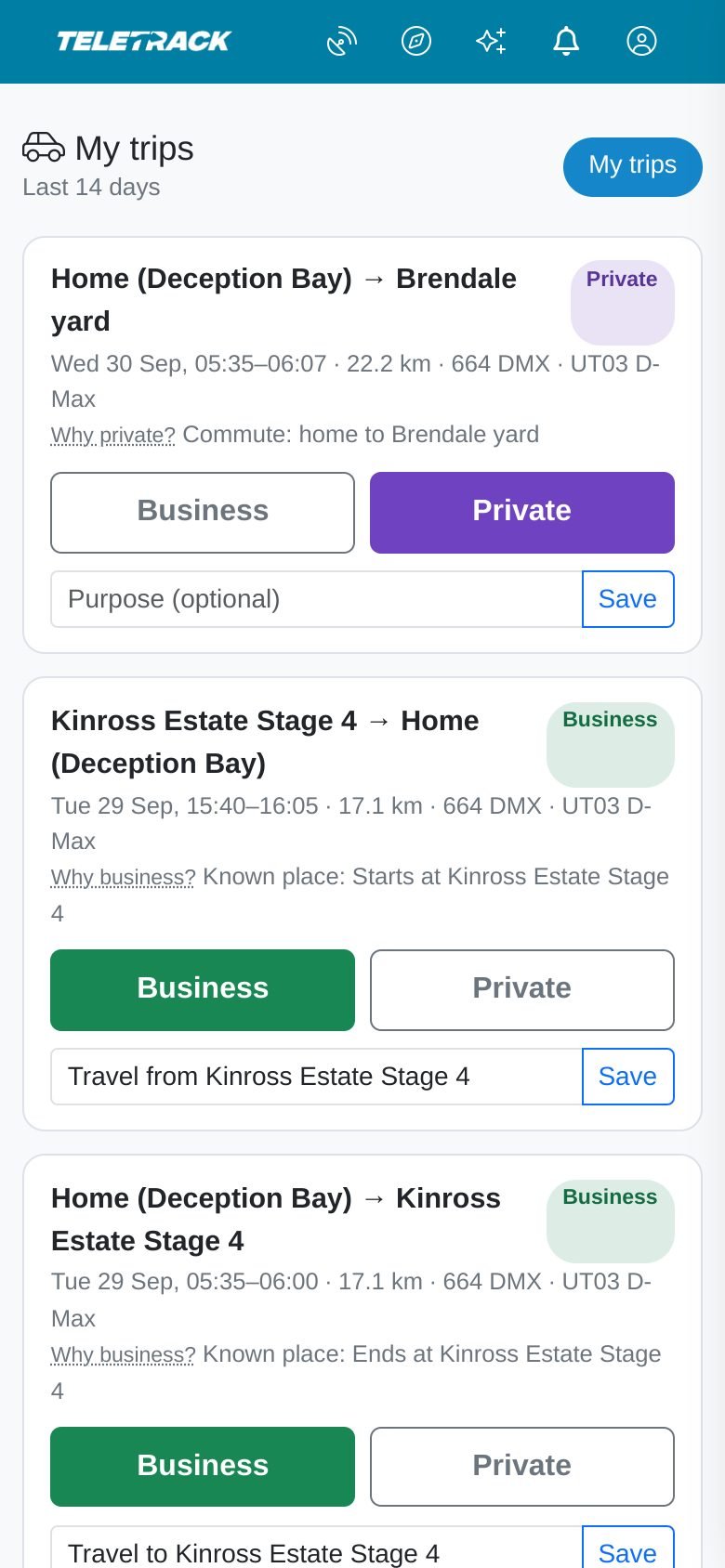
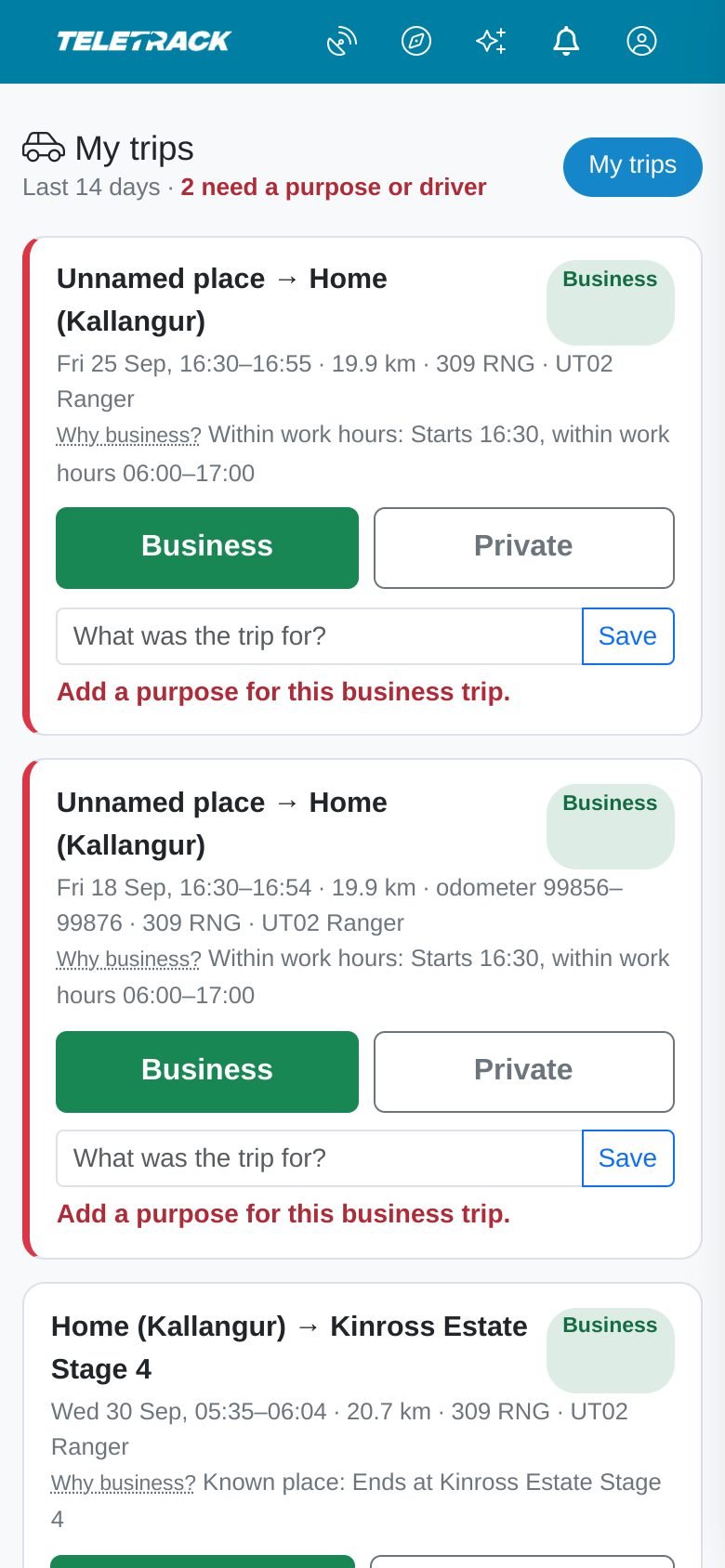
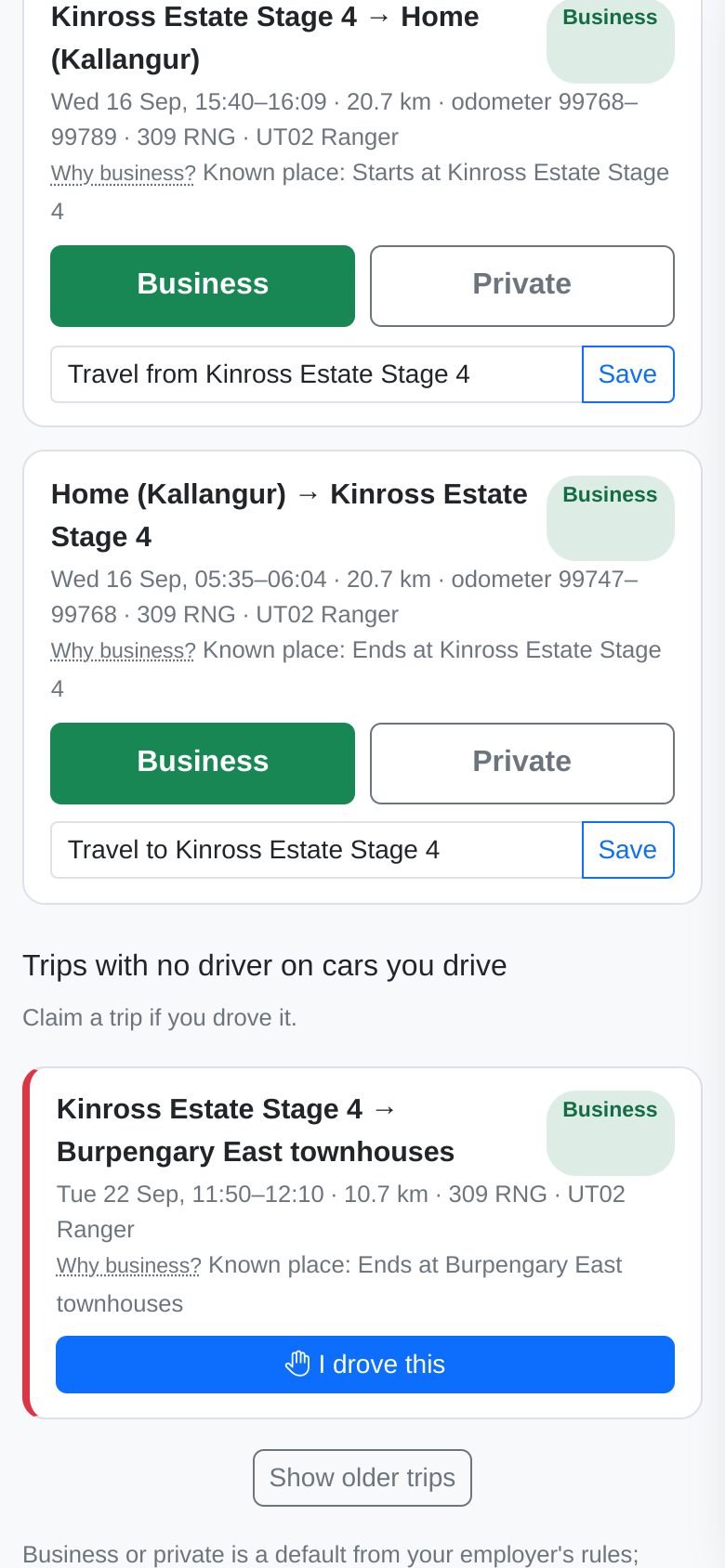
Drivers can check their own trips on a phone, with the reason for each one. Nothing to install.
A business trip without a purpose stays flagged until someone says what it was for.
A car's default and regular drivers can claim a trip with no driver recorded, with one tap.
For the office
Every car, and what still needs attention.
Administrators and Editors run the logbook from the Review page, for the cars their Teletrack access covers.
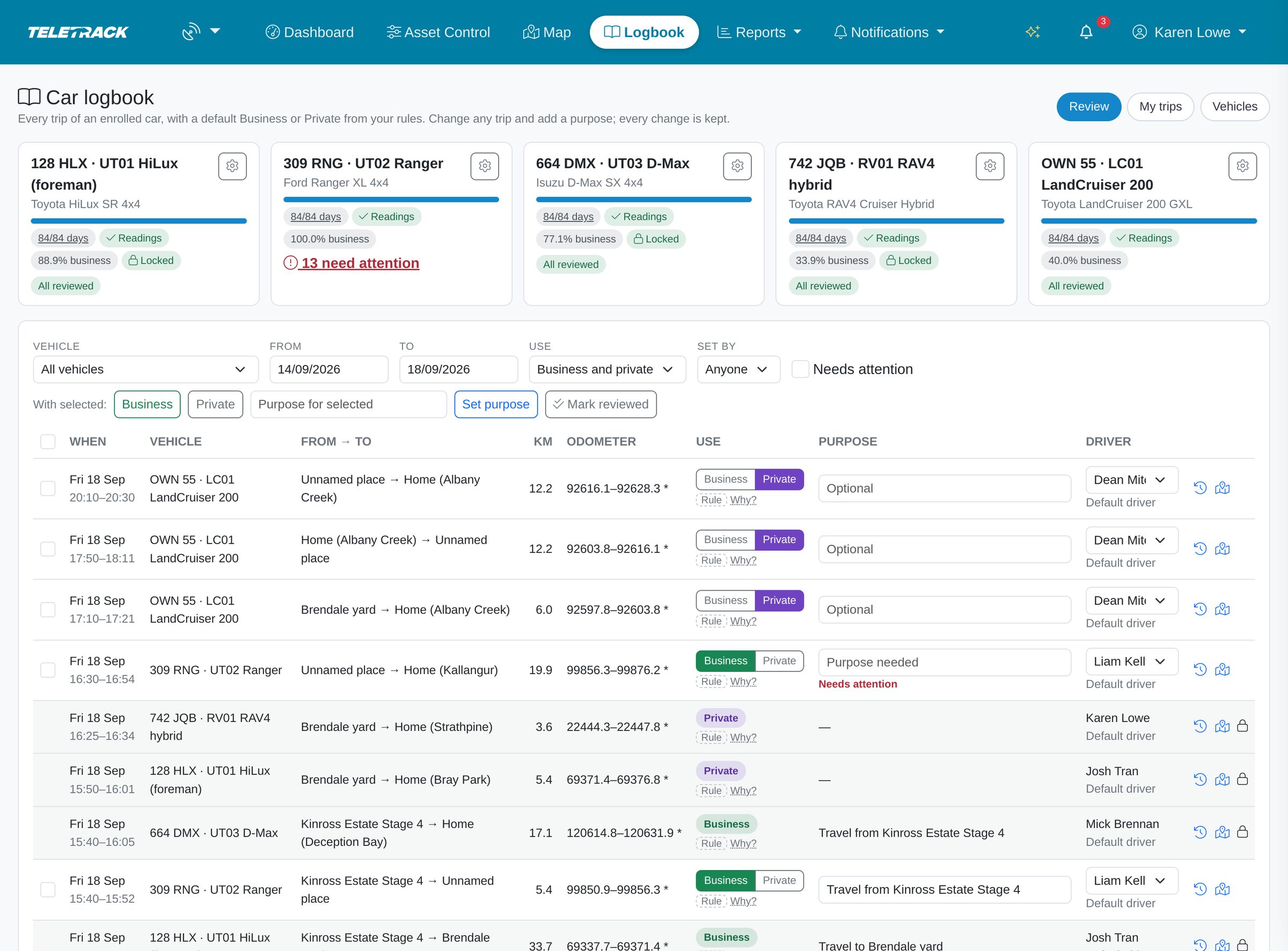
- A card for each car: days through its logbook period, whether the odometer readings are in, business use % and how many trips need attention ("All reviewed" when none do, not that anyone checked them).
- Filter by vehicle, dates, Business or Private, who set it and Needs attention: the last 14 days to start, up to 400 days at a time.
- Change any trip outside a locked period, saved on the spot: Business or Private, purpose or driver. Tick a run of trips to mark them Business or Private in one go, or give trips that shared a purpose the same one.
- Needs attention flags a business trip with no purpose, a trip with no driver, and a trip that has dropped out of the tracker data.
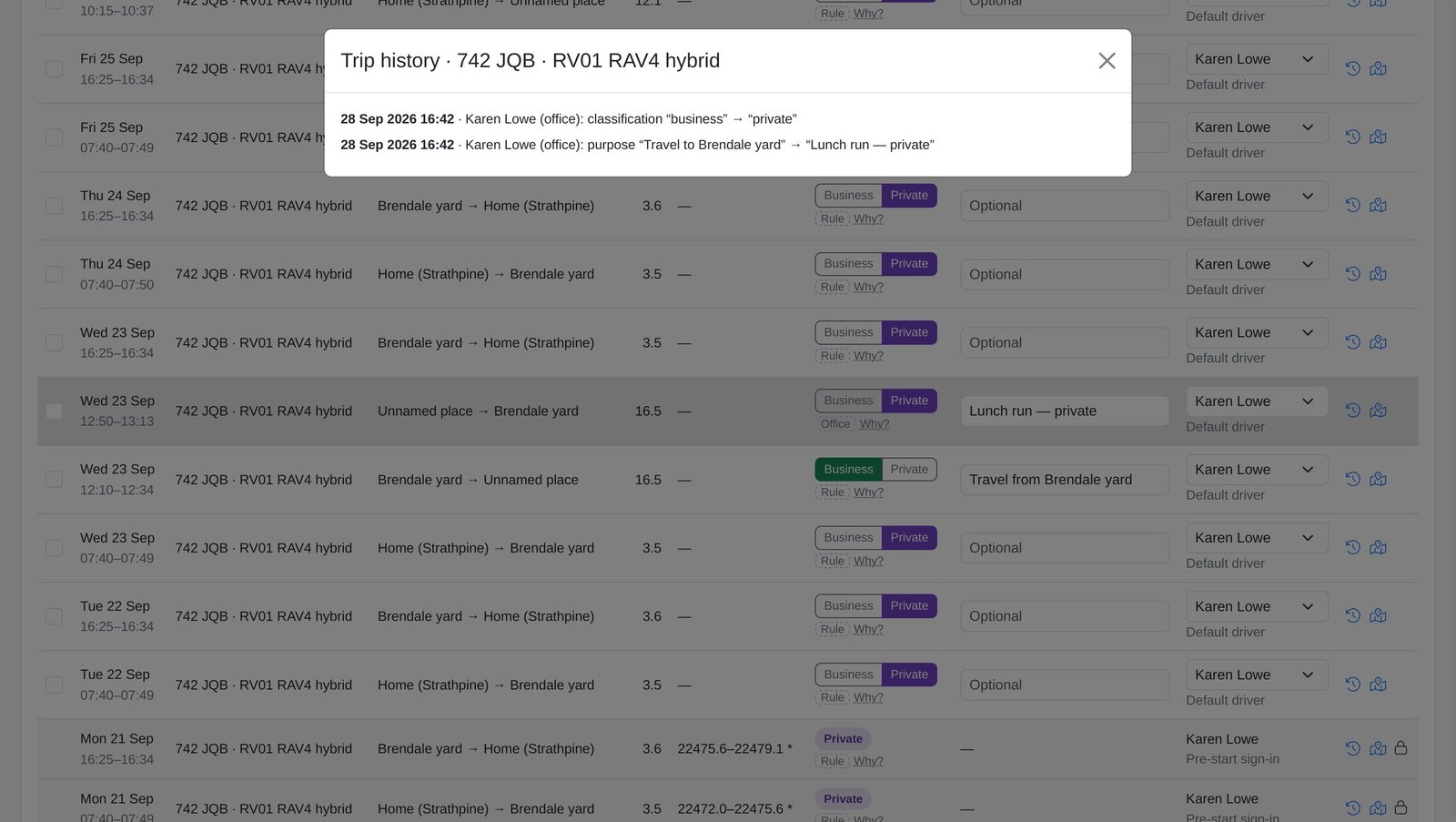
- Every change a person makes to a trip's Business or Private, purpose or driver goes in its Trip history: who, when, old and new value. A late purpose shows as late.
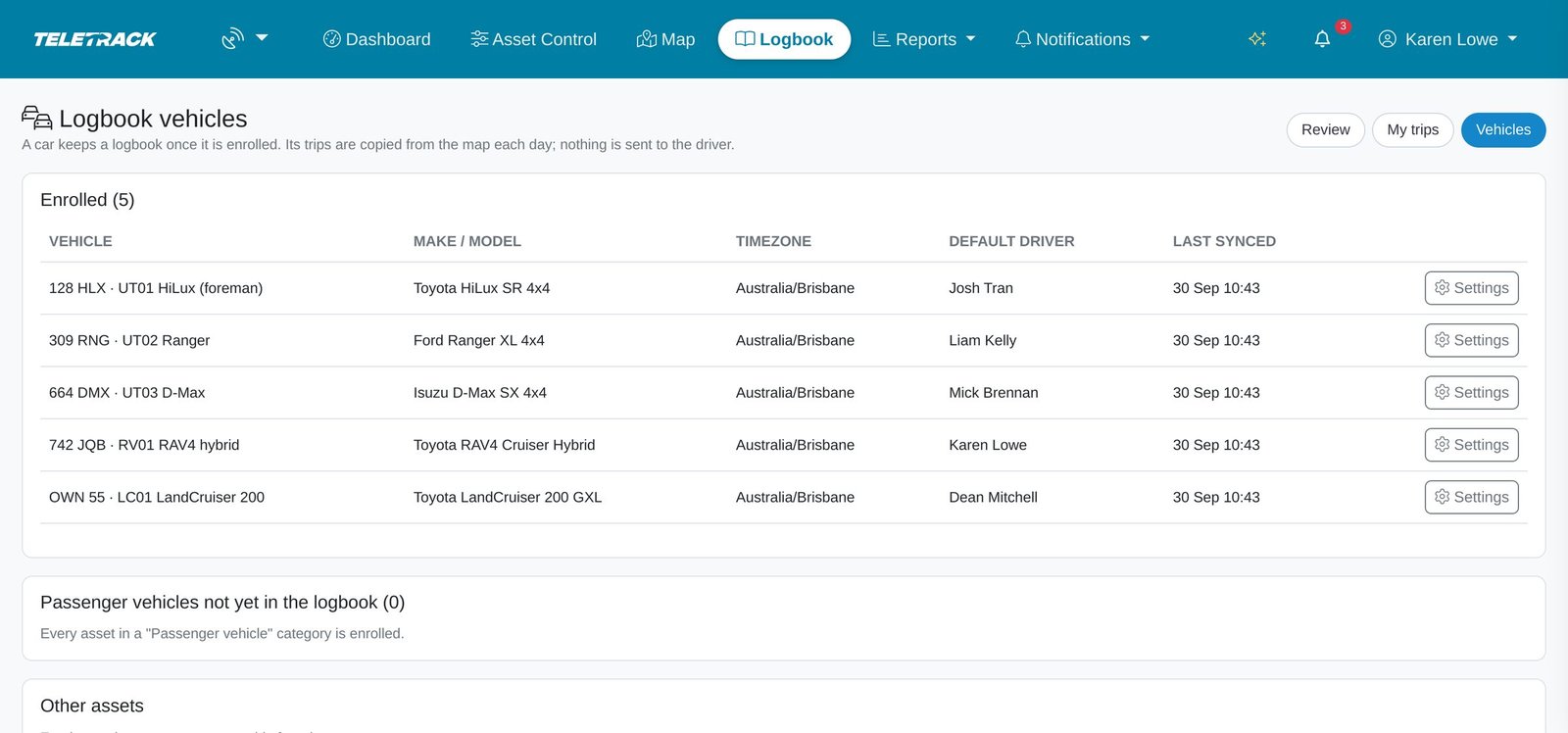
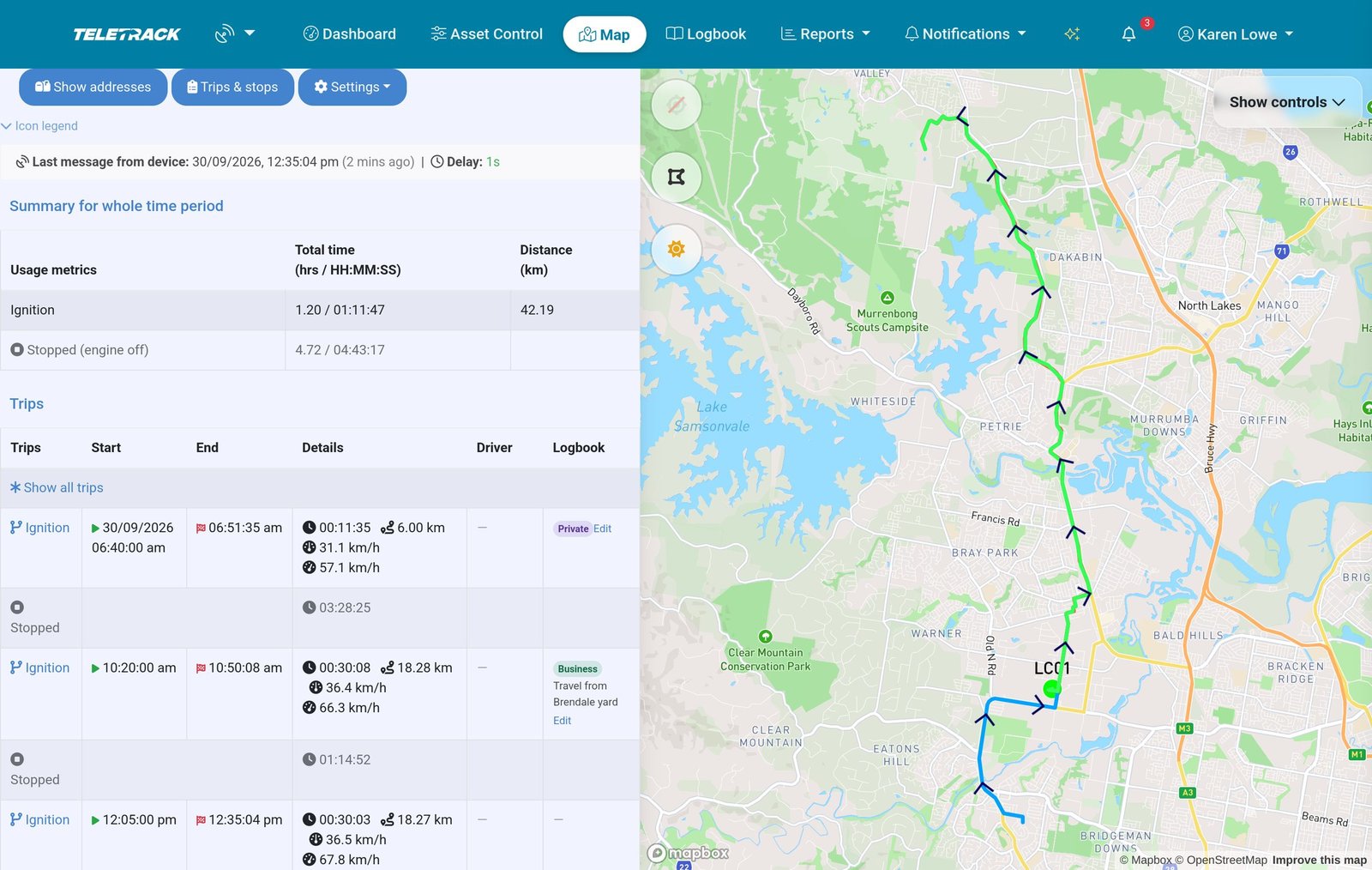
- Logbook vehicles lists the enrolled cars, their default driver and last sync, and enrols more. On the map, a logbook car's trips show Business or Private and purpose, linking Administrators and Editors to the Review page.
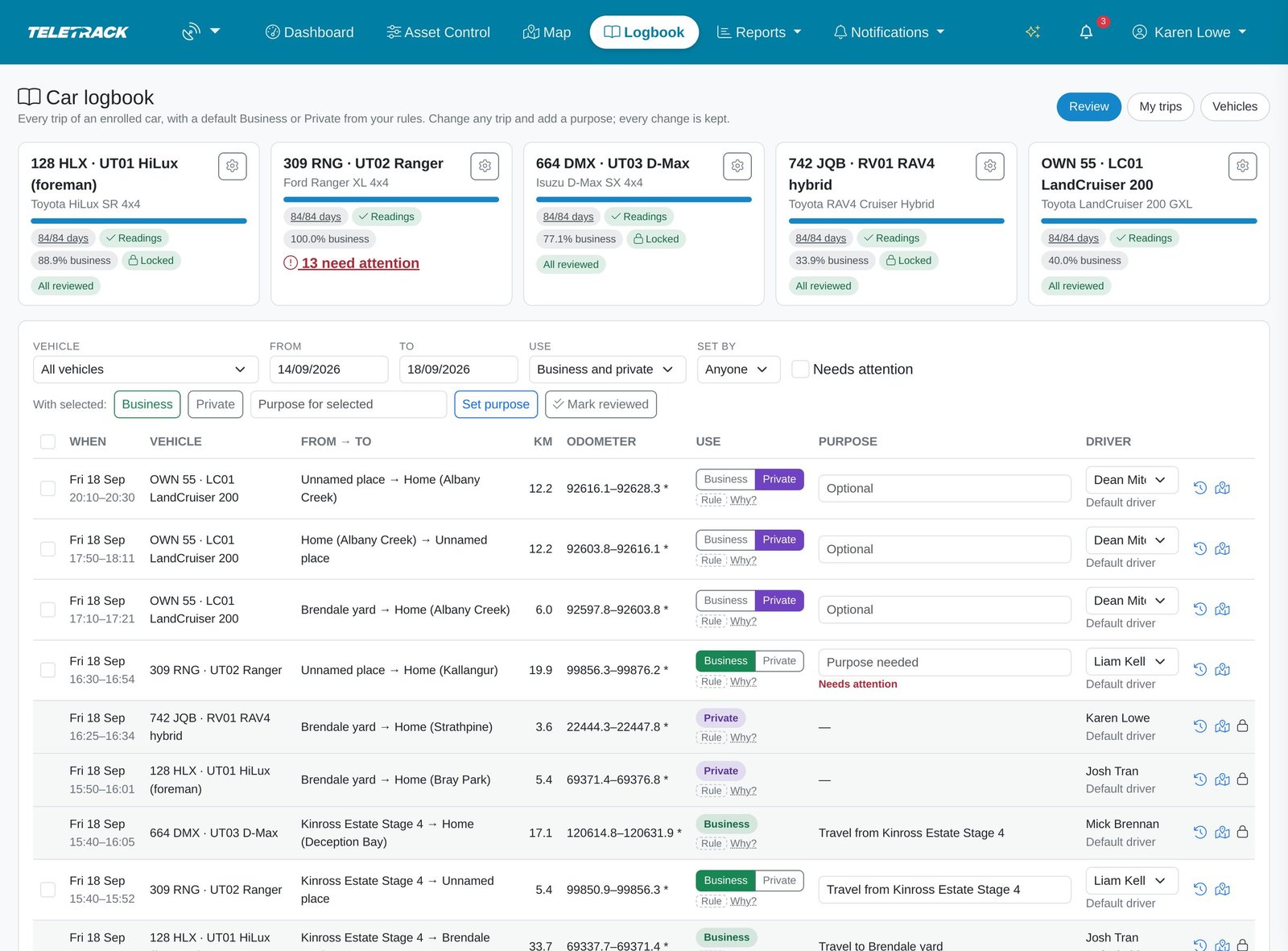
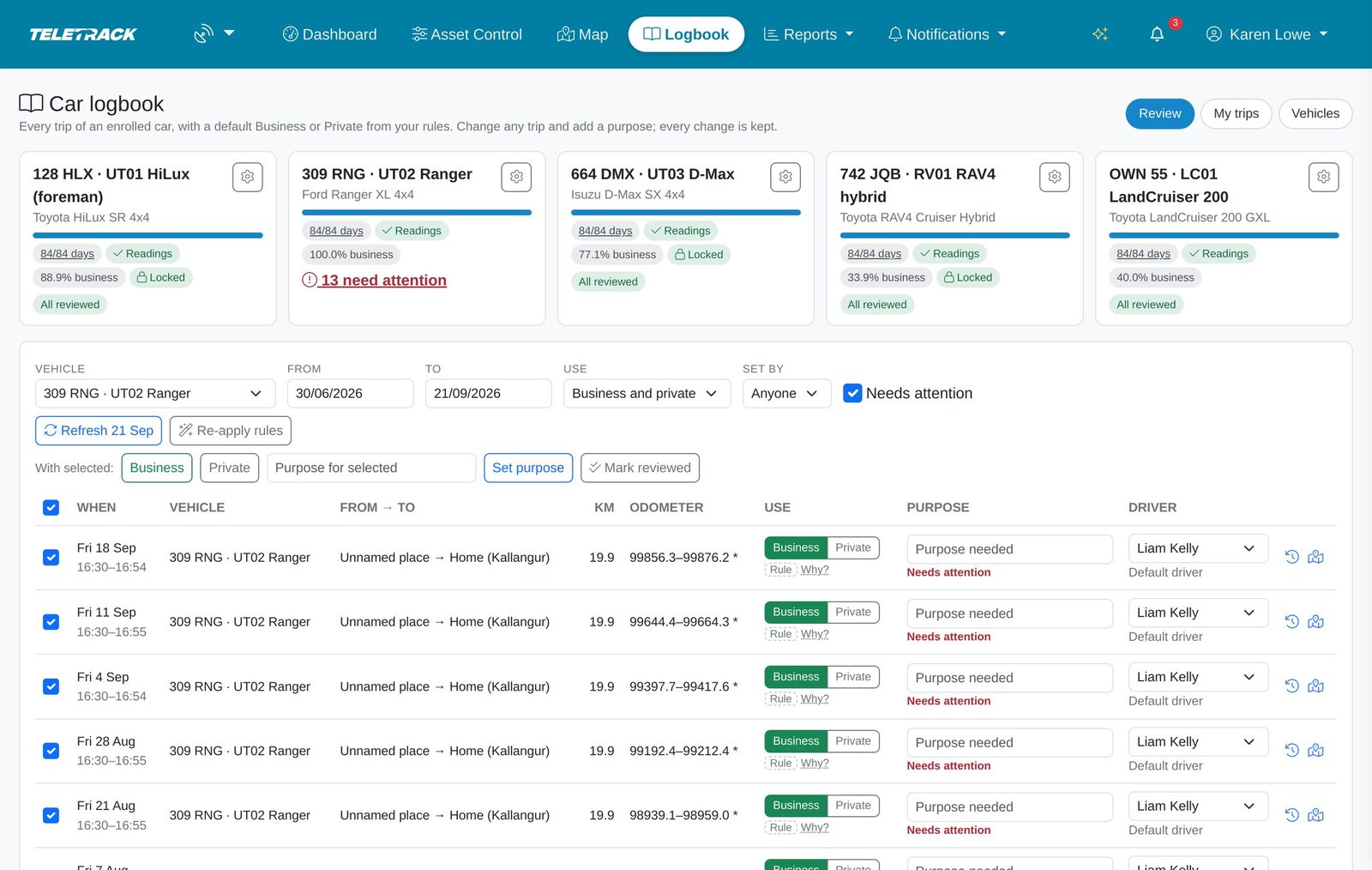
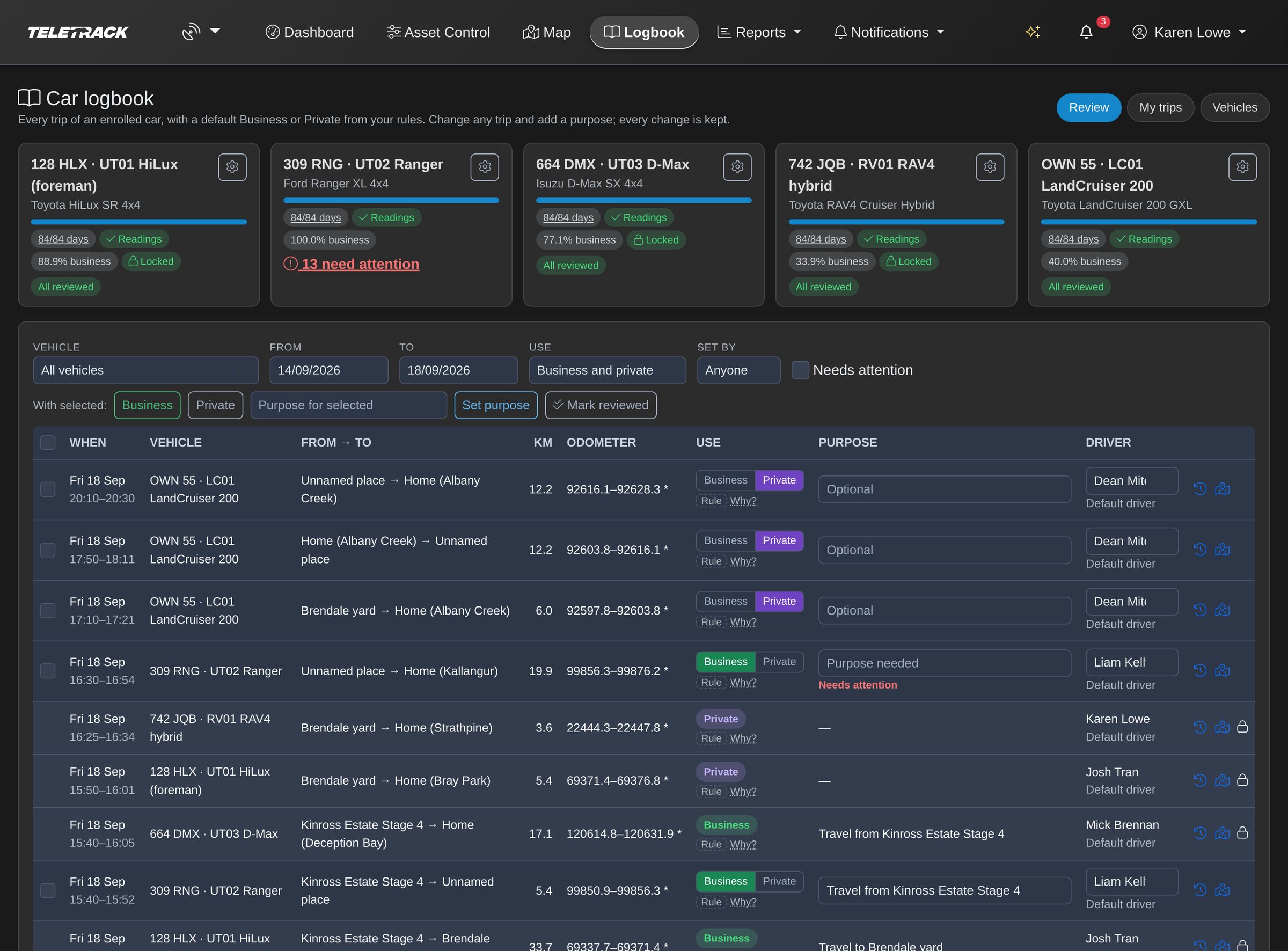
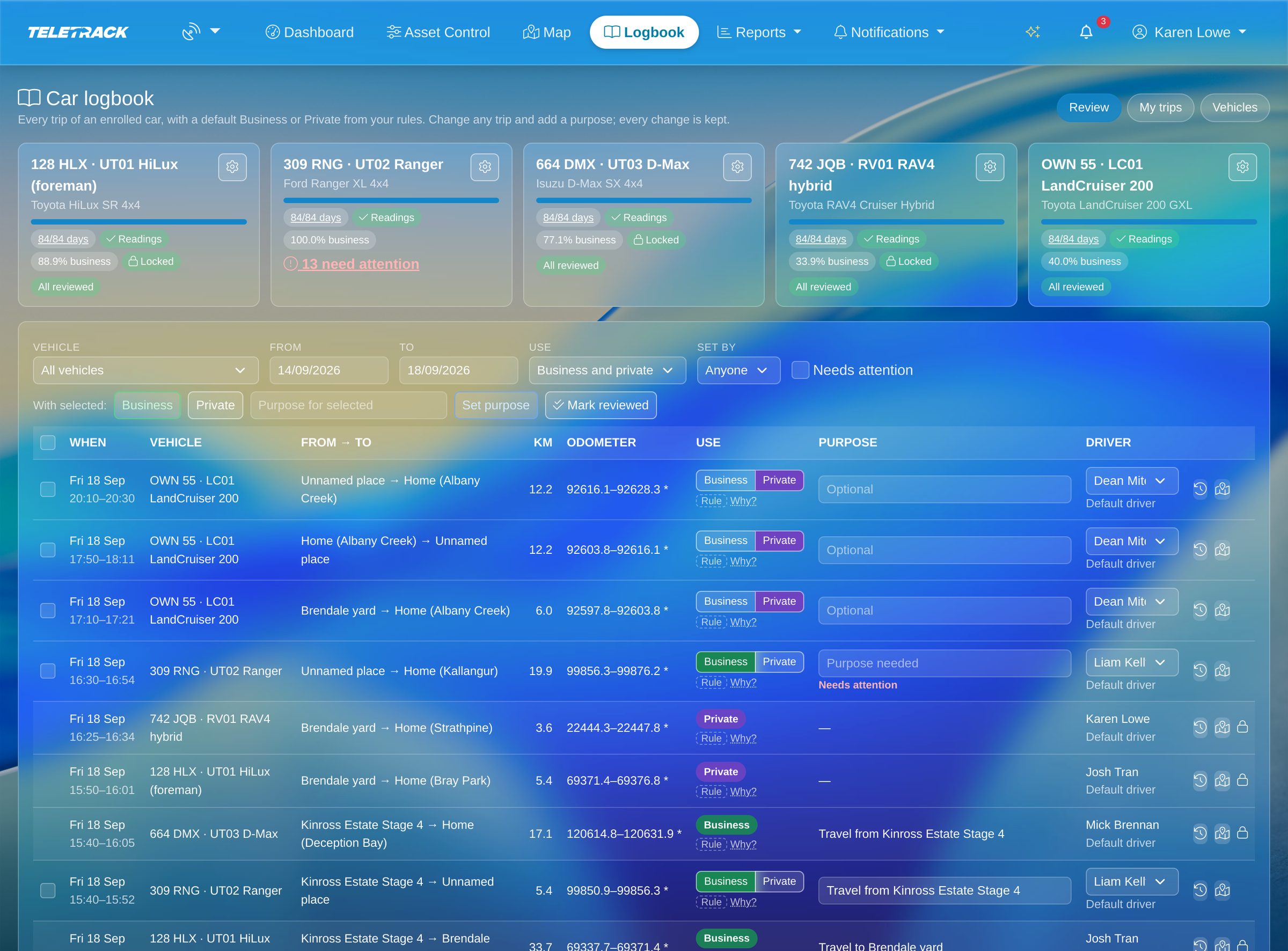
A card for each car, then every trip with its Business or Private, purpose and driver.
Put a run of trips right in one go, such as Friday drives home that the rules marked Business.
Every change a person makes to Business or Private, purpose or driver is kept: who, when, and what it was before.
Every enrolled car in one list, with its default driver and when it last synced.
The logbook sits beside each trip on the map, with a link to change it.
Rules
A first guess you can read, set car by car.
Four rules, checked in order, start each trip as Business or Private and say why; they never change a Business or Private, or a purpose, set by hand. A trip where someone only typed a purpose, or only picked the driver, can still be switched between Business and Private by the rules. They're defaults for people to check, not tax advice; check with your adviser how they suit your FBT position.
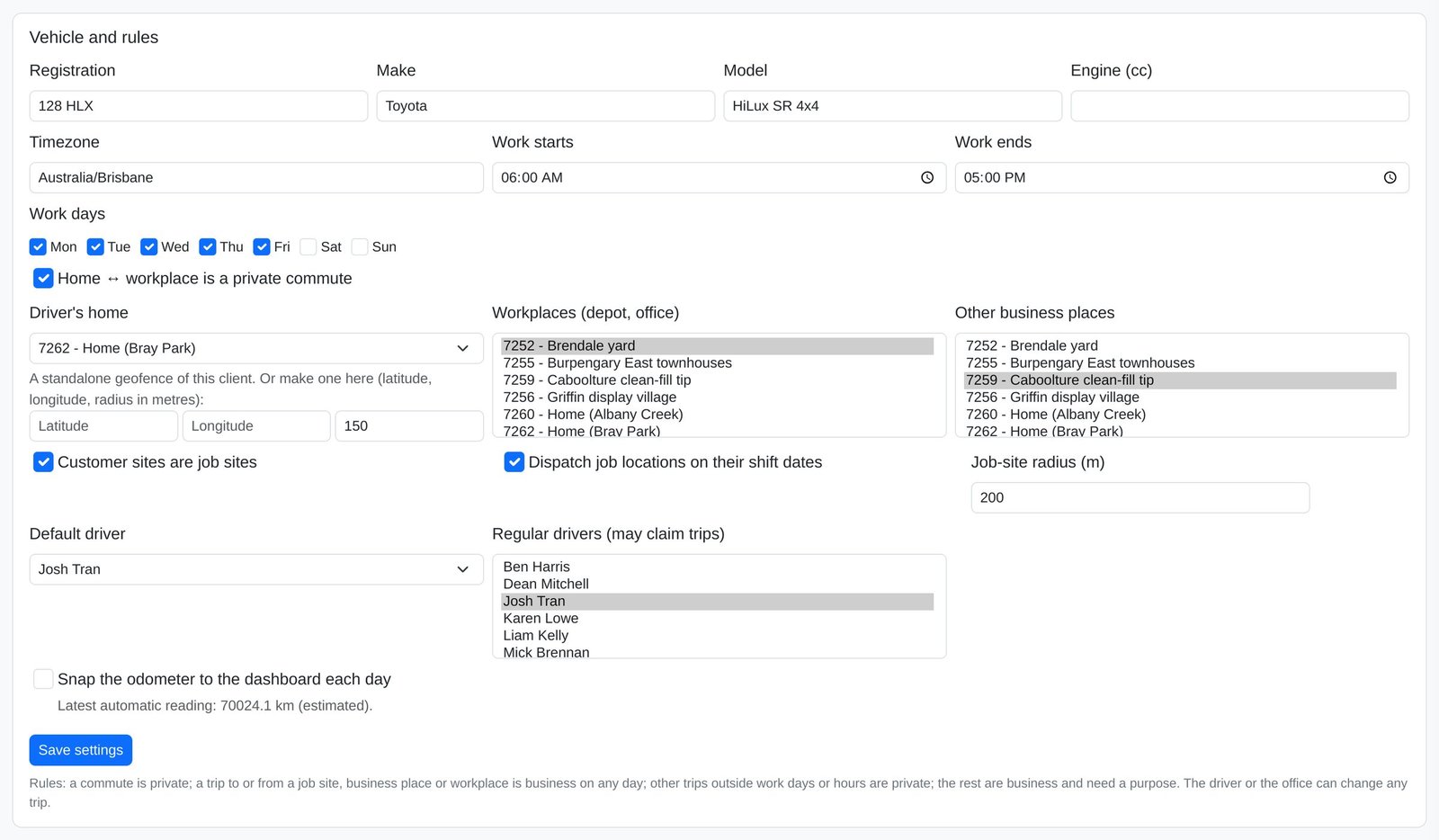
- Commute: a direct trip between the home set for the car and a workplace (the depot or office) is Private. The setting can be unticked per car, which makes new trips like that Business; check with your adviser before you untick it.
- Known place: a trip starting or ending at a job site, customer site, other business place or workplace is Business at any time, with a purpose filled in such as "Travel to <site>". These aren't flagged: read them before you lock.
- Outside work hours: any other trip that starts on a day off, or outside the car's work hours, is Private.
- Within work hours: everything else is Business, and stays flagged until someone adds what it was for.
- Night shifts: work hours can run past midnight, but each trip is checked against the work days ticked for the calendar day it starts, so check trips just after midnight at the start or end of a run of night shifts before you lock.
- The commute rule only catches a direct trip between home and a workplace. With a stop, between home and a job site, or ending at home in work hours, a trip can start as Business. Check trips to and from home before you lock.
- Set per car: work days and hours (Monday to Friday, 06:00–17:00 by default), home, workplaces, other business places and drivers.
- Active customer sites with a location count as job sites by default, as do Teletrack Dispatch job locations on the job's shift days, for every logbook car, not just the one rostered. Either can be switched off per car.
Periods and odometer
Twelve weeks, two readings, one figure.
A logbook period is set per car and covers at least 12 continuous weeks (84 days), up to 366 days. Back-dating one copies the car's earlier trips in (up to 400 days back, as far as the tracker data goes), but that isn't a logbook kept at the time.
- The ATO expects purposes at the end of each trip or as soon as reasonably practicable, and readings at or soon after the period's start and end: check with your adviser before relying on a back-dated period.
- An Administrator or Editor enters the opening and closing readings, typed in from the odometer (photo optional) or read from the car in one click where its tracker supports it. That's the car's latest reading, so take it on the day.
- Where the car doesn't report a dashboard odometer, the page shows the tracker's GPS estimate for reference only; it can't be saved as a reading.
- Each journey's odometer start and end is calculated from the opening reading plus the tracker's distance, not read from the car, and the logbook says so. Where the car reports a dashboard odometer, you can snap each day's first reading up to it (off by default), but the logbook doesn't mark which readings were snapped.
- Business use % = business km ÷ (closing − opening reading), with kilometres the tracker didn't record counted as private. It's the period's figure, not the FBT year's reasonable estimate. The app doesn't check the two readings against each other, so check both before you lock.
- Lock period stays disabled until the period has ended and every day is final, both readings are in (not the GPS estimate), and every business trip has a purpose. The page lists what's missing.
- Only an Administrator can lock, freezing the figures and every trip in the period and keeping the logbook PDF with its SHA-256 fingerprint. Reopening also needs an Administrator and a written reason, and is recorded in the period's history with the earlier PDF, which can't be downloaded from the page.
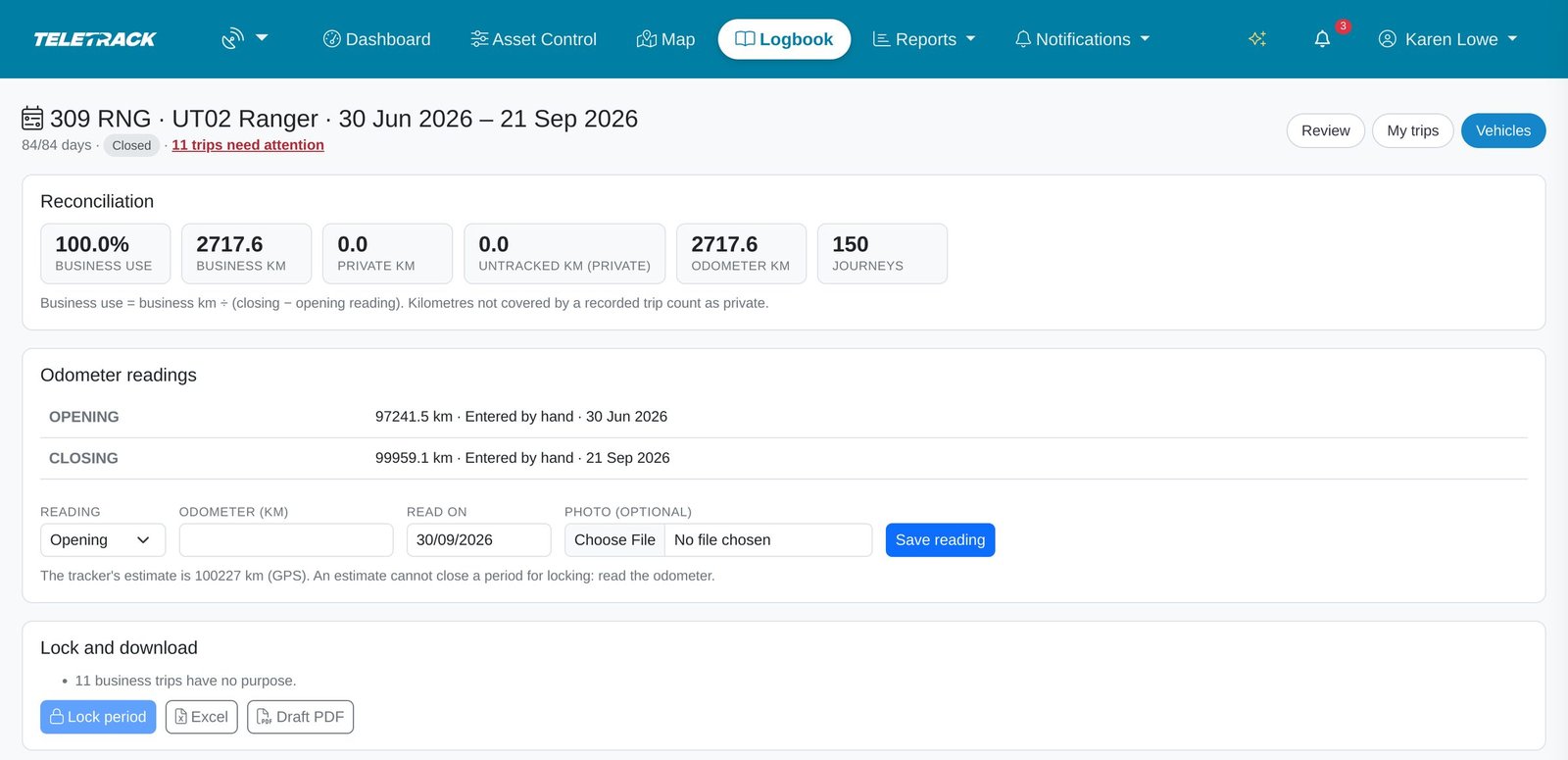
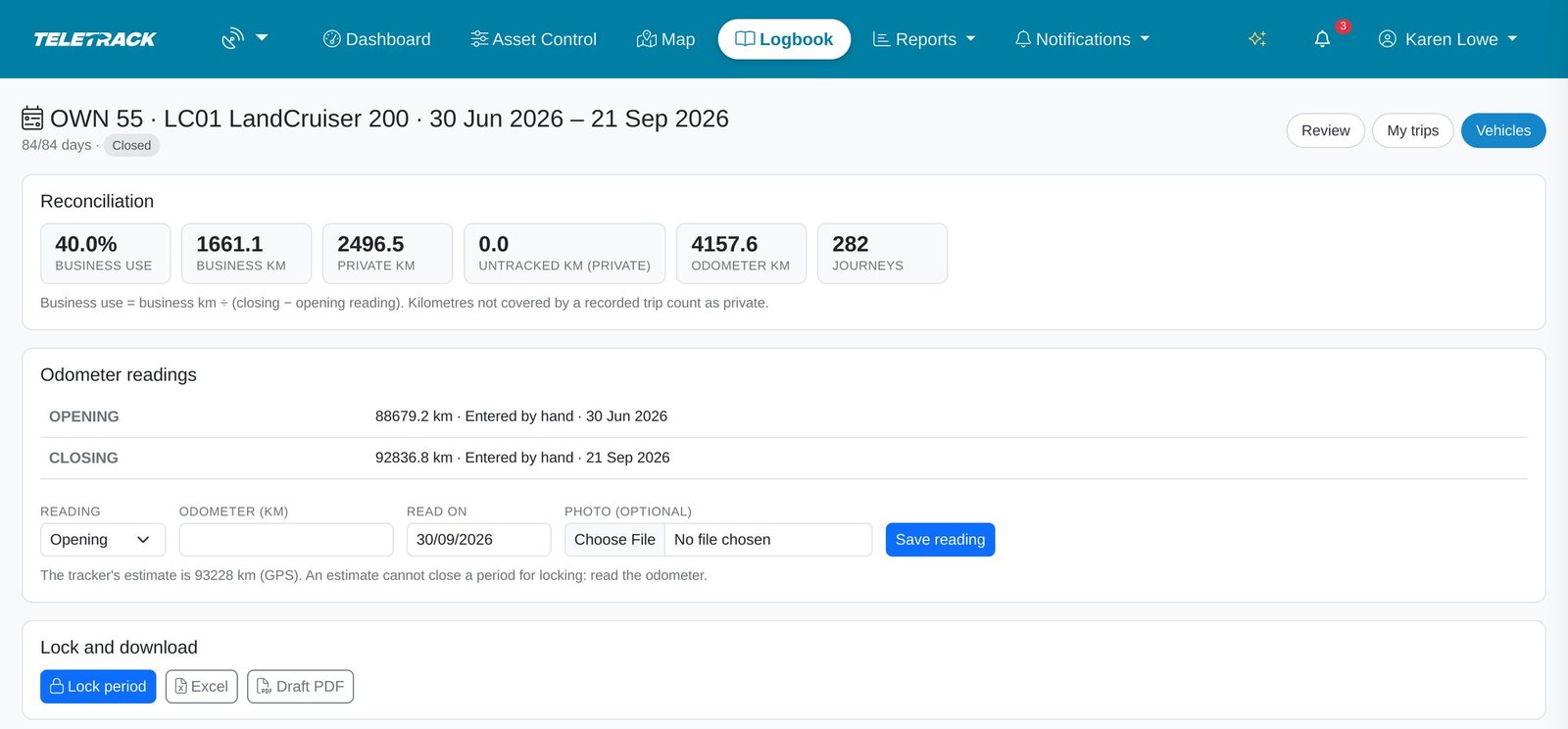
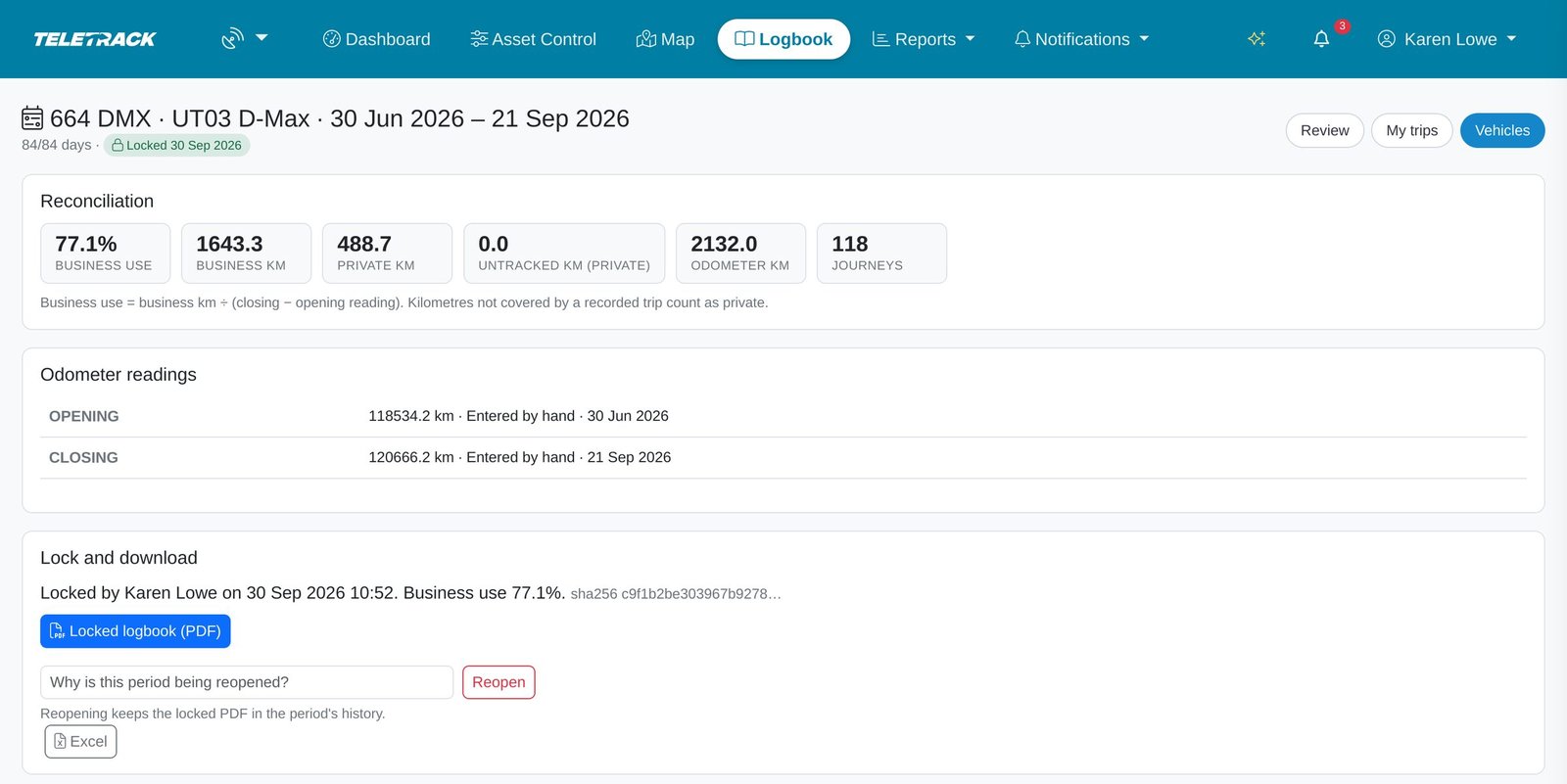
The page lists exactly what stands between you and a lockable logbook. A 100% business figure like this one is worth checking before you lock.
Period over, every day final, both readings in and a purpose on every business trip: ready to lock.
Locked with a SHA-256 fingerprint. Reopening needs an Administrator and a reason.
The logbook
A PDF to sign and keep, and an Excel copy.
Administrators and Editors can download a period's logbook at any time: Excel, a draft PDF while it's unlocked, and the locked PDF once it's locked.
- The cover: employer, vehicle, registration, opening and closing odometer and where each came from, total, business and private kilometres, business use %, the period, and "These classifications are defaults, not tax advice."
- A declaration for the employee and employer to sign on paper. Read its wording with your adviser first: it calls the period's business use % "a reasonable estimate of its business use", the ATO's term for the FBT year's figure, which Teletrack doesn't work out.
- A method note: how journeys were recorded and classified, that per-journey odometer readings are calculated, and how business use is worked out.
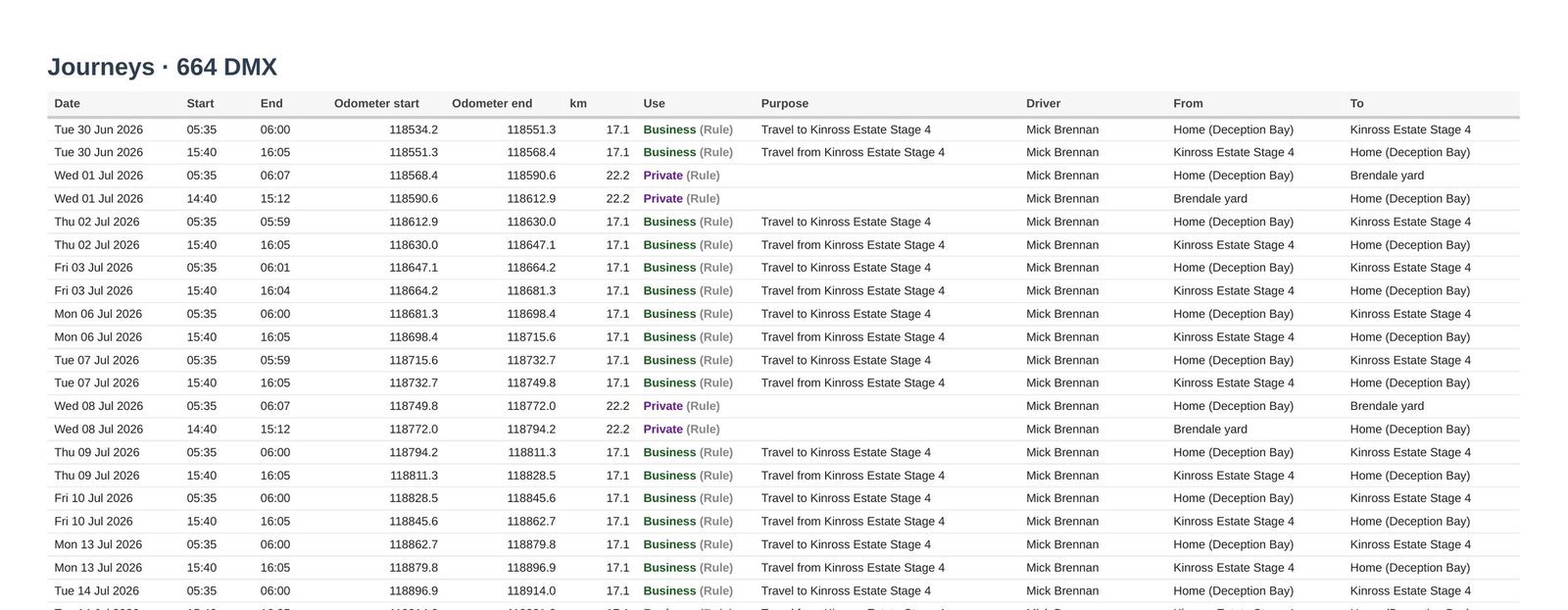
- Every journey: date, start and end time, calculated odometer start and end, kilometres, Business or Private and who set it, purpose, driver, and where it started and ended.
- A Changes section: edits to those journeys and car events dated inside the period, with when, who, from what, to what and the reason.
- The Excel file has Summary, Journeys and Changes sheets, with kilometres as numbers and the Why? for every trip.
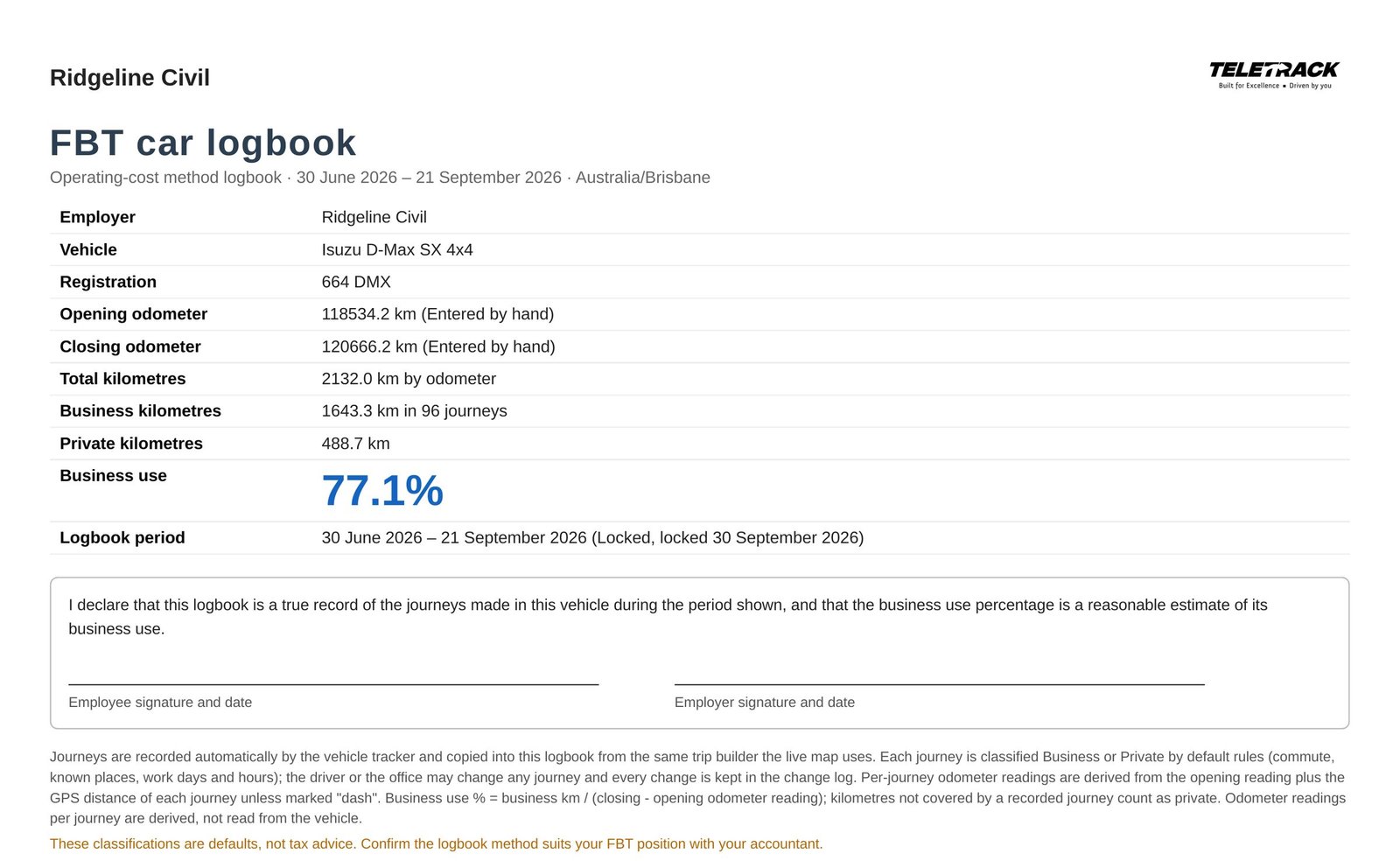
A cover to sign on paper, with the method and the business use % on it. Read the declaration's wording with your adviser first.
Every journey with its calculated odometer readings, kilometres and purpose. The "Travel to …" purposes here were filled in by the rules: read them before you lock.
Reports and schedules
Many cars in one report, and the trips by email.
The same trips run as a report across many cars, or arrive by email each week or month.
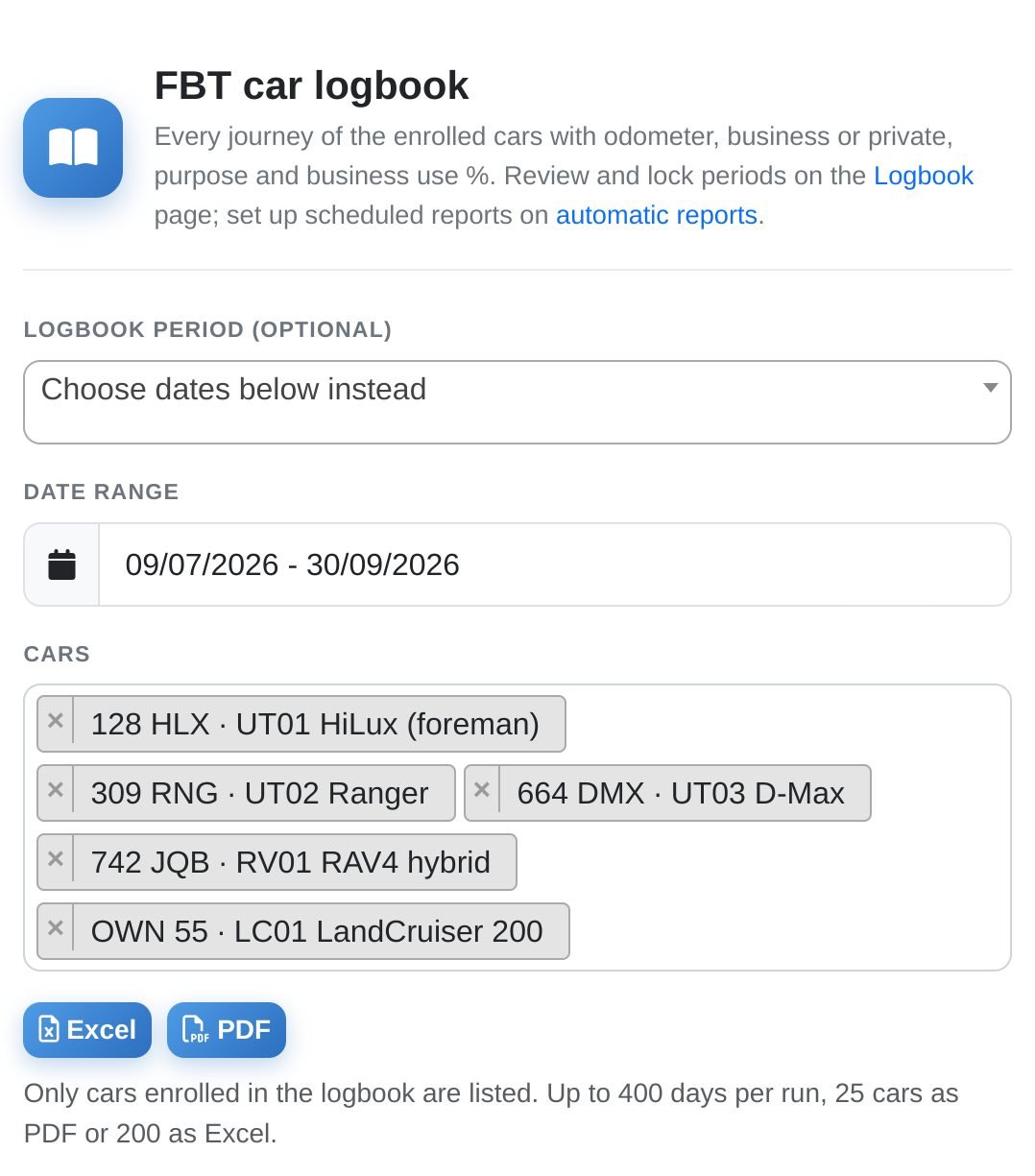
- The FBT car logbook tile on the Reports page runs for one enrolled car or many, as Excel or PDF: up to 400 days, 25 cars as PDF or 200 as Excel. It builds in the background and is emailed to you too.
- Opening and closing readings, and business use by odometer, appear only when the dates match a logbook period exactly; a period that's still running is cut off at today, so it won't match. Any other date range shows business use of the kilometres recorded, though its PDF is still headed "Operating-cost method logbook": for the logbook, use the period's own.
- Automatic reports email the trips as Excel, weekly (Mondays, for the previous Monday to Sunday) or monthly (on the 1st, for the previous month), at a time you choose. They're a running record, not a period's logbook: no opening or closing reading.
- Saved reports keeps runs, downloads and scheduled sends, with their files for 90 days. Locked period PDFs are kept on the period, outside that clean-up, but no retention period is promised, so download and keep them.
- In Asset Control, an enrolled car's Reports menu opens its logbook report, and its History tab has a Logbook view.
Privacy and access
Clear about who sees what.
Access follows the Teletrack permissions you already use, car by car.
- Administrators and Editors whose access covers a car run its logbook; only Administrators lock or reopen. User/Operator logins fix their own trips on My trips, and can view the car's logbook settings and periods without changing them.
- Private trips are visible to the employer. Administrators and Editors see every trip in full; anyone who can see the car on the map or in Asset Control, including other drivers, sees each trip's Why?, Business or Private, purpose and driver.
- My trips tells drivers only that their employer's administrators can see all trips, so tell your drivers who else can see their car.
- A driver's home circle is left off the map and the geofence pickers for logins with no Administrator or Editor access in the organisation. Only the circle is hidden: trip routes, addresses and the Why? still show, and so can the circle's name.
- The PDF and Excel list private trips too, with their places, and can't leave them out yet. Odometer photos and locked PDFs are kept in private storage, behind a permission check.
- Each organisation's logbook is its own; the client picker can't widen it. If a car moves to another organisation, its logbook is switched off at the next sync. The previous employer keeps its history, open to people with organisation-wide access, but a period that hadn't ended can no longer be locked. The new owner starts afresh.
What the ATO asks
The ATO's logbook rules, next to what Teletrack records.
A plain summary of the ATO's FBT guide for employers (chapter 4 on record keeping, chapter 7 on car fringe benefits): not tax advice, so check with your adviser. The ATO doesn't publish an official logbook, and Teletrack has no ATO approval, endorsement or class ruling.
- ATO: at least 12 continuous weeks (or the whole time you held the car, if shorter), representative of its business use and stated in the records. Teletrack: needs 84 days or more, so it can't set a period for a car you held for less than 12 weeks, and prints the period. Whether it's representative is for you and your adviser.
- ATO: odometer readings at the start and end of the period, made at or soon after those times. Teletrack: typed in from the odometer or read from the car where its tracker supports it, with the source printed beside each. Nothing checks a reading's date against the period, and the PDF doesn't print it, so take them on the day.
- ATO: for each business journey, the dates it began and ended, the odometer at the start and end, the kilometres and the purpose. Teletrack: the start date, start and end times, calculated odometer readings, the tracker's kilometres and the purpose; a journey that runs past midnight shows its start date only.
- ATO: a purpose that describes the journey; "business" on its own isn't enough. Teletrack: won't lock while a business trip has no purpose, but can't judge whether one describes the journey, and rule-filled ones like "Travel to <site>" pass that lock check without anyone typing them. Ask your adviser whether they're enough.
- ATO: entries at the end of a trip or as soon as reasonably practicable. Teletrack: records journeys automatically, but nothing prompts anyone for a purpose. Each change a person makes to a trip's Business or Private, purpose or driver is time-stamped, so a late entry shows as late; a purpose the rules fill in, including after Re-apply rules, isn't logged.
- ATO, for electronic logbooks: tracking with the opening odometer entered; each journey's date, time, distance and use; a weekly report in English; and checks, ideally on the day or weekly. Teletrack: records each trip's date, times, distance and Business or Private from the tracker, holds the opening reading entered for the period, and can email a weekly Excel report of the trips; kilometres the tracker misses count as private. It can't make the checks happen, and no screen, report or history shows that a check was done.
- ATO: odometer readings at the start and end of every FBT year (1 April to 31 March) you use the method, or the part of it you held the car. Teletrack: an automatic overnight reading on those dates, only if the tracker reads the dashboard odometer, and on eastern and central time the 31 March one comes before that day's driving; others can't be typed in. Keep your own for every car.
- ATO: business use for the FBT year is a reasonable estimate; a logbook alone isn't enough unless it's kept for the full year, and the estimate takes in the logbook, odometer and other records, and any change in use. Teletrack: gives the period's figure only; the estimate, the written election, costs and taxable value stay with you and your adviser.
What it doesn't do yet
We'd rather you hear it now than in week twelve.
The logbook does a lot of the recording for you. These are the gaps, as they stand today.
- No reminders and no app: nothing emails, texts or pushes drivers for a purpose, and My trips is a web page that needs a data connection, with no offline mode.
- It doesn't work out FBT, a car's taxable value, operating costs or a full-year business use estimate.
- It doesn't track when a car needs a new logbook (the ATO says one can be kept for up to five years if there's no major change in the pattern of use), carry the business use % into later years, or move a logbook to a replacement car.
- It can't record a logbook period shorter than 12 weeks, which the ATO allows for a car held for less than 12 weeks of the FBT year.
- FBT-year readings on 1 April and 31 March are automatic only for cars that report a dashboard odometer, and can't be typed in for other cars. They come from an overnight job, not the end of the day, nothing alerts you when one is missing, and they don't show on the period page or the logbook cover.
- Per-journey odometer readings are calculated from the tracker's distance, not read from the car, and each journey shows its start date only. The opening and closing readings aren't checked against each other or the period's dates, so check them before you lock.
- It checks that every business trip has a purpose, not that the purpose describes the journey, and rule-filled purposes such as "Travel to <site>" pass that check.
- Commutes with a stop on the way, trips between home and a job site, and trips home in work hours can all start as Business. Check trips to and from home before you lock.
- It doesn't record that anyone checked a trip: "All reviewed" on a car's card means no trips need attention. If you need a record of your weekly checks, keep it yourself.
- Private trips are listed in the PDF and Excel, with where they started and ended. There's no option yet to leave them out.
- No retention period is promised: keep your locked PDFs. The ATO asks for FBT records to be kept five years from lodging the relevant FBT return, and a logbook relied on in later years is a record for those years too; check with your adviser.
- Trips arrive within about 15 minutes from trackers on Teletrack's current data connection. Older connections, which can include CalAmp units, update overnight or when the office refreshes the day: ask us which applies to your cars.
Common questions
How much does it cost?
The car logbook is included in Telematics, from $21.90 / asset / month + GST on the Track tier, month-to-month. There's no separate FBT price, and driver logins cost nothing extra because every Telematics tier includes unlimited platform users. Tracker hardware is sold separately.
What hardware do our cars need?
A Teletrack-connected tracker in each car: the logbook builds its trips from it, the same way as the live map. On Teletrack's current data connection, new trips arrive within about 15 minutes; older connections, which can include CalAmp units, update overnight. Odometer readings can come from the car only if its tracker reads the dashboard odometer; otherwise they're typed in, which works for any car.
Is it ATO approved?
No. The ATO doesn't publish an official logbook: it offers a sample and says employers can design their own or buy a commercial one. Teletrack has no ATO approval, endorsement or class ruling. It records the period, both odometer readings and, per journey, the start date, times, calculated readings, kilometres, business or private use and, for business trips, a purpose. Whether your records meet the ATO's requirements depends on how you keep them and on the gaps listed in "What it doesn't do yet", so check with your adviser.
Are per-journey odometer readings read from the car?
No. Opening and closing readings come from the odometer, typed in or read from the dashboard. Each journey's readings are calculated from the opening reading plus the tracker's distance, the logbook says so, and they aren't reconciled to the closing reading. Where the car reports a dashboard odometer, you can snap each day's first reading up to it (off by default), but the logbook doesn't mark which readings were snapped. The ATO's guide doesn't say how to work them out; ask your adviser whether this suits you.
How is business use worked out?
Business kilometres divided by the odometer distance between the period's opening and closing readings; anything the tracker didn't record counts as private. Without both readings it falls back to a share of the kilometres recorded, and the app doesn't check the readings against each other, so check both before you lock. That's the period's figure, not the year's: for the FBT year, you and your adviser work out a reasonable estimate from the logbook, odometer records and any change in how the car is used.
Can drivers hide private trips?
No. Drivers can switch their own trips between business and private and add a purpose, but can't hide or delete one. Administrators and Editors see every trip; anyone who can see the car on the map or in Asset Control, other drivers included, sees each trip's Why?, label, purpose and driver. Only a driver's home circle is hidden, from logins without Administrator or Editor access in your organisation, and trip routes still show.
Do drivers need an app?
No. My trips is a web page that works in the phone's browser, with nothing to install. It needs a data connection, and each driver needs a Teletrack login that covers the car. Nothing is sent to remind drivers, so build checking their trips into the week.
What happens at the end of the FBT year?
A logbook period isn't tied to the FBT year: it's any run of at least 12 continuous weeks, up to 366 days, and can cross 31 March (ask your adviser which year it then counts for). Cars whose tracker reads the dashboard odometer get a reading on 1 April and 31 March from an overnight job; on eastern and central time the 31 March one is taken in the early hours, before that day's driving. Other cars get none, and nothing is recorded when a car joins or leaves the fleet mid-year, so take your own readings at the start and end of each FBT year, or the part of it you had the car, for every car.
Can a locked logbook be changed?
Not from the logbook screens. Locking freezes the figures and every trip in the period, and keeps the PDF with a SHA-256 fingerprint. To change anything, an Administrator reopens the period with a written reason. The reopen is recorded in the period's history with the earlier PDF and its fingerprint, though that PDF can't be downloaded from the page, so download it before you reopen. That doesn't make a change impossible, but a reopened period leaves a record.
What if a car changes hands or gets a new tracker?
If the car moves to another organisation, its logbook is switched off at the next sync: the previous employer keeps its history, open to people with organisation-wide access, but a period that hadn't ended can no longer be locked, and the new owner starts afresh. A tracker swap doesn't erase it: trips are copied into the logbook's own records, and edited or final trips are kept. Nothing yet carries a logbook over to a replacement car.
How far back can it go?
Enrolling a car copies about three months of its trips, and a back-dated period up to 400 days, as far as the tracker data goes. That's history, not a logbook kept at the time: the ATO expects purposes and readings at or soon after the time. Start the period when you start the logbook, and check with your adviser.
Can staff use it for their own tax return?
No. It's built for the employer's FBT records on cars the employer provides, around the FBT year (1 April to 31 March). It has no income-year (1 July to 30 June) readings, and nothing keeps several cars on the same dates, which the income-tax logbook method asks for. This isn't tax advice; staff should ask their own tax adviser.
What doesn't it do yet?
No reminders, app or offline mode: My trips is a web page. It doesn't work out FBT, taxable value, operating costs or a full-year estimate, or track when a car needs a new logbook. FBT-year readings are automatic only for cars that report a dashboard odometer. It prints each journey's start date but not a separate end date, checks that business trips have a purpose, not that the purpose describes the journey, and doesn't show or report that anyone checked a trip. The full list is in "What it doesn't do yet" above.
Are the screenshots from a real organisation?
No. Every screen on this page comes from a demonstration organisation, an invented civil contractor with fictional people and vehicles, and the GPS is simulated.
See the FBT car logbook from first trip to locked PDF
In 30 minutes we'll walk one demonstration car through the logbook, from enrolment to a locked period: the rules, a driver's phone, the office review, the odometer readings and the PDF. Or call 02 8279 2727.
More solutions
View all →Asset tracking
Live GPS, geofencing, history playback, and theft-response assistance — we'll help you mobilise a police-accessible live tracking link when an asset goes missing. From $21.90 / asset / month.
Fleet intelligence
Customisable dashboards, scheduled email reports, Excel exports (CSV on request), and custom API + webhooks on request. Custom reports our team develops using AI as professional services. Included from $21.90 / asset / month.
Driver scorecard
Rules-based driver scoring across harsh braking, acceleration, cornering, idling, rollover events, and accidents. Leaderboards, branch comparisons, coaching with dashcam tie-in. PDF report emailed on schedule.
Ready to see the FBT car logbook in action?