
Solution
Maintenance
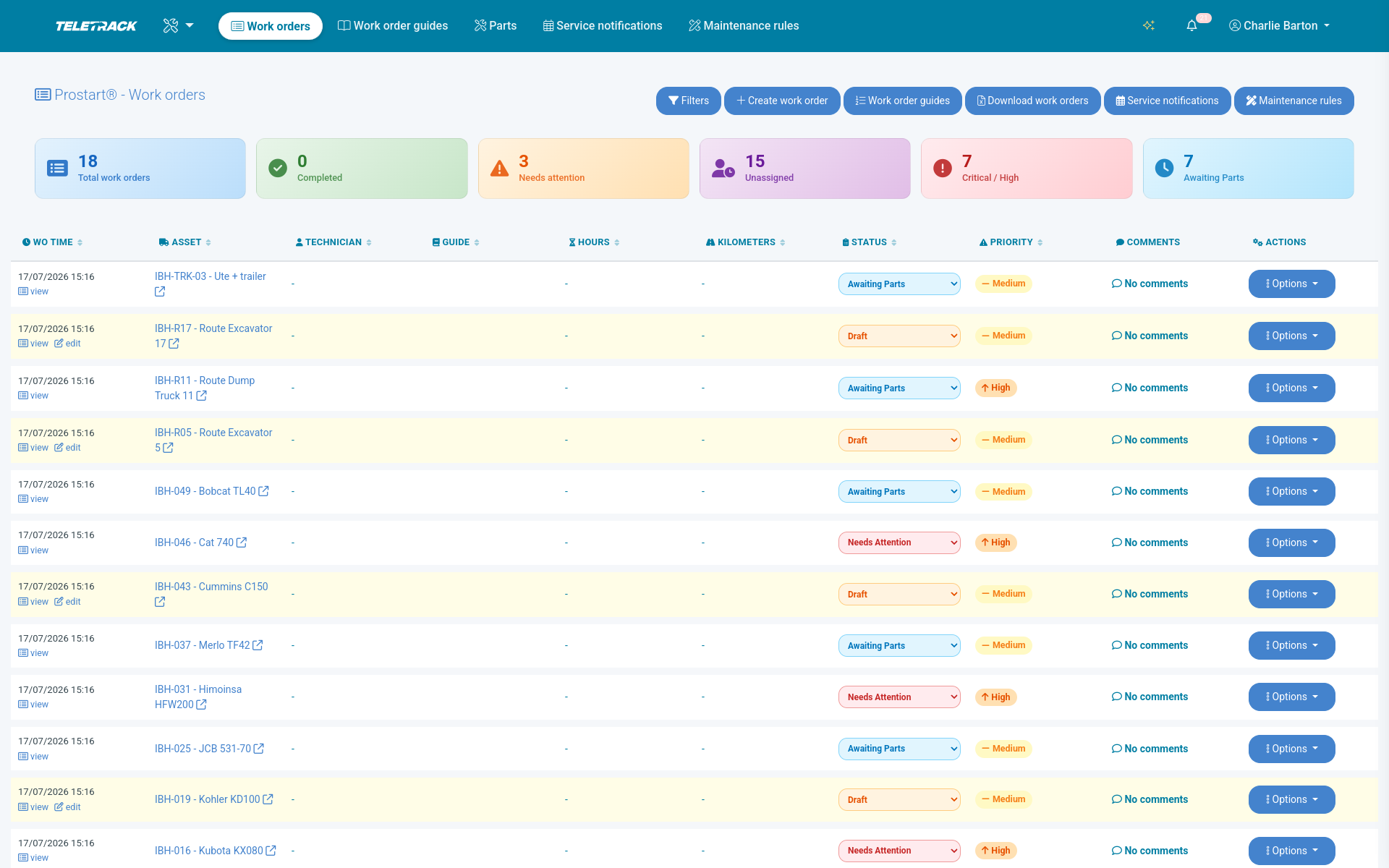
Draft work orders raised by engine hours, kilometres, schedule, or failed pre-start questions set up to create one. Parts inventory. Technician tablet workflows with photo and signature capture.
Automation
Four ways a work order gets created.
You don't have to remember to schedule maintenance. The platform watches the data and raises a draft work order when the asset says it's due.
-
1
Engine hours
Set an hours-based service interval per asset class (e.g. 250-hour service on the excavator fleet, 500-hour on the telehandlers). The hour meter counts the tracker's ignition time, or follows the engine's own CANBUS hours where the asset is set to use them, and the rule can raise a draft work order when the threshold is crossed.
-
2
Kilometres
Distance-based intervals on light vehicles and trucks. Same mechanism — odometer comes off the tracker, and the rule can raise a draft work order when the threshold is crossed.
-
3
Scheduled service
Time-based intervals — weekly inspections, monthly checks, annual compliance services, statutory plant inspections. The rule can raise a draft work order on the scheduled date.
-
4
Failed pre-start
A failed PROSTART® pre-start question set up to create one opens a draft work order with the operator photo evidence, the failed check description, and the operator ID. The failure email goes to your nominated people straight away. Nothing waits for a phone call.
You can also create work orders manually — operator request, supervisor-flagged issue, scheduled rebuild, anything.
Parts inventory
Parts on the platform, not on a spreadsheet.
- Stock levels per location — main store, satellite yards, service vans. See what you've got, where it is, what's allocated to which work order.
- Stock movements — issue parts to a work order; the inventory count drops automatically. Returns, transfers, and adjustments all logged.
- Reorder thresholds — set per part. The platform flags low-stock items when they cross the threshold.
- Cost tracking — purchase price per part, average cost across stock movements, total parts cost per work order, per asset, per year.
Useful for hire fleets working out true cost-of-ownership per asset; for construction businesses costing maintenance into project margins; and for OEM dealers running service programmes against equipment they sold.
Technician workflow
Work orders on a tablet, not on paper.
-
1
Work order assigned
Technician opens the platform on their tablet (or phone) and sees their assigned work orders. Asset details, fault description, full asset history, attached photos from the pre-start fail (if that's what triggered it).
-
2
Photo capture
Before-and-after photos of the work. Damage photos. Replaced parts. All time-stamped and attached to the work order. Becomes part of the asset's permanent record.
-
3
Parts issue
Technician issues the parts used from inventory directly on the tablet. Stock counts drop. Cost rolls up against the work order.
-
4
Sign-off
Digital signature from the technician on completion. Optional sign-off from the supervisor or the operator returning the asset to service. Work order closes; asset goes back into the available pool.
Hardware compatibility
What hardware feeds maintenance.
- Engine-hours trigger — the hour meter counts the tracker's ignition time, or follows the engine's own CANBUS hours (Smart5, FMM250, FMM650, FMC650 — plus TrakaX® Series 2 on special order) where the asset is set to use them.
- Kilometres trigger — any device tracking distance — including OBD plug-ins (FMM003, Plug5).
- Schedule trigger — any asset on the platform, including non-powered (Asset5, Barra GPS).
- Failed pre-start trigger — any asset with PROSTART® configured.
Common questions
How is maintenance priced?
The Maintenance Module isn't sold separately. It comes bundled with the Track + Safety and Track + PROSTART® Telematics tiers. Track + Safety — $26.90 / asset / month bundles Maintenance with pre-start checks (no immobilisation). Track + PROSTART® — $31.90 / asset / month bundles Maintenance with PROSTART® (pre-starts with cross-vendor immobilisation). Both give you the full Maintenance Module — work orders, parts inventory, automation triggers (engine hours, km, scheduled servicing). The difference between the two tiers is whether the pre-start workflow enforces immobilisation when a check fails.
Can we customise work order forms per asset type?
Yes. Different asset classes can have different work order templates — a fleet vehicle service template looks different from a heavy plant rebuild template. Form-builder gives you photo capture, conditional logic, validation, and required fields. Your maintenance manager owns the content.
Can we run our own techs and external service providers on the same platform?
Yes. Per-user permissions can scope external technicians to specific assets or asset groups — your in-house team sees the whole fleet, an external service provider sees only the assets they're contracted to maintain. Useful for fleets running mixed in-house plus outsourced service models.
Does maintenance integrate with our finance / ERP system?
Yes — we can develop a connection to your system if you need one. Talk to us about what you're running and we'll scope a custom integration; Xero, MYOB, NetSuite, and similar finance systems are all common targets. On the hire-rental side we already have direct integrations with HirePOS, MCS, Syrinx, and Latner.
If you don't need a direct integration, Excel exports and scheduled reports are standard (CSV on request) — finance teams typically pull parts cost / labour cost / work order completion data on a recurring schedule. Custom API and webhooks are available on request at Teletrack's discretion if you'd rather wire it up yourself.
What about statutory inspections — plant compliance, annual safety checks?
Schedule them as time-based triggers. The rule can raise a draft work order on the due date with the inspection checklist attached. Sign-off captures the inspector ID, date, and result. The full inspection history is part of the asset's audit trail — exportable for regulator audits or tender response.
What happens if a technician misses a work order?
There's no SLA management in the platform today. Open work orders stay visible — the dashboard shows assigned vs overdue counts per technician and per asset, so a supervisor can see what's lingering and follow up directly. Driven by people watching the dashboard, not an automated escalation engine.
Can operators raise their own work orders?
Yes. Operators can flag defects via the PROSTART® pre-start (a failed question set up to create one opens a draft work order). Maintenance sees the draft in its work order list, with the operator, the failed answers and the photo evidence attached.
See maintenance running on your fleet
A 30-minute demo will walk through the auto-trigger logic on your asset classes, the technician tablet workflow, and how it ties back to PROSTART® and diagnostics.
More solutions
View all →PROSTART® pre-starts
Pre-starts that immobilise across every hardwired tracker we sell — Digital Matter, Teltonika, Ruptela, and TrakaX®. HammerTech-integrated.
Asset tracking
Live GPS, geofencing, history playback, and theft-response assistance — we'll help you mobilise a police-accessible live tracking link when an asset goes missing. From $21.90 / asset / month.
Fleet intelligence
Customisable dashboards, scheduled email reports, Excel exports (CSV on request), and custom API + webhooks on request. Custom reports our team develops using AI as professional services. Included from $21.90 / asset / month.
Ready to see Maintenance in action?