
Solution
Safety: incident and near miss reporting, toolbox talks and SWMS sign-off on a phone
Crews report incidents, near misses and hazards from their phone, sign on to toolbox talks and sign the current SWMS. Supervisors follow each report through to its corrective actions, and managers download the registers. Part of the Workforce package.
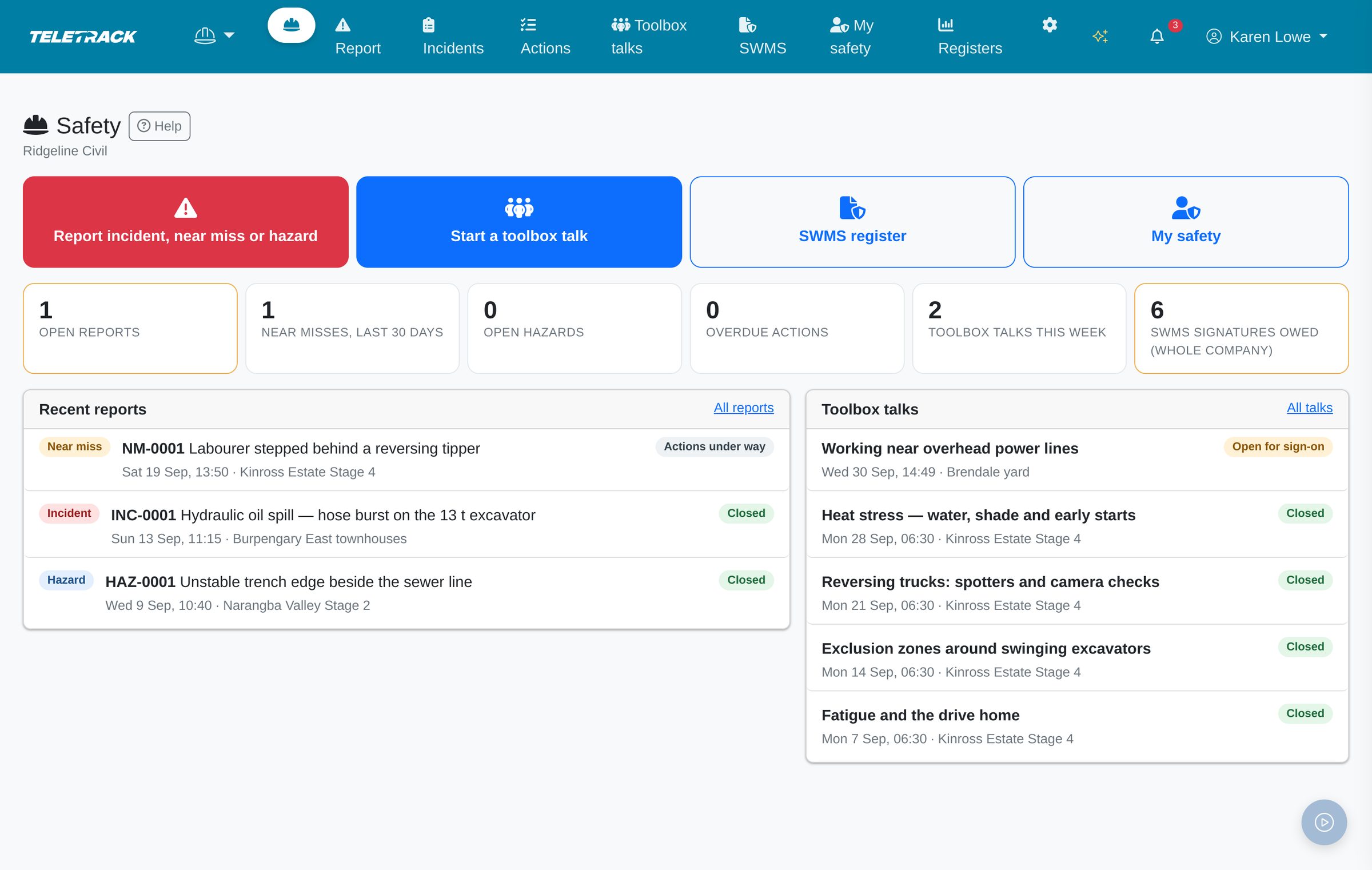
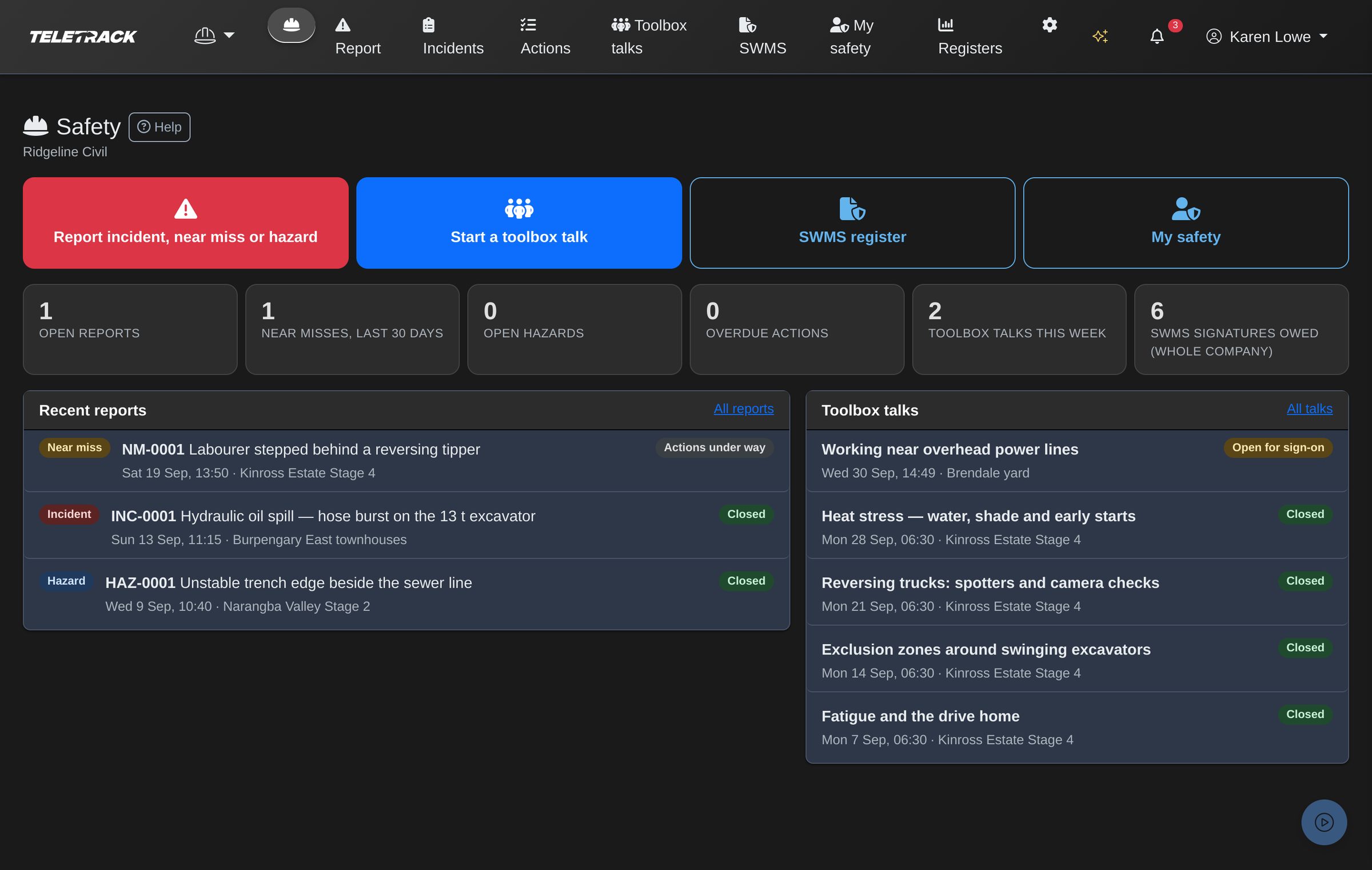
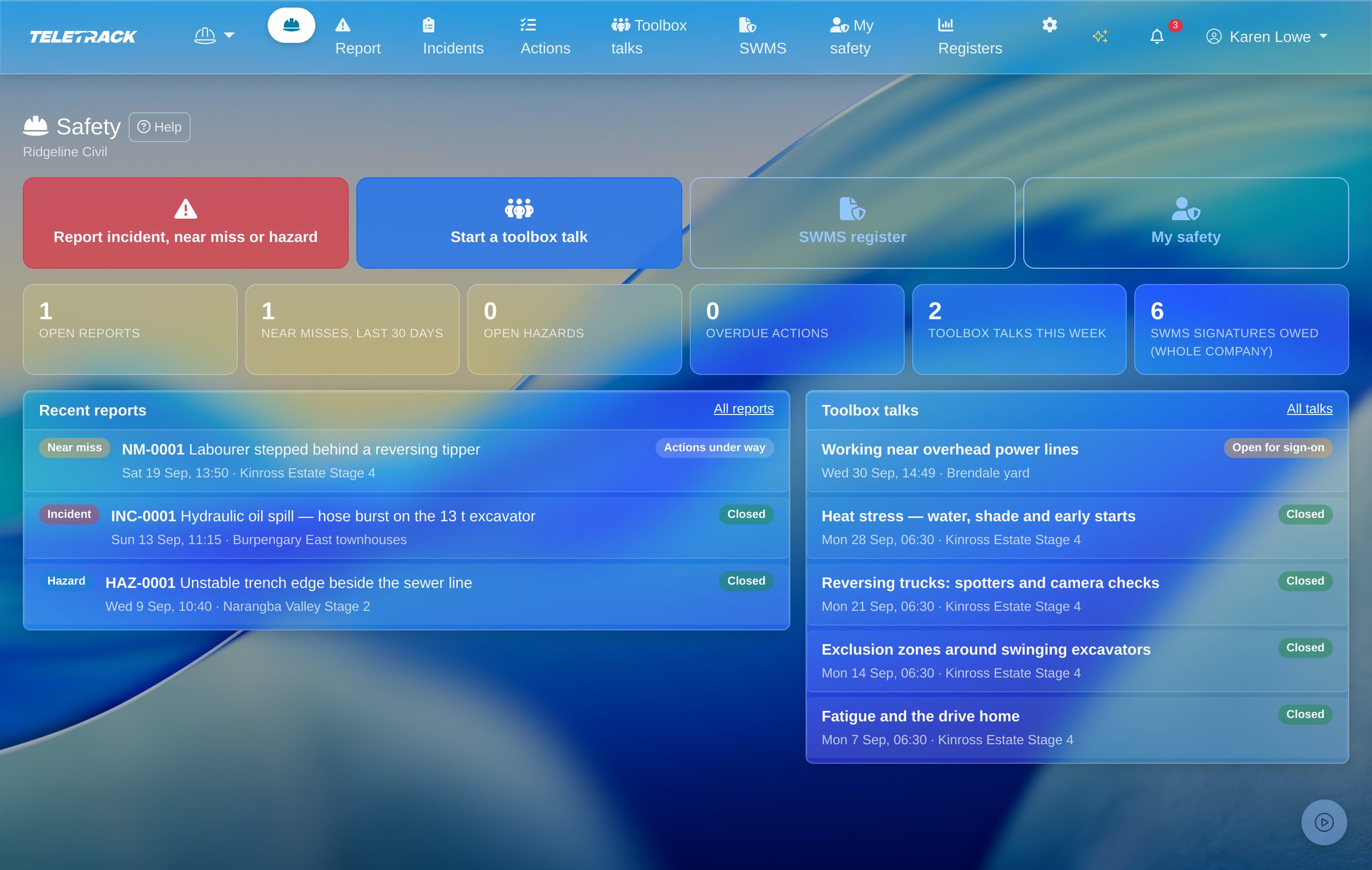
Part of Workforce, $5 / user / month + GST.
Safety is part of the Teletrack Workforce package, bundled with Timesheets, Inductions, Dockets, Dispatch and Staff transport (all six included). $5 / user / month + GST. Priced per user, not per device. Month-to-month, no lock-in contracts. Safety isn't sold on its own. Already on Workforce? Safety is already switched on. Already on Teletrack without it? A client Administrator can start a 30-day free Workforce trial from the Apps page, once per company.
The pain
A clipboard in the ute and a fix in someone's inbox.
Most site safety paperwork starts well and ends up in the ute. It usually goes like this.
- Monday, 6:30 am. The sign-on sheet for the toolbox talk, the crew's short safety briefing, goes round on a clipboard. By Friday it's in the door pocket of the ute, and two of the names can't be read.
- Tuesday, 2 pm. A labourer steps behind a reversing tipper and the spotter calls stop in time. Nobody was hurt, so nobody writes it down.
- The excavation SWMS (safe work method statement) was revised last month. The crew signed the old version on paper, and nobody can say who has read the new one.
- The fix from last month's incident, a reversing camera on the spare tipper, sits in someone's inbox. Nobody knows if it was fitted.
- Friday, 4 pm. The principal contractor wants this month's toolbox attendance and SWMS sign-offs. Someone spends the afternoon scanning clipboards.
Fit
Who it's for, and who it's not.
Built for smaller civil and construction contractors, plant and yard crews, and material handling and warehouse teams: anyone whose safety paperwork has to follow people from job to job.
For
- Contractors who brief crews with toolbox talks and have crews sign their SWMS for high risk construction work across several sites.
- Teams where anyone should be able to report an incident, a near miss (it nearly went wrong and nobody was hurt) or a hazard (something that could hurt someone if left) from their own phone, on the spot.
- Supervisors who run talks for a mix of their own staff, subcontractors and visitors.
- Companies already on Teletrack Dispatch, trackers or Maintenance. The roster fills sign-on and SWMS lists, nearby plant is suggested on a report, and with Maintenance a fix on a machine can raise a work order.
Not for
- A full WHS management system. There's no risk matrix, site inspection or audit checklists, permits to work, chemical or SDS register, contractor prequalification, or injury rates such as LTIFR.
- Lodging with the regulator. Teletrack doesn't notify WorkSafe, SafeWork or any other regulator for you.
How it works
From a report on a phone to a closed record.
Five steps, all in Teletrack, on a phone or at a desk.
-
1
Report
Anyone with Safety access reports an incident, near miss or hazard, with where it happened, photos, and the people and plant involved.
-
2
Investigate
A supervisor or manager starts the investigation, names an investigator and records the root cause, the underlying reason it happened.
-
3
Fix
Each corrective action, the fix that follows, gets an owner, a due date and a priority. The owner is emailed reminders and marks it done with a note and photos.
-
4
Brief
A supervisor runs a toolbox talk. People sign on with a finger on the supervisor's phone, or scan a QR code with their own.
-
5
Sign
Crew read the current SWMS on their phone and sign it. A revision can ask everyone to sign again.
For crews
Report, sign and see what they owe, on their own phone.
Crews use Safety in their phone's browser with their own Teletrack login. Nothing to install, and it needs mobile coverage. Safety isn't in the Teletrack mobile app.
- Report on one screen: Incident (someone was hurt or something was damaged), Near miss or Hazard, then when, where, what happened and what was done straight away, and the people and plant involved. Something that happened earlier can be dated back up to two years.
- Take photos with the phone's camera. Saved photos and PDFs can be added to the report from a computer while it's open. Files can be PDF, JPG, PNG, WebP or HEIC: up to 10 at a time, 20 MB each, and 40 per report.
- Use my location picks the nearest of their sites (inside the site's geofence, or 500 m where none is set) and suggests tracked plant that was within 300 m in the last 30 minutes. Or they pick a site from the list, or type where it happened.
- Every report gets its own number, such as NM-0001, and shows in My safety under What I've reported.
- My safety shows their open corrective actions, the SWMS they need to sign, what they've reported, the toolbox talks they signed on to and whether a talk is due. It also flags their licences and tickets that have expired or expire within 60 days, and overdue inductions, from the records Teletrack already keeps.
- To sign a SWMS, they open the current PDF, see what changed, tick that they've read and understood it, and sign with a finger. If their signature still counts, the page says there's nothing more to sign.
- At a toolbox talk they scan the QR code. Logged in, they sign on as themselves and confirm the SWMS they were briefed on. Visitors and subcontractors sign with their name, company and signature, with no login.
- Every Safety page has a Help button that says what the page is for, what each button does and what happens next. A written Safety guide explains the words used and who sees what, with a two-minute guided tour from the Safety home.
Screens shown with demonstration data.
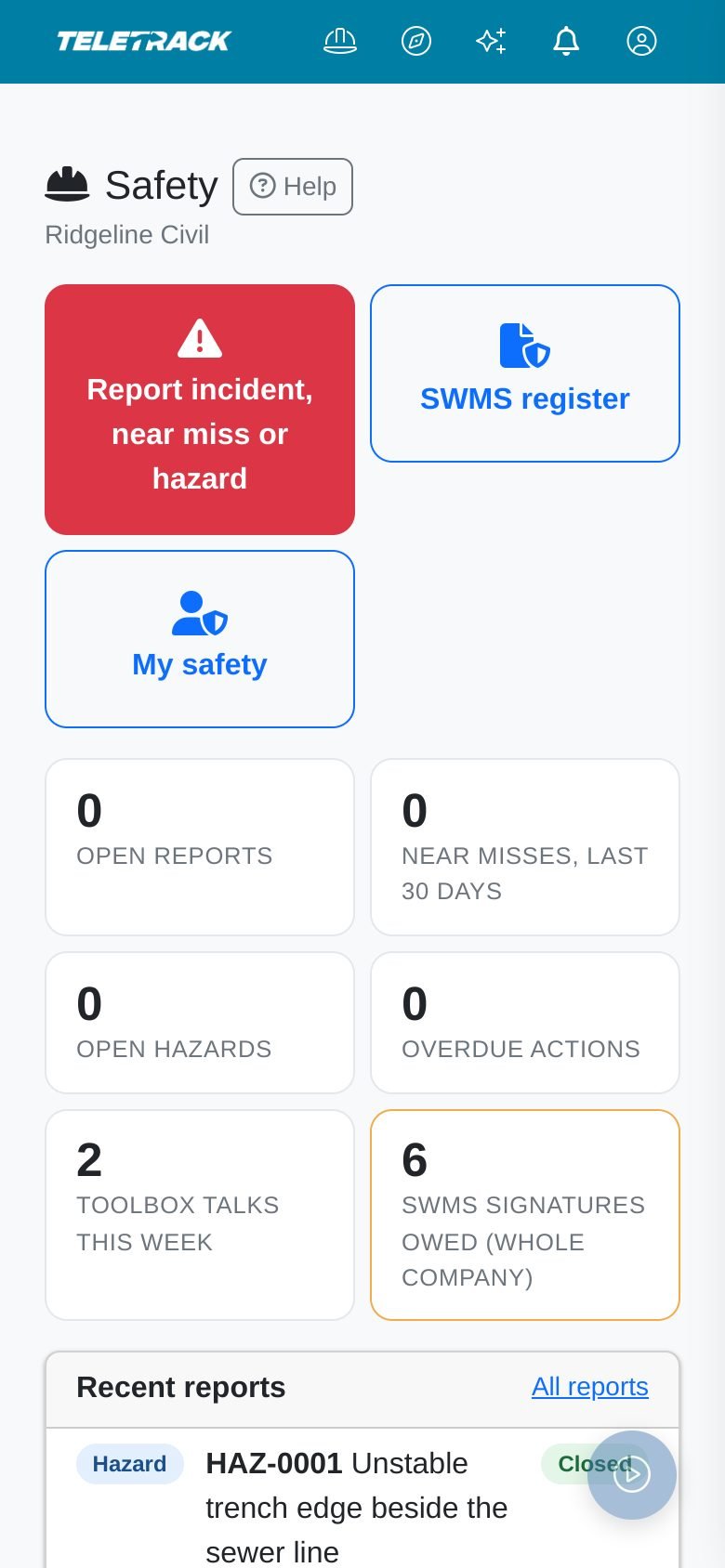
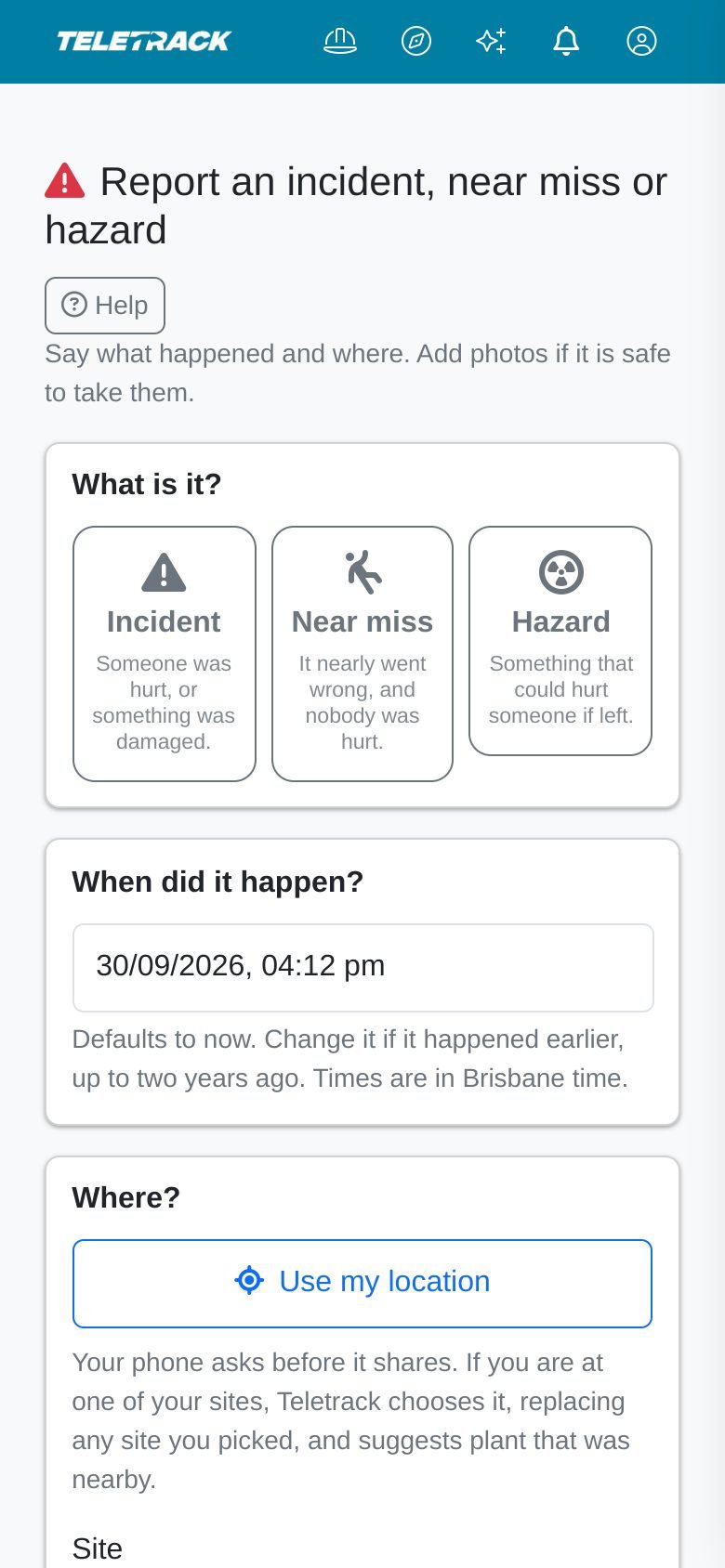
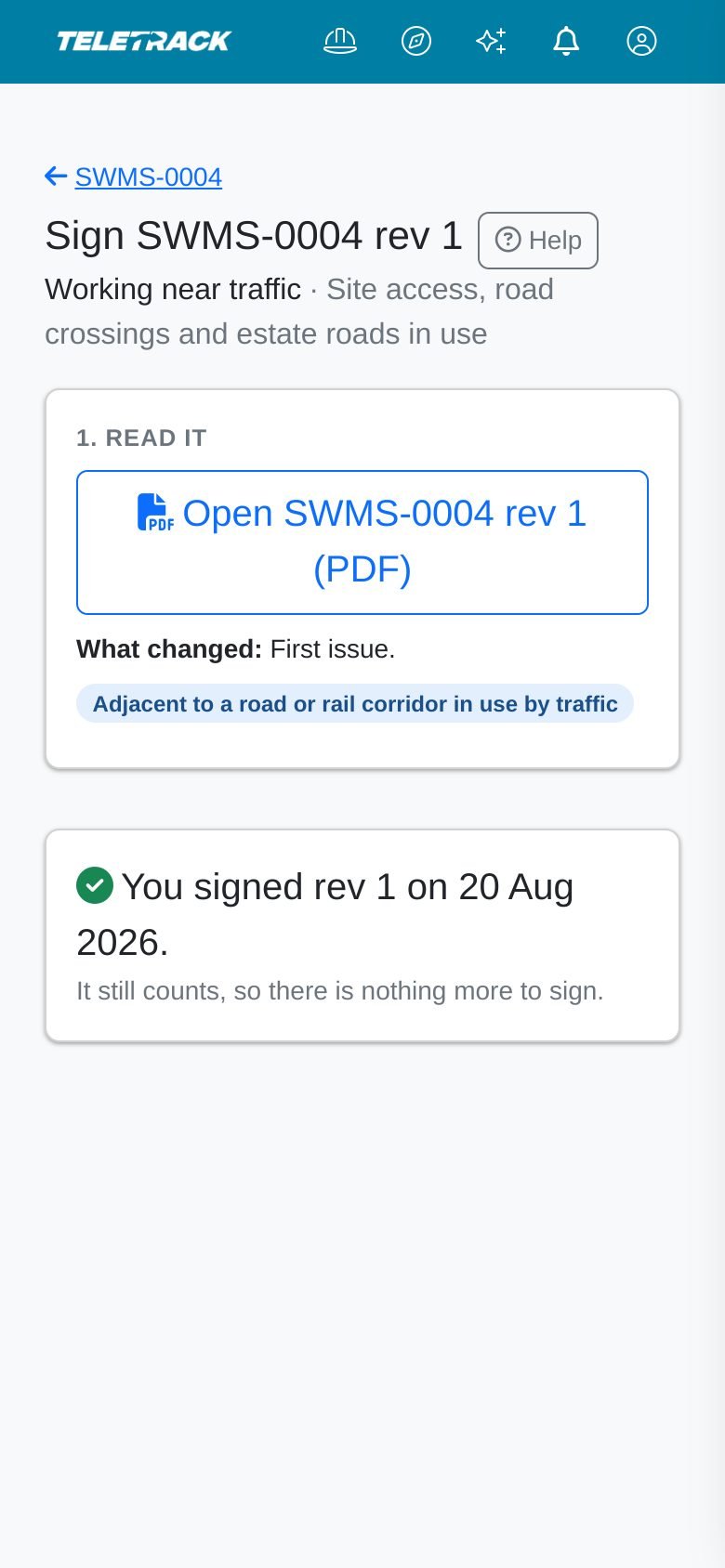
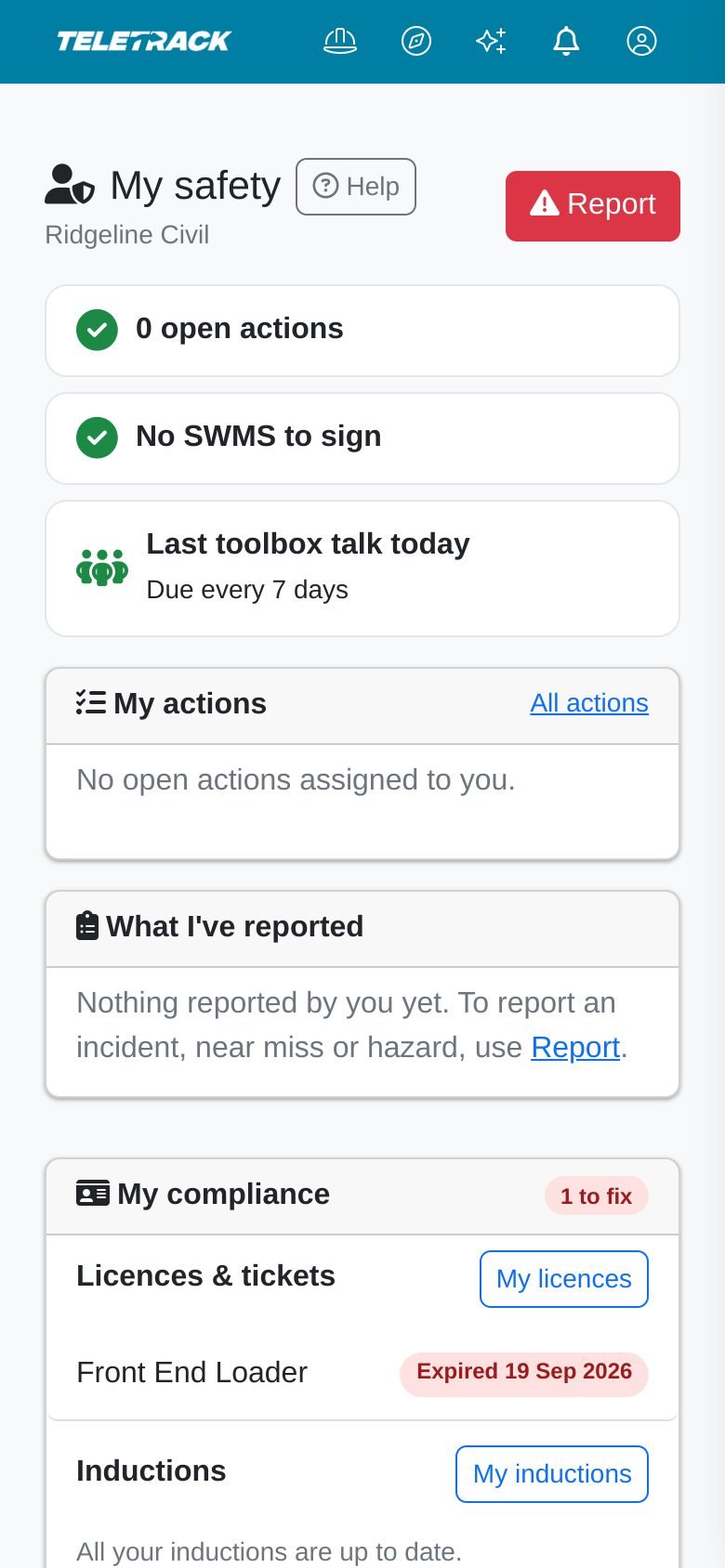
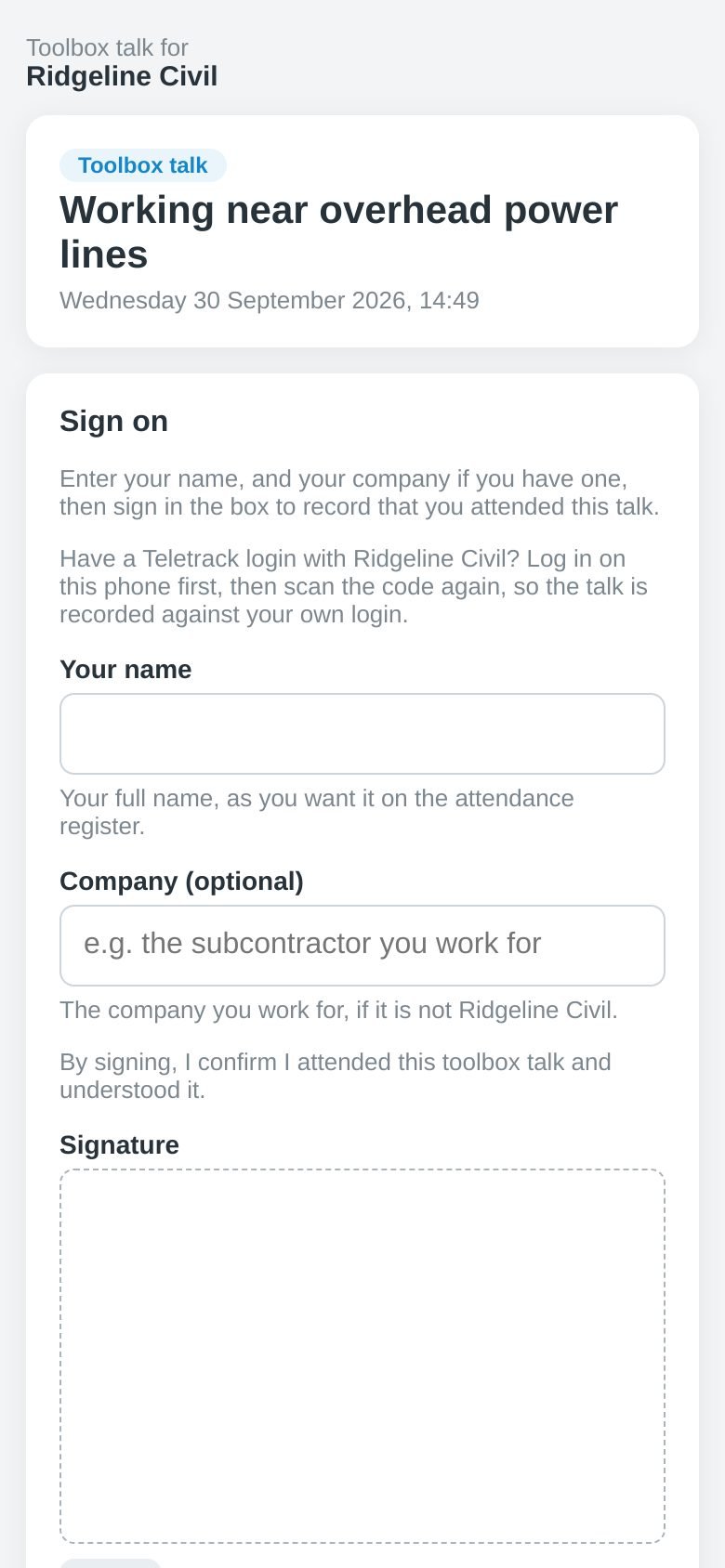
On a crew member's phone: report something, sign a SWMS or check what they owe. Nothing to install.
One screen to report an incident, near miss or hazard. Use my location picks the site and suggests the plant nearby.
Crew open the current SWMS on their phone and sign it. When their signature still counts, the page says so.
Each person's own list: actions, SWMS to sign, their reports, when a talk is due, and licences that need attention.
Visitors and subcontractors scan the QR code and sign on with their name, company and signature. No login.
Incidents, near misses and hazards
Each report followed through to closed.
Each report gets a running number (INC-, NM- or HAZ-) and moves through Reported, Investigating, Actions under way and Closed. Supervisors look after the reports at their sites. Only a manager closes one.
- Severity is Low, Moderate, High or Critical, called Risk on a hazard. Moderate is chosen until the reporter changes it, so check it when you look into the report.
- For an incident, record whether someone was injured and the most care anyone needed: none, first aid, medical treatment or lost time.
- Start investigation, name an investigator from your company, and record the root cause, the underlying reason it happened, and the investigation notes. The investigator can open the report and add photos, but only a manager or a supervisor of the site fills in the investigation, and the investigator isn't emailed, so tell them.
- Raise corrective actions from the report. It can't be closed while one is still open unless a manager writes an override note, which is kept in its History.
- The reporter can withdraw their own report, with a reason, until someone starts investigating it. A supervisor or manager can withdraw one until actions are under way. Closed and withdrawn reports can't be reopened, or deleted from the Safety pages.
- What was reported can't be edited from the Safety pages once it's sent. A wrong severity, person or machine is explained in the investigation notes.
- Each report has a History of who did what and when, including which emails went out. Its PDF copy shows up to 12 JPG, PNG or WebP photos, lists other files by name, and has the people, plant, actions and History. It includes injury details, so share it with care.
- Filter the list by type, status, site and dates, or search by number, title, site or place.
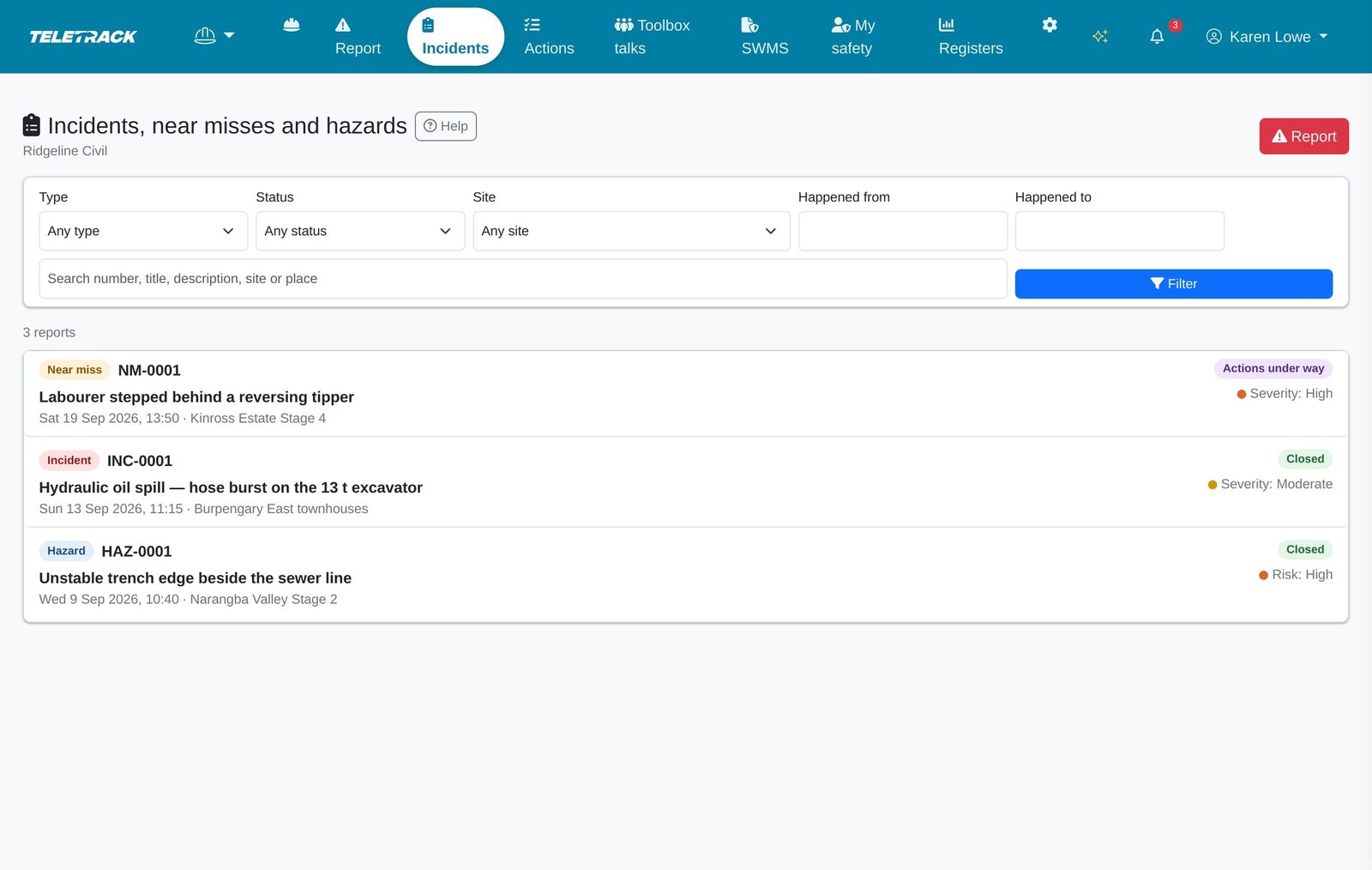
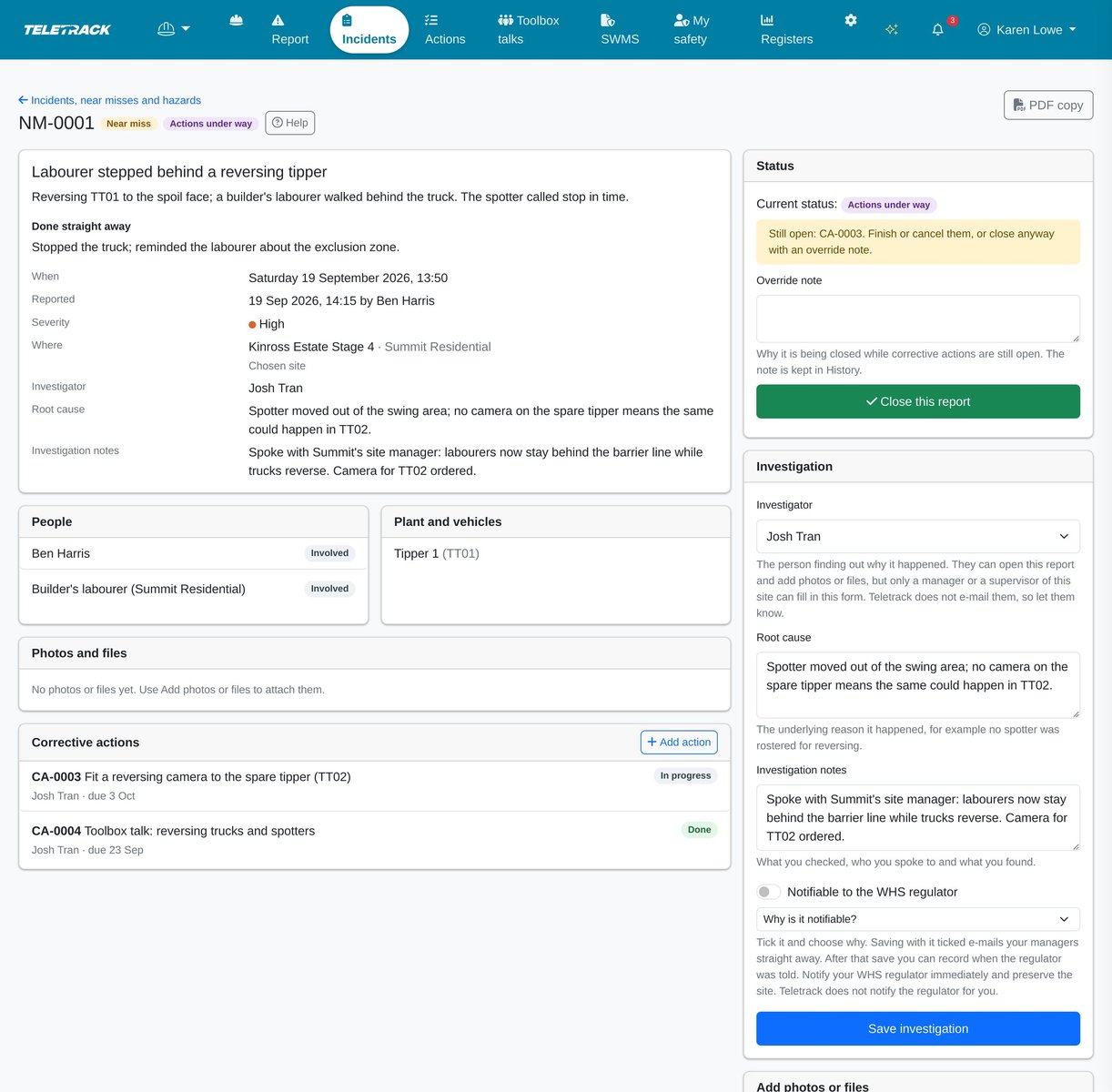
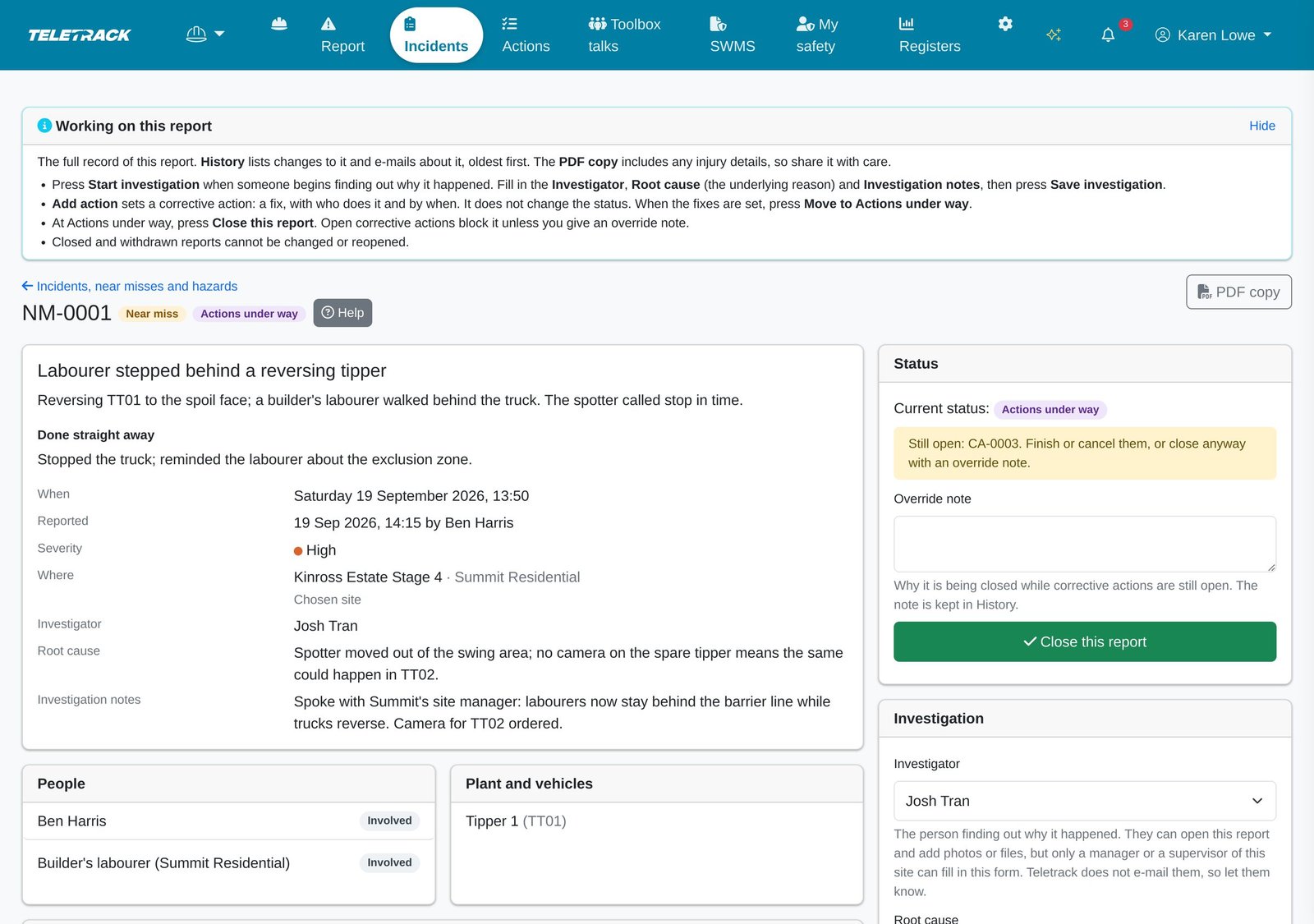
Every report in one list, with its number, type, status and severity.
A near miss followed through: investigation, corrective actions and history. It can't close while an action is open unless a manager writes an override note.
Every page has a Help button that explains it in plain words.
Notifiable incidents
Teletrack tells your managers. You tell the regulator.
Some incidents must by law be reported to your work health and safety regulator straight away (in Victoria, WorkSafe Victoria under the OHS Act). Under most states' and territories' laws today, that means a death, a serious injury or illness, or a dangerous incident. The definitions differ between jurisdictions and are changing, so check with your regulator. Teletrack does not notify the regulator for you.
- Look after people and make the area safe first. If it may be notifiable, the law says to tell the regulator immediately: don't wait for the Teletrack report or its email. Record it in Teletrack afterwards.
- The reporter, or later a manager or a supervisor of the site, marks an incident or near miss as notifiable and picks why: a death, a serious injury or illness, or a dangerous incident. Hazards can't be marked notifiable, and only a manager can clear the mark.
- Your client-level Administrators and Editors are emailed straight away, with [NOTIFIABLE] in the subject. The email carries the number, type, site and a link, never injury details.
- Until you record that the regulator was told, an open report shows: "Notify your WHS regulator immediately and preserve the site. Teletrack does not notify the regulator for you."
- Once the regulator has been told, a manager or the site's supervisor records when, and the reference number the regulator gave. These fields appear once the report has been saved as notifiable, and are typed in. Nothing is sent to WorkSafe, SafeWork or any other regulator.
- The law where you work sets what's notifiable. Working out whether an incident fits is for your business, and Teletrack doesn't decide it. If you're unsure, call your regulator.
Corrective actions
Every fix gets an owner, a due date and a record of what was done.
A corrective action is the fix that follows a report, a toolbox talk, or a problem spotted on its own. Supervisors and managers raise them, and each gets a CA- number.
- Give each one an owner from your company, a due date, a priority (Critical, High, Medium or Low, filled in from the report's severity), a site and, if it's about a machine, the asset.
- The owner is emailed when someone else assigns it to them, the day before it's due, the day after, and then every 3 days while it stays open. Reminders go out each morning, and only for actions with an owner and a due date. Managers can turn reminders off in Settings.
- The owner, a manager or a supervisor of the action's site marks it in progress, then done, with a note of what was done and photos or PDFs of the fix (up to 10 files, 20 MB each). Evidence goes on when it's marked done, and can't be added after.
- Managers and supervisors can cancel an action, with a reason. Filter the list by Open, Overdue, Done or Cancelled, by owner (mine or unassigned), and by where it was raised from.
- For companies that also use Teletrack Maintenance (part of PROSTART®), the action's owner, a manager or a site supervisor who also has Administrator or Editor access to the machine can raise a draft work order, linked to the action. Finishing the work order doesn't close the action: mark it done when the work is finished.
- Overdue actions reach managers only through the optional safety digest. Nothing else escalates them.
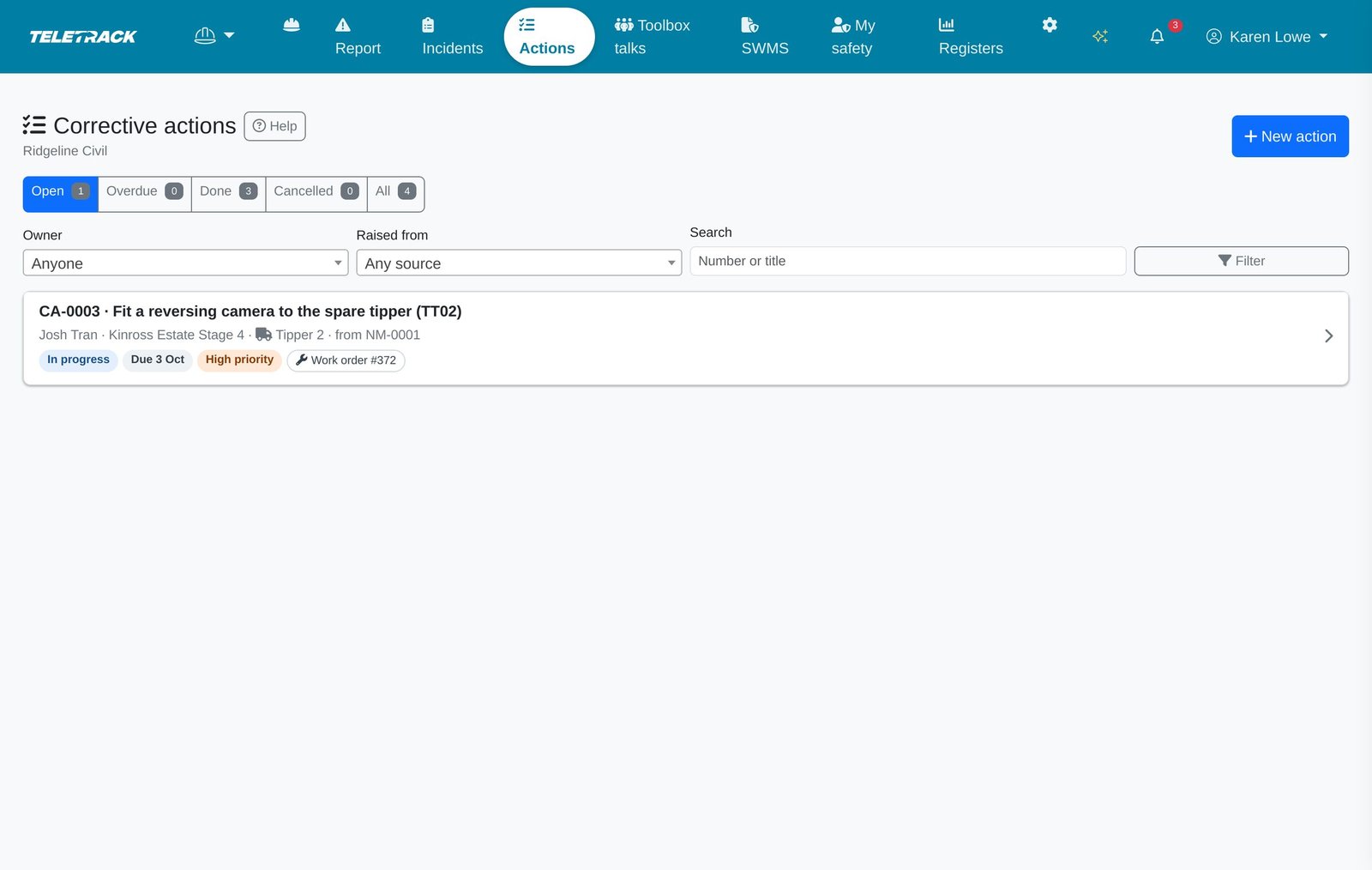
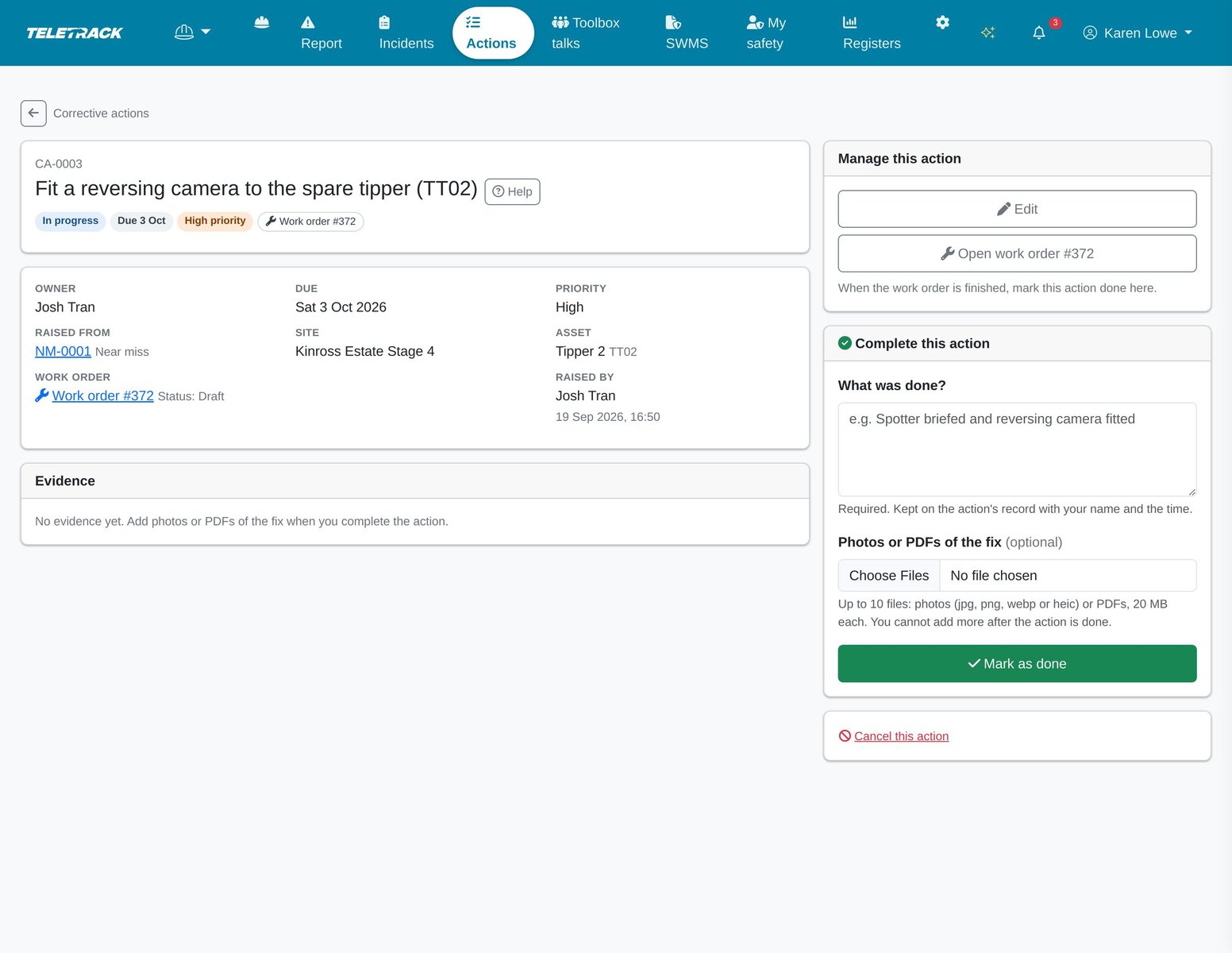
Every fix in one list, open, overdue, done or cancelled, with the report it came from.
The owner writes what was done, adds photos or PDFs of the fix and marks it done, including when a work order did the work.
Toolbox talks
Signed attendance, without the clipboard.
A toolbox talk is a short safety briefing for the crew. A supervisor or manager starts one for a site or a Dispatch job, with a topic, a presenter, a time and talking points. Each talk gets a TBT- number.
- The crew list starts with the people confirmed on that job, or at that site, in Dispatch for the day, or else whoever signed the last talk at the site. Tap a name, hand over the phone, and they sign with a finger. With no roster and no earlier talk at the site, there's no list.
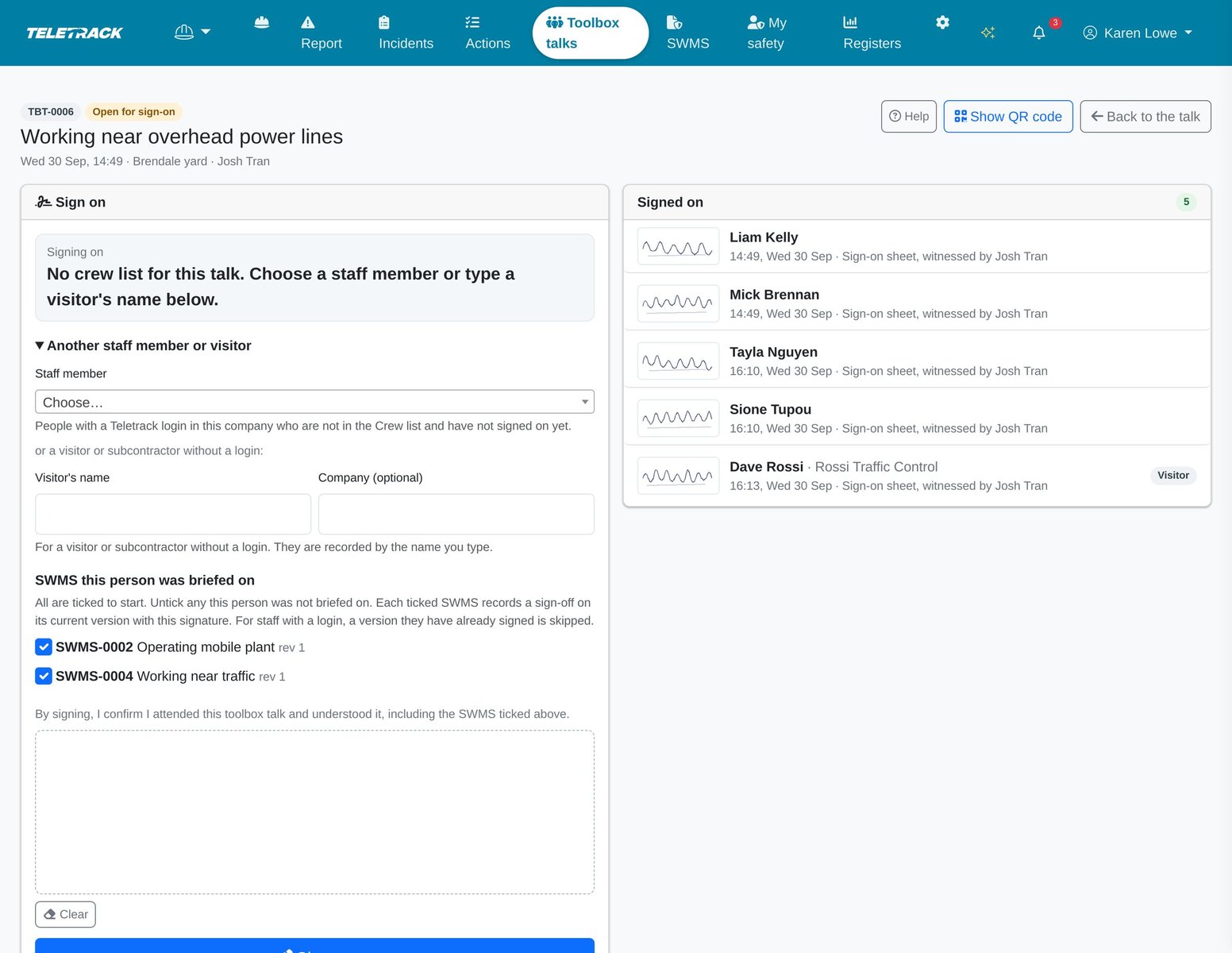
- Anyone else can be picked from your staff, or typed in as a visitor with their company.
- Show QR code: staff logged in on their own phone sign on as themselves. Visitors and subcontractors scan the same code and sign with their name, company and signature, with no login. The visitor page shows your company's name and logo, the topic and the date, and never who else signed on.
- The QR code works for 1 to 12 hours from when the talk is started (12 by default, set by a manager), and closing the talk turns it off. Staff who scan it while logged out sign on as visitors, and the talk then doesn't count towards their cycle in Teletrack.
- Tick the SWMS covered at the talk. Each staff member's signature also signs the current version of the SWMS left ticked for them, skipping a version they've already signed. A visitor briefed on the supervisor's phone is recorded by name only, and visitors on the QR page can't sign SWMS.
- Record the talking points and the issues the crew raised, and raise a corrective action for anything that needs fixing.
- Close the talk when everyone has signed: attendance becomes final, the talking points and issues lock, and the QR code stops working. A closed talk can't be reopened, and once a talk has started only its talking points and issues can change.
- Download the attendance PDF, with every signature, your logo and the SWMS covered.
- Set your company's own talk cycle for each worker: every 7 days by default, anywhere from 1 to 60. My safety shows when a talk is due.
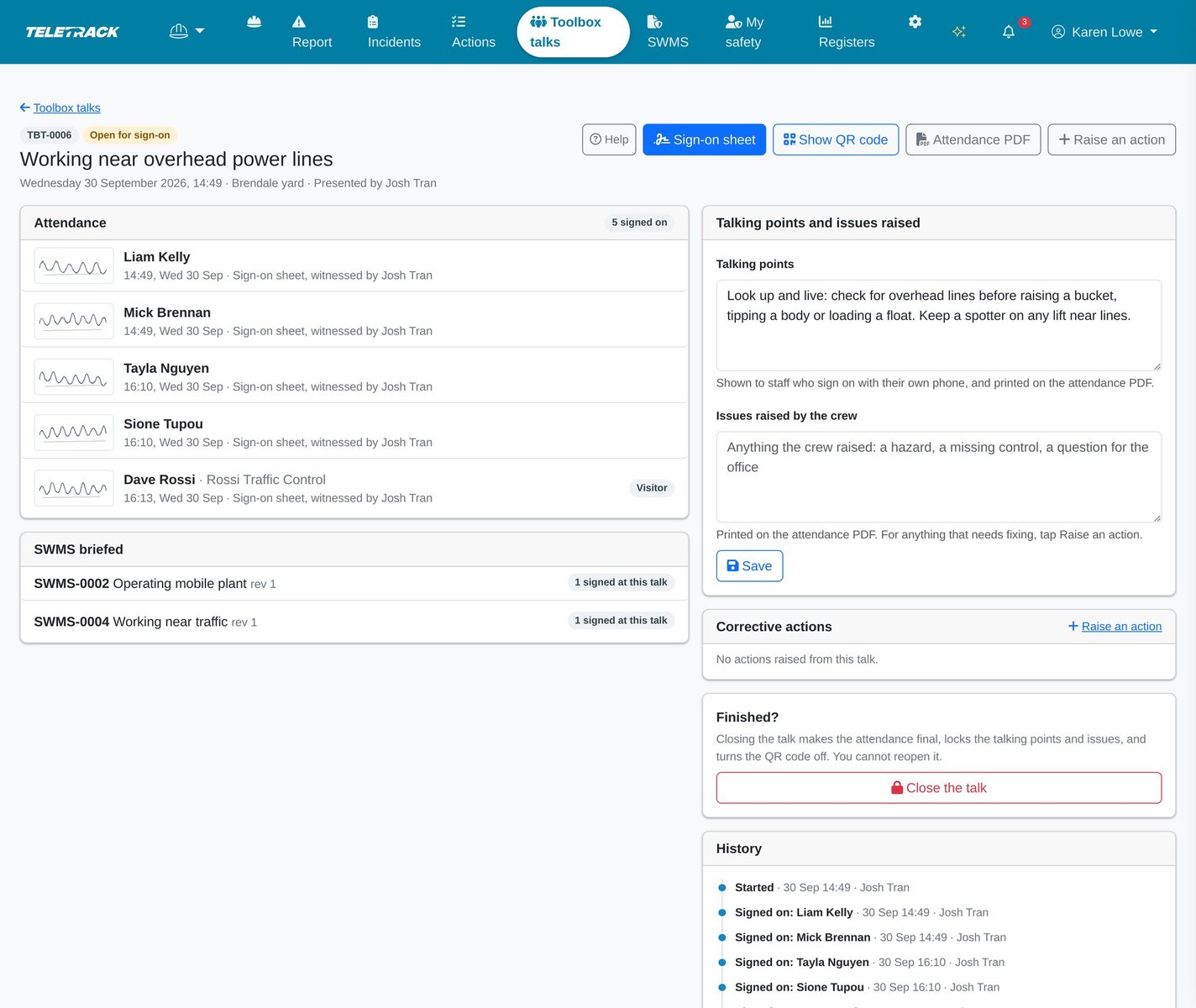
A live talk: who has signed, the SWMS covered and the talking points. Close it when everyone has signed.
The sign-on sheet for a talk with no crew list: pick a staff member or type a visitor's name, leave ticked the SWMS they were briefed on, and pass the phone.
SWMS
The current version, and who has signed it.
A SWMS (safe work method statement) sets out high risk construction work, its hazards and risks, and the controls that will be used. Safety keeps your SWMS register: the current PDF of each one, every earlier version, and who has signed which.
- Managers add each SWMS with its activity, the sites it applies to (all, or the ones you choose), a builder or customer, a review date, and tags for common kinds of high risk construction work. The tags aren't the full list in the regulations.
- Publish each revision as a PDF (up to 20 MB), with a line on what changed. Every version is kept, with who published it and when.
- Tick Needs new signatures on a revision that matters: earlier signatures stop counting and the required signers are emailed. Untick it for a minor correction, and earlier signatures keep counting.
- Name the people who must sign. Operators rostered in Dispatch on a job where the SWMS applies in the next 14 days are added to its to-sign list automatically.
- Each SWMS lists who has signed the current version, whose signature no longer counts, and who still has to sign and why. A supervisor can take someone's signature on their own phone.
- Required signers are emailed once, when a version is published. After that, people who haven't signed see it in My safety, managers see the count in the optional digest, and the Dispatch run sheet warns when they're rostered. Nothing else chases them.
- Managers are emailed about SWMS whose review is due within 14 days or overdue, at most once a week. Archive a SWMS to take it off crew screens, and restore it any time.
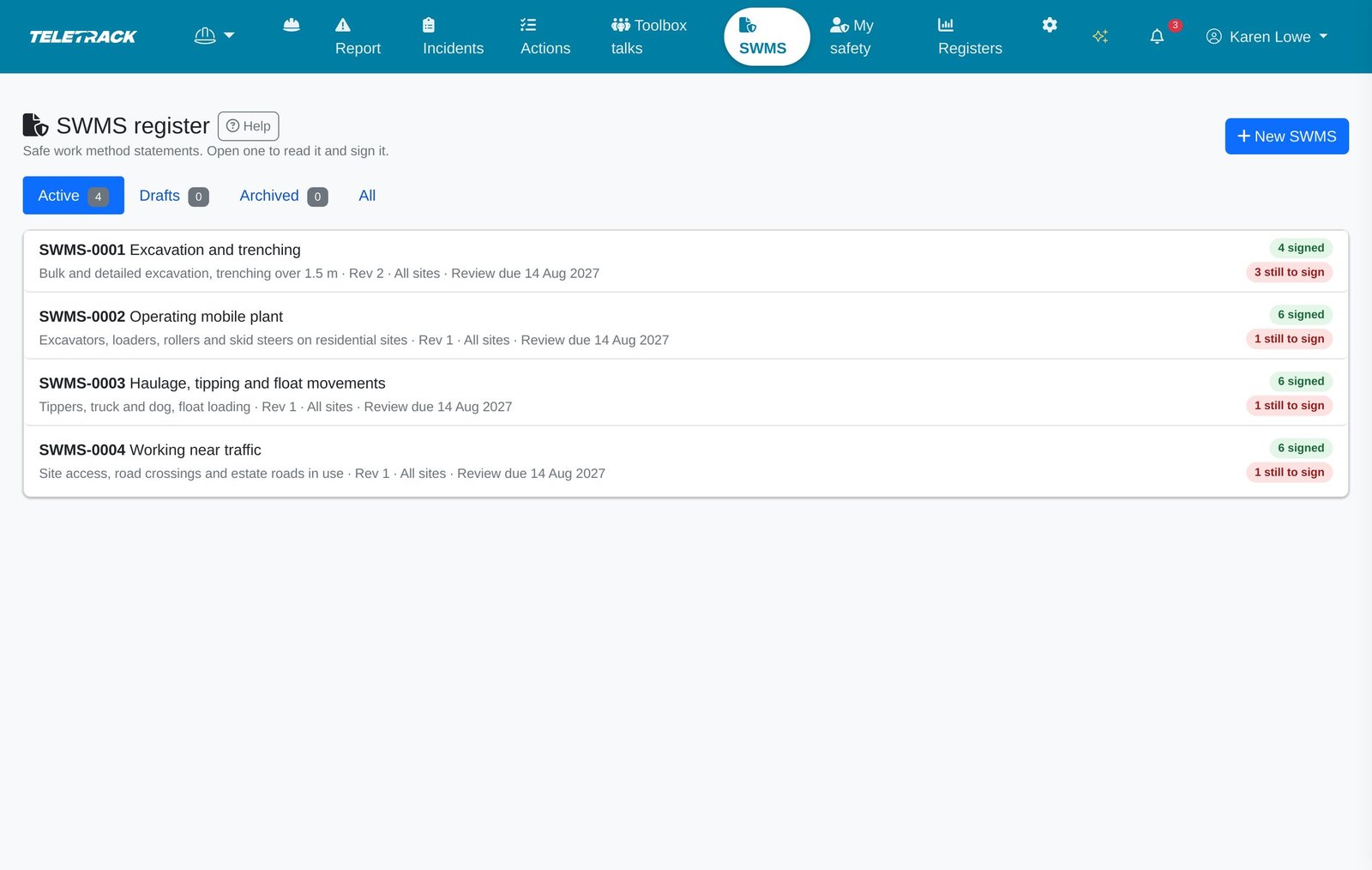
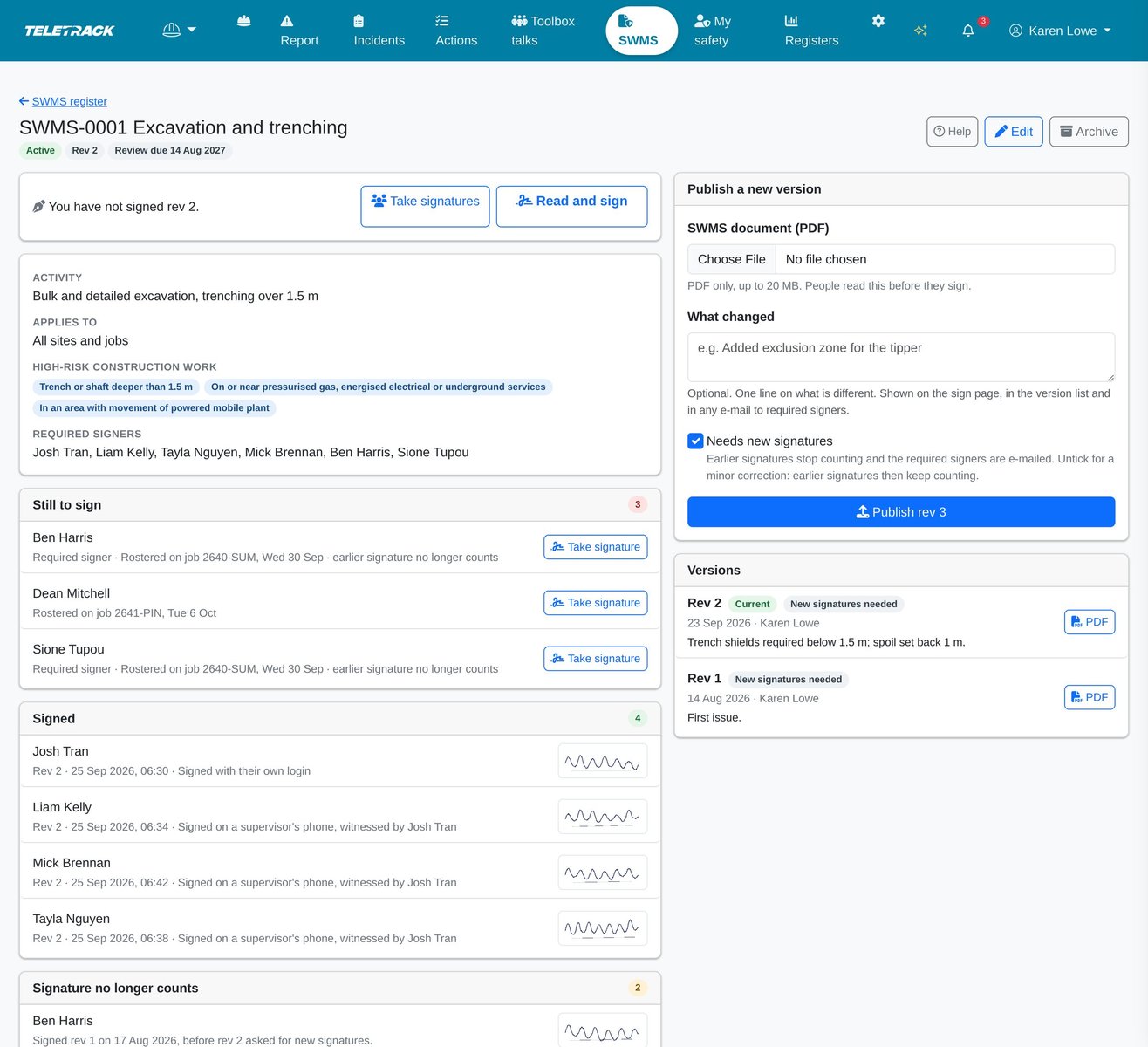
The SWMS register: every statement, its current revision, and how many people still have to sign it.
Who has signed the current version, whose signature no longer counts, and who still has to sign, and why.
Registers
The safety records for any period, as Excel or PDF.
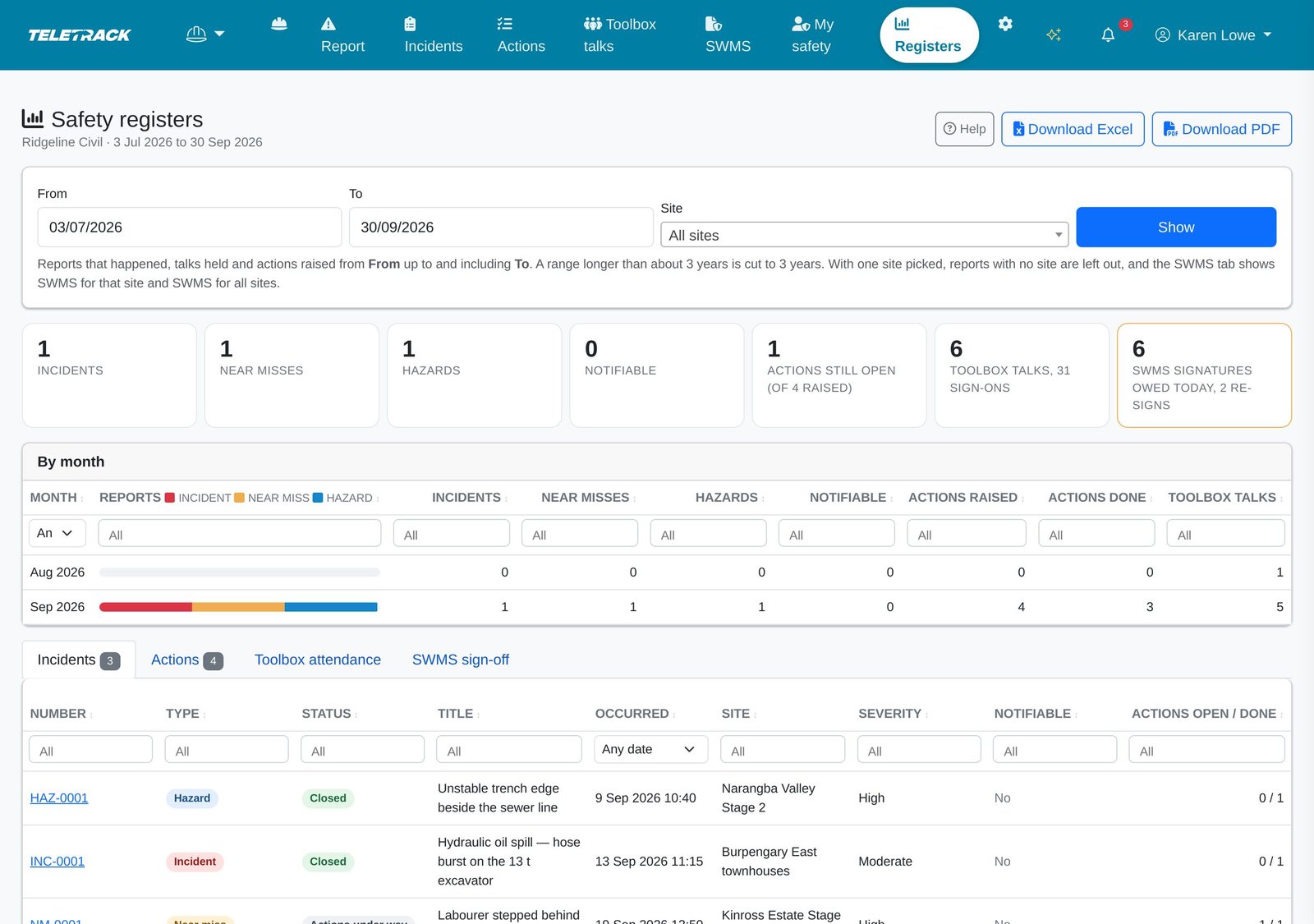
Supervisors and managers open Registers for any date range and site: totals, a month-by-month table and four registers.
- Incidents, near misses and hazards; corrective actions; toolbox attendance, showing who attended which talk; and SWMS sign-off, showing who has signed which SWMS.
- Totals for the period: incidents, near misses, hazards, notifiable incidents, actions still open, toolbox talks and sign-ons, and SWMS signatures owed.
- Download Excel, one sheet per register, or PDF. Each download is saved to Saved reports for the person who ran it, and logged.
- The last 90 days to start, up to 3 years at a time. A supervisor's registers hold what they can open: mainly the reports, actions and talks at their own sites.
- The Reports page has a Safety registers tile. The home dashboard's Safety card shows supervisors and managers open reports, notifiable incidents, near misses and hazards in the last 30 days, overdue actions and this week's talks, and shows everyone else their own actions and SWMS to sign.
- Registers are on demand: they can't be scheduled as automatic reports yet, and there are no injury frequency rates such as LTIFR.
Who sees what
Built on the Teletrack permissions you already have.
There are no separate Safety roles to set up: each person's role comes from the grants they already hold in Teletrack.
- Managers are Administrators and Editors at client level. They see every safety record, close reports, manage the SWMS register and change Settings.
- Supervisors are Administrators and Editors of a customer, site or asset. They look after the reports, actions and toolbox talks at their sites and download the registers. An Administrator or Editor grant on one asset makes that person a supervisor of the whole site the asset is at.
- Everyone else with Safety access can report, complete their own actions, sign SWMS and sign on to talks. They see what they reported or are investigating, the actions they own or raised, and the talks they attended.
- An incident or near miss opens for managers, the site's supervisors, the reporter and the investigator. A report saved without a site opens for managers, the reporter and the investigator. Hazard reports are open to everyone with Safety access unless a manager limits them in Settings.
- Teletrack staff with platform administrator access can also open every Safety record, injury details included, for example when supporting your account. They can also change or delete records outside the Safety pages.
- New reports are emailed to your client-level Administrators (a manager can turn this off) and up to 20 more addresses. The optional daily or weekly digest goes to client-level Administrators and Editors and to those extra addresses. Opening a link needs a Teletrack login that can see the record.
- Safety emails carry the record number, type, site and a link, never injury or treatment details. Emails about an action, and the digest, include the action's title, so keep injury details out of action titles.
- Photos, evidence, signatures and SWMS PDFs are kept in private storage, and open only for people allowed to see the record. Crew see only their own signature; supervisors and managers see the whole sign-on register.
- People who work for more than one company switch between them, and each company's records stay separate.
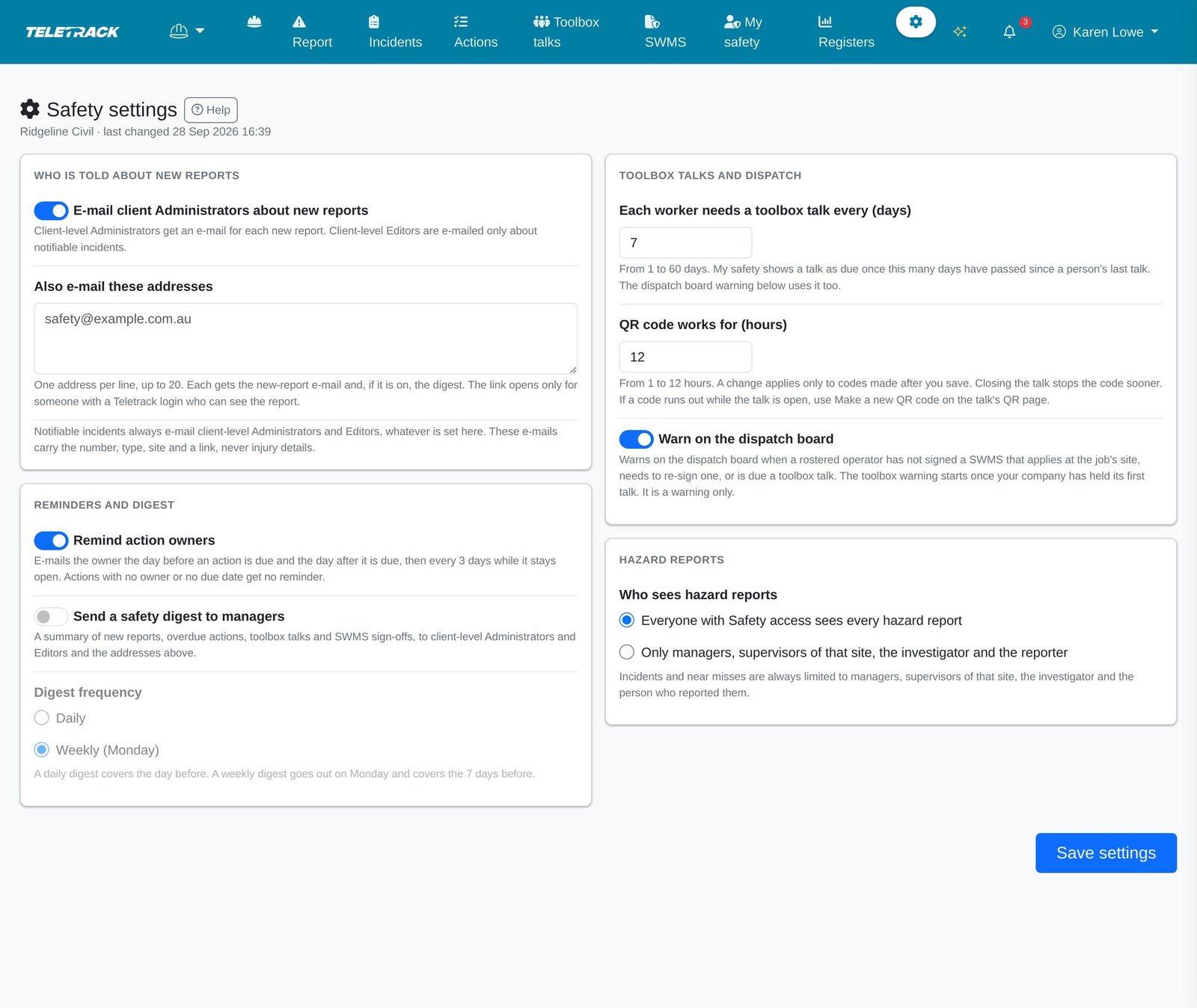
- Managers set the rest in Settings: action reminders, a daily or weekly digest, how often each worker needs a toolbox talk, how long a QR code works and the Dispatch warnings. Every change to Settings is logged.
With the rest of Teletrack
Dispatch, trackers, Maintenance and Inductions.
Safety works on its own, and does more alongside the Teletrack modules you already run.
- Dispatch: start a toolbox talk from a job on the run sheet, with the day's crew ready to sign. Rostered operators join a SWMS's to-sign list, and a report can be linked to one of today's jobs.
- The Dispatch run sheet warns when a rostered operator hasn't signed a SWMS for the job's site, needs to re-sign a revised one, or is due a toolbox talk. They're warnings only and never stop a booking, and a manager can turn them off. The compliance hub lists outstanding SWMS sign-offs and crew due a talk over roughly the next two weeks.
- Trackers: Use my location suggests plant that was nearby in the last 30 minutes, from trackers in Teletrack's main device feed. CalAmp and other units outside that feed aren't suggested.
- Maintenance (PROSTART®): for companies that also use it, a corrective action on a machine can raise a draft work order.
- Inductions and licences: My safety flags expired or expiring licences and tickets, and overdue inductions, from the records Teletrack already keeps.
- HammerTech: Safety doesn't sync with HammerTech. The HammerTech integration covers operators, tickets and pre-starts, and doesn't carry incidents, toolbox talks or SWMS.
WHS law
What the law asks, next to what Teletrack records.
A plain summary of Safe Work Australia's model work health and safety (WHS) laws, which every state and territory except Victoria has passed as its own law, some with changes. Victoria has its own Occupational Health and Safety Act 2004, and Western Australia's version, its WHS Act 2020, has differences noted below. This is general information, not legal advice: check with your regulator. The duties stay with the business (the PCBU, or in Victoria the employer or self-employed person), and a duty can't be handed to a software provider.
- Law: notify the regulator immediately after becoming aware of a notifiable incident, by the fastest possible means: by phone, or in writing in the form the regulator approves. After a phone call the regulator can ask for written notice within 48 hours. In Victoria a written record in WorkSafe's form is always due within 48 hours. Teletrack: emails your managers and shows that guidance when a report is marked notifiable, and records when you notified and the reference. It doesn't notify the regulator or write a written notice for you: add a copy of your notice to the report while it's open, and keep it with the report's PDF.
- Law: what's notifiable depends on where you work. Most jurisdictions list a death, a serious injury or illness, and a dangerous incident, each defined in detail. Victoria has its own list in its OHS Act, WA adds its own serious-injury cases, and the ACT widened its definitions of serious injury and dangerous incident from 19 November 2025. December 2025 changes to the model laws add more kinds of event, and apply only where a state or territory adopts them. Teletrack: offers the three common reasons only, and doesn't work out whether an incident is notifiable.
- Law: after a notifiable incident, the person with management or control of the workplace must, so far as is reasonably practicable, leave the site undisturbed until an inspector arrives or says otherwise, apart from helping injured people, making it safe and a few other listed reasons. The exact rule varies. Teletrack: tells people to preserve the site, and can hold photos taken before anything is moved and the names of witnesses.
- Law: keep a record of each notifiable incident for at least five years from the day the regulator is told (in Victoria, a copy of your written record, available to inspectors, the injured person and health and safety representatives). Teletrack: holds the report, the investigation, the actions, and when you told the regulator. Reports can't be deleted from the Safety pages, and no retention period is promised, so download the PDF, and keep the original photos and your written notice with it.
- Law: a SWMS is needed only for high risk construction work: 18 kinds in the model regulations and 19 in Victoria's, such as a risk of falling more than 2 metres, work in or near a shaft or trench deeper than 1.5 metres, or work where powered mobile plant is moving. Other work still needs its risks managed. A SWMS must be prepared before that work starts and fit the actual workplace. Teletrack: holds the SWMS you write, as a PDF. It doesn't write one, check what's in it, or judge whether it fits the site.
- Law: the work must follow the SWMS, a copy must be readily accessible to the workers doing it, and it's kept until the work is finished and, if a notifiable incident is connected with it, for at least two years after that incident, available for inspection (Victoria: for the duration of the work). Teletrack: shows the current PDF on a phone with coverage and keeps every version. It has no offline mode, so keep a copy on site where coverage drops out.
- Law: a SWMS must be readily accessible and understandable to the workers doing the work. The regulations don't require workers to sign it, although many principal contractors ask for signatures. Teletrack: records who signed which version. A signature doesn't show that someone understood the SWMS or that the work followed it.
- Law: review a SWMS, and revise it as necessary, when its control measures are revised (in Victoria, whenever the work changes or there's a sign the controls aren't working, such as after an incident). Teletrack: keeps a review date, emails managers when it's due, and publishes a revision with or without new signatures.
- Law: on a construction project, a copy of the SWMS goes to the principal contractor before the high risk work starts. What counts as a construction project differs: $250,000 or more of work under the model laws, or 5 or more people working at the same time in WA, and Victoria's regulations set their own rules. Teletrack: doesn't share records with a principal contractor. Download the PDF and send it.
- Law: consulting workers on health and safety matters is a duty, under the model laws and Victoria's OHS Act alike. "Toolbox talk" isn't a term in the model WHS Act or Regulations: the model code of practice on consultation lists toolbox talks as one way to consult workers. Under the model laws, consulting means sharing information, giving workers a reasonable chance to have their say, taking their views into account and telling them the outcome. Teletrack: records who attended, what was covered and the issues the crew raised, and turns issues into corrective actions. A signed sheet doesn't on its own show that consultation happened.
What it doesn't do yet
Better to hear it now than after an incident.
Safety does the everyday recording for you. These are the gaps, as they stand today.
- No app and no offline mode: Safety runs in the phone's browser, needs mobile coverage and isn't in the Teletrack mobile app.
- It doesn't notify or lodge anything with a regulator, or decide whether an incident is notifiable. The notifiable reasons it offers are the three in most WHS laws today.
- No risk matrix (likelihood × consequence), site inspections or audits, permits to work, job safety analyses, chemical or SDS register, custom report fields or contractor prequalification.
- No injury coding (body part, nature of injury, days lost) and no frequency rates such as LTIFR or TRIFR.
- A report can't be edited from the Safety pages after it's sent, and closed and withdrawn reports can't be reopened. Corrections go in the investigation notes.
- Email only, with no SMS or push. Supervisors aren't emailed about new reports at their sites, an investigator isn't emailed when named, nobody is chased about an unsigned SWMS after the first email, and overdue actions reach managers only in the optional digest.
- Toolbox talks have no topic library or templates, can't hold photos or files, and don't close on their own: close each one when everyone has signed.
- Visitors on the QR page can't sign SWMS: brief them on the supervisor's phone. Staff who scan the code while logged out sign on as visitors, and the talk doesn't count for them.
- The QR page takes about 10 sign-ons from one network every 10 minutes, so on shared site Wi-Fi a large crew can be turned away: sign the rest on the supervisor's phone. Two visitors with the same name and company are recorded once: the second sees the thank-you page, but nothing more is saved.
- The SWMS register holds PDFs you write. There's no SWMS builder or templates, and its high risk work tags are common categories, not the full list in the regulations.
- Finishing a Maintenance work order doesn't close the safety action: mark it done yourself. Raising a work order needs Teletrack Maintenance.
- Registers can't be scheduled as automatic reports yet, and nothing is shared with a principal or head contractor through Teletrack.
- Nothing syncs with HammerTech, and there's no API or webhooks for safety data.
- No lone worker, SOS or duress features.
- A drawn signature records who acknowledged what and when. It doesn't prove who signed. The History on each record is an audit trail of who did what and when, not a tamper-evident log.
- No retention period is promised: download the PDFs of records you need to keep.
Common questions
How much does it cost?
Safety is part of the Workforce package: $5 per user per month total, ex GST, for Timesheets, Inductions, Dockets, Dispatch, Staff transport and Safety. Priced per user, not per device, month-to-month with no lock-in contracts. Safety isn't sold on its own. Visitors and subcontractors who sign on to a talk with the QR code need no Teletrack login. Ask us how your crew and subcontractors would be counted.
Is this the same as Track + Safety?
No. Track + Safety is a Telematics tier at $26.90 / asset / month + GST: tracking plus pre-start checks and the Maintenance module, priced per asset. Safety is the module for incidents, near misses, hazards, corrective actions, toolbox talks and SWMS, in the Workforce package at $5 / user / month + GST.
Does Teletrack notify the regulator?
No. Marking a report notifiable emails your client-level Administrators and Editors and shows the guidance: notify your WHS regulator immediately and preserve the site. Your business still has to work out whether an incident is notifiable under the law where you work, and notify the regulator itself, immediately and by the fastest possible means: by phone, or in writing in the form the regulator approves. Don't wait for the Teletrack email. Once you have, a manager or the site's supervisor records when, and the reference, on the report.
Do crews need an app, and does it work offline?
No app: Safety runs in the phone's browser, with nothing to install, and each person needs their own Teletrack login. It needs mobile coverage and has no offline mode, and it isn't in the Teletrack mobile app. Visitors signing on to a toolbox talk with the QR code need no login.
Can subcontractors and visitors take part?
At toolbox talks, yes. They sign on with their name, company and signature, on the supervisor's phone or by scanning the talk's QR code, with no login. A visitor briefed on a SWMS is recorded by name when they sign on the supervisor's phone; the QR page can't record SWMS. There are no contractor accounts or prequalification.
What does a drawn signature prove?
It's a record of who acknowledged what and when: the signature image, the time, the IP address and the phone's browser details, with a SHA-256 fingerprint of the image, and how it was taken (their own phone, a supervisor's phone or the QR page). It doesn't prove identity, because whoever holds the phone draws it. Signing a SWMS on its own page also needs a tick that the person has read and understood it.
Who can see an injury report?
An incident or near miss opens for your managers, the supervisors of its site, the person who reported it and the investigator. Teletrack staff with platform administrator access can also open it, for example when supporting your account. Emails about it carry the number, type, site and a link, never injury or treatment details. The PDF copy does include them, so share it with care.
Can a report be changed or deleted?
What was reported can't be edited from the Safety pages after it's sent: corrections go in the investigation notes. Reports can't be deleted from the Safety pages, and closed or withdrawn reports can't be reopened. Changes made in Safety after sending go in the report's History, an audit trail of who did what and when. Teletrack staff with platform administrator access can change or delete records outside the Safety pages, and the History doesn't show those changes.
Does it write our SWMS?
No. You write the SWMS for your site and task and upload it as a PDF, and Safety keeps the versions and who signed which. It doesn't check what's in a SWMS or whether it fits the site. A SWMS is only required for high risk construction work; other work still needs its risks managed. Teletrack Inductions can also show a PDF, such as a SWMS, before the induction questions, but only the Safety register keeps versions and asks people to sign the current one.
When we revise a SWMS, does everyone have to sign again?
Only if you tick Needs new signatures when you publish the revision. Earlier signatures then stop counting, the required signers are emailed once, and the SWMS shows who still has to sign and why. Untick it for a minor correction and earlier signatures keep counting. After that first email, people who haven't signed see it in My safety, managers see the count in the optional digest, and the Dispatch run sheet warns when they're rostered.
Does it replace PROSTART® pre-starts?
No. PROSTART® checks the machine before it starts and is priced per asset. Safety records what happens with people on site: reports, fixes, toolbox talks and SWMS. They meet where a corrective action on a machine raises a work order in Maintenance.
Does it sync with HammerTech?
No. The HammerTech integration syncs operators and tickets and sends pre-starts back as inspections. Incidents, toolbox talks and SWMS stay in Teletrack.
Can we export our safety records for an audit or a principal contractor?
Yes. Supervisors and managers download the registers for a date range and site, up to 3 years at a time, as Excel (one sheet per register) or PDF: incidents, near misses and hazards; corrective actions; toolbox attendance; and SWMS sign-off. Each report and each toolbox talk also has its own PDF. Safety records aren't part of the portal sharing with head contractors, so download them and send them.
How long are records kept?
Reports can't be deleted from the Safety pages, and every SWMS version is kept, but Teletrack promises no retention period. WHS and OHS laws ask for a record of each notifiable incident to be kept for at least five years from the day the regulator is told, so download the PDFs you need to keep. Register downloads also go to Saved reports, where files are kept for 90 days.
Can we try it?
Yes. If your company is on Teletrack, a client Administrator can start a 30-day free Workforce trial, Safety included, from the Apps page, once per company. Already on Workforce? Safety is already switched on. To keep it after a trial, Subscribe sends a request to your account manager. If a trial ends without a subscription, Safety switches off and its records stay in Teletrack. New to Teletrack? Build an Instant quote with Workforce and tick Start a free trial of the Teletrack system at the end: it creates your company's account with the quoted packages, Safety included, on a 30-day trial. Or book a demo.
What doesn't it do yet?
No app or offline mode, and email only. It doesn't notify the regulator or decide what's notifiable. No risk matrix, inspections, permits, injury rates, contractor prequalification, SWMS builder, HammerTech sync or lone worker alerts. Reports can't be edited from the Safety pages after they're sent, talks don't close on their own, and finishing a work order doesn't close its safety action. The full list is in "What it doesn't do yet" above.
Are the screenshots from a real organisation?
No. Every screen on this page comes from a demonstration organisation, an invented civil contractor with fictional people, builders and sites, and the GPS is simulated.
See Safety from a near miss to a closed report
In 30 minutes we'll walk a demonstration company through Safety: a near miss reported on a phone, the investigation and its corrective action, a toolbox talk with a visitor signing on, a SWMS revision and the registers. Or call 02 8279 2727.
More solutions
View all →Inductions
Online operator inductions with a custom competency questionnaire builder — YouTube videos or PDFs for operators to review, then scored multiple-choice questions. Ticket and licence expiry tracking with alerts. Feeds PROSTART® pre-start gating. $5 / user / month + GST Workforce package (bundled with Timesheets, Dockets, Dispatch, Staff transport and Safety).
Dispatch
Live jobs × shifts × plant grid — replace the weekend run-sheet spreadsheet. Assign operators + plant, cycle Confirmed / TBC / TBA, catch double-bookings + compliance gaps, text the crew, log shifts to timesheets, raise dockets, invoice.
PROSTART® pre-starts
Pre-starts that immobilise across every hardwired tracker we sell — Digital Matter, Teltonika, Ruptela, and TrakaX®. HammerTech-integrated.
Ready to see Safety in action?