
Excavator
GPS tracking for excavators — built for AU fleets.
Hardwired on Ruptela Smart5 or Teltonika FMM250 — live location, CANBUS/J1939 fault codes, engine hours, PROSTART® pre-starts with immobilisation. WHS-ready audit trail.
Recommended hardware
Preferred: Ruptela Smart5 hardwired in the cab + Ruptela Asset5 as a hidden backup tracker for theft defence-in-depth (Asset5 enters recovery mode if it can't hear the Smart5 over Bluetooth). Or Teltonika FMC650 + Dashcam / DualCam when dashcam compliance is required. Teltonika FMM250 or Digital Matter G70-BLE as fleet-standardised alternatives.
Hardware for gps tracking for excavators | engine hours + prostart®
Trackers we recommend.
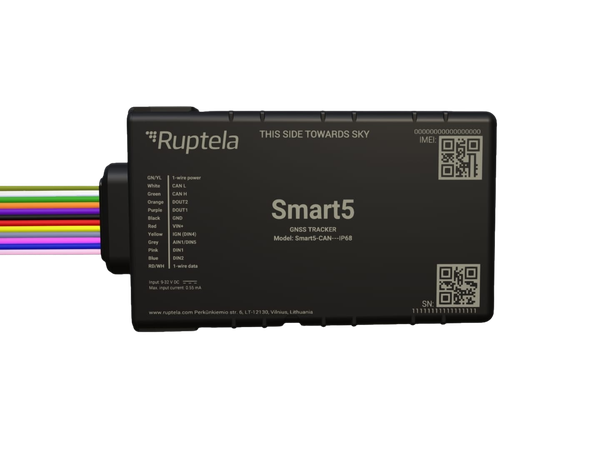
Smart5
Hardwired, fleet vehicles + heavy plant.
See device →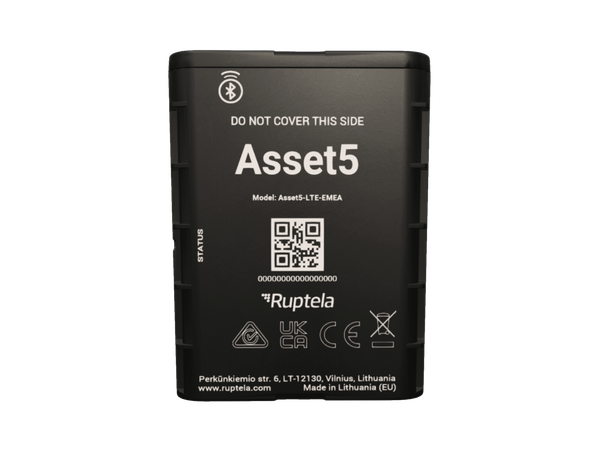
Asset5
Long-battery (3-year at 2 reports/day), non-powered assets, cold chain.
See device →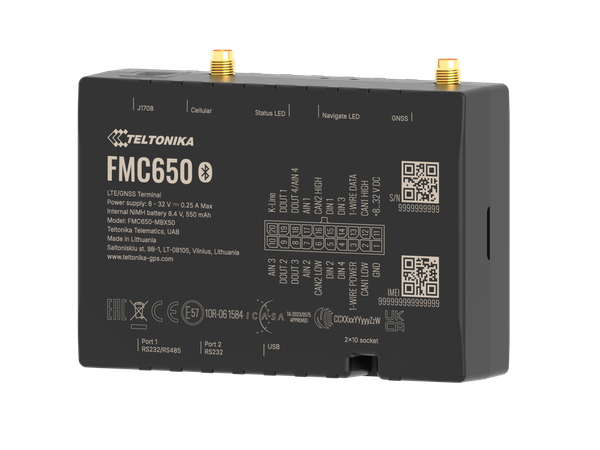
FMC650
Dashcam-pairing telematics device (Cat 1, higher bandwidth).
See device →Fleet dashcams + video telematics
Two Teltonika dashcam options paired with the FMC650 telematics device. Forward-facing ($200 upfront) or forward + driver-facing ($250 upfront); $10 / $15 per unit / month subscription.
See device →Capabilities
What Teletrack does on an excavator
Live GPS tracking
Position updates while ignition is on. Configurable reporting intervals. Geofence sites so platform knows when excavator arrives, leaves, or moves between yards.
PROSTART® pre-starts
Operator scans RFID/iButton/keypad/QR, runs pre-start questionnaire. Pass — machine unlocks. Fail — photo-evidenced, and a draft work order opens for a failed question set up to create one. No pre-start, no power.
CANBUS / J1939 fault codes
Fault codes pulled from machine's CAN bus and surfaced in platform.
Engine hours servicing
Engine hours counted from ignition time, or read from the machine's own CAN hours where the asset is set to use them. Service rules can raise draft work orders at 250/500/1000-hour intervals.
Fuel monitoring
Track fuel consumption per machine, operator, site. Flags large unexplained drops outside normal use windows.
Anti-theft + recovery
Geofence breaches, after-hours movement alerts, active recovery support. Most theft happens after hours from yards — platform flags it immediately.
Hardware
Recommended hardware for excavators
Preferred: Ruptela Smart5 + Asset5 backup tracker
Smart5 hardwired in the cab for live tracking, CANBUS / J1939 fault codes, engine hours, and PROSTART® pre-starts with immobilisation. A hidden Ruptela Asset5 battery tracker pairs over Bluetooth as a defence-in-depth backup — if the Asset5 stops hearing the Smart5 (typically because a thief has found and disabled the visible tracker), the Asset5 enters recovery mode automatically with higher reporting frequency and an alert to Teletrack. Two-tracker setup is the right kit for high-value plant on yards or remote sites where theft is the headline risk.
Smart5 detail →Alternative: Teltonika FMC650 + Dashcam
Teltonika FMC650 hardwired with the same CAN / J1939 read and PROSTART® immobilisation as the Smart5, plus dashcam pairing (Teltonika Dashcam or DualCam) for AU mining-site spec and Tier 1 head-contractor compliance. Pick FMC650 when video alongside the telematics is required — BMA / Rio Tinto / FMG site gates, insurer-led safety programmes.
Dashcam options →Fleet-standardised alternatives
Teltonika FMM250 (the hardwired non-dashcam Teltonika option) or Digital Matter G70-BLE (Australian-designed) can substitute for the Smart5 when the rest of the fleet runs that vendor — PROSTART® immobilisation works across the hardwired range; for engine hours off CANBUS, pick the FMM250 (the G70-BLE doesn't read CANBUS). Ruptela Asset5 companion-recovery pairing is Smart5-only, so drop the hidden-backup layer (or standardise on the Ruptela preferred kit) if you go FMM250 or G70-BLE.
Compare hardware →Install
Professional hardwired install
Typical fit is 30–60 minutes per machine with an auto-electrician — wire to switched 12V/24V, ground, CANBUS tap into J1939 bus, and the relay loop into start circuit for PROSTART® immobilisation.
Three options: Professional install via our partner network (most common for bulk plant rollouts). Customer-arranged auto-electrician with our diagrams and phone support (common for fleets with in-house workshops). DIY isn't a fit for excavators given the CANBUS tap and immobilisation wiring.
Common questions
How long does install take?
Typical 30–60 minutes per machine with an auto-electrician. Wiring to switched power, ground, J1939 CAN bus, and (if PROSTART®) the start circuit for the immobilisation relay. We can arrange install or supply diagrams for your own auto-electrician.
Will the tracker work on remote sites?
Yes. The Smart5 is a standard 4G tracker, and the SIM we supply roams across Telstra, Optus and Vodafone, so it uses whichever network has coverage. The G70-BLE is a Cat-M1 device that runs on Telstra's Cat-M1 network only. The FMM250 is 4G LTE-M / NB-IoT capable, and the FMC650 runs on 4G LTE Cat-1 for dashcam video. For sites that drop coverage entirely the device stores trip and event data locally; pre-starts completed offline in the Teletrack app sync when back online, for machines whose pre-start doesn't unlock them. A machine with immobilisation needs a connection, because a pass is what unlocks it.
Can I read engine hours from the machine?
Yes, on hardwired devices with CANBUS / J1939. Ruptela Smart5 and Teltonika FMM250 / FMM650 / FMC650 read the engine's own hours off the bus. Where the asset is set to use them, its hour meter follows the engine instead of counting ignition time.
Does it support immobilisation?
Yes — when wired for it. PROSTART® cross-vendor immobilisation works on every hardwired tracker in the lineup (Smart5, FMM250, FMM650, FMC650, G70-BLE, TrakaX® Series 2). Relay loops into the start circuit and gates the machine on pre-start pass / fail.
Why pair an Asset5 backup tracker with the Smart5?
Excavators are high-value, often sit unattended on yards or remote sites overnight, and are a real theft target. A visible hardwired tracker is the first line — a thief who knows what they're looking for will find and disable it. A hidden Ruptela Asset5 paired over Bluetooth with the cab-mounted Ruptela Smart5 gives you defence-in-depth: when the Asset5 stops hearing the Smart5's BLE signal, it enters recovery mode automatically — higher reporting frequency, aggressive cellular behaviour, and a Teletrack alert. Companion-recovery pairing is Ruptela-to-Ruptela — Smart5 + Asset5 only — so this two-tracker setup only slots in on the Ruptela preferred kit; standardise there for flagship plant where loss hurts.
Can I move the tracker between excavators?
Technically yes, but it's not the default. Tracker is wired to the machine, so reassignment is an auto-electrician refit job. Most fleets leave the device on the machine for its working life.
See Teletrack on your excavator fleet
30-minute demo walks through operator pre-start flow, engine-hours servicing trigger, CANBUS fault feed, and what install looks like on the make/model you're running.
See it on your fleet.
A 30-minute demo is the fastest way to see what Teletrack does on excavator.