
Solution
Geofencing + sites
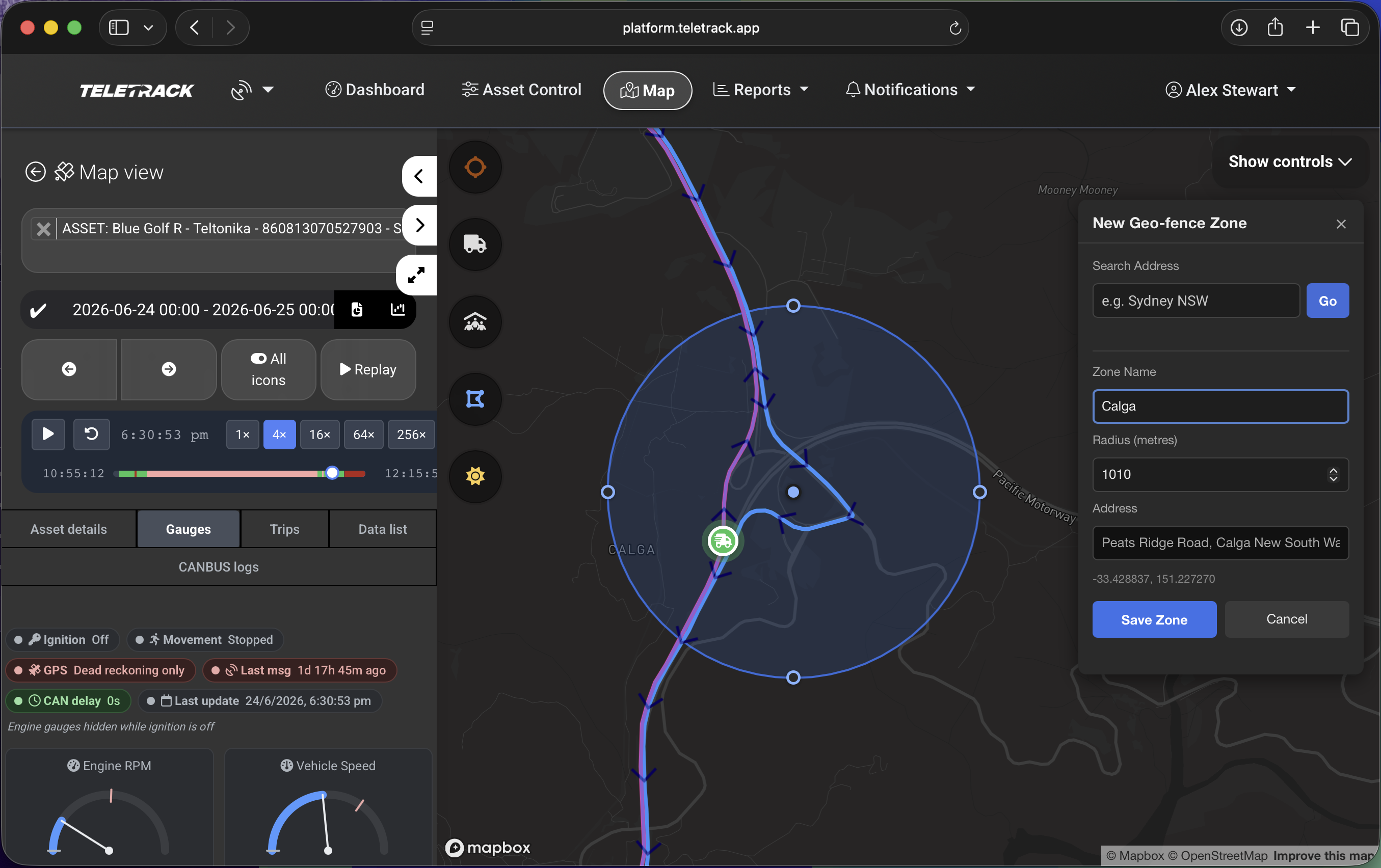
Circular geofences. Entry, exit, dwell, unauthorised-use alerts. Site and project-level reporting that aggregates every asset on site, regardless of owner.
What this does
Circular zones, layered
Teletrack's geofencing isn't just a single circle drawn around your depot. It's a layered system for managing where assets are allowed to be, where they need to be, and what counts as 'on site' for reporting.
Zones are drawn as circles — drop a centre point on the map and set the radius. Useful for yards, customer addresses, project sites, service catchments, and no-go areas.
Alerts
Alerts you can trigger from a zone
Entry
An asset crosses into a zone — get a notification by email or in-platform. Useful for 'arrived at customer site', 'entered no-go area', or 'off-site machine returned to yard'.
Exit
An asset leaves a zone — same channels. Useful for 'left depot without dispatch', 'left customer site at end-of-shift', or 'moved out of state-defined area'.
Dwell time
An asset is inside a zone for longer than X minutes / hours / days. Catches over-runs on customer sites, abandoned machines, and assets that have been sitting in yards longer than expected.
Unauthorised use
An asset moves inside a zone where it shouldn't be moving — for example, after-hours movement in a depot.
Site and project reporting
Where Teletrack pulls ahead of typical telematics
Most platforms report on assets you own. Teletrack reports on sites — aggregating every asset working there, regardless of who owns it.
What that means in practice
- A Tier 1 head contractor running a project site sees every sub-contractor's machine on the site, with hours, location, pre-start status, and operator activity — provided each sub-contractor is also on Teletrack or has shared a portal view (see Portal Sharing Mode 2).
- A hire business with multiple yards rolls up activity by yard — assets in / assets out / utilisation by branch.
- A civil contractor on a multi-site project gets one report per site showing every machine that's been on that site this week, regardless of whether it's owned, hired in, or sub-contracted.
Pair geofencing with portal sharing Mode 2 and you have a site-aware platform that head contractors can actually rely on.
Use cases
Where customers use this
Yard management
Circular zones around every depot. Entry / exit alerts catch unbooked movements.
Project sites
Circular zones around active construction or civil sites. Pair with portal sharing to share a live site view with the head contractor.
Customer site visibility
Circular zones around each customer's address. Alerts when a hired machine arrives, when it leaves, and how long it's been there. Useful for charge-by-usage and dispute resolution.
Service-area alerts
Service businesses use geofences to trigger maintenance or service workflows when an asset enters a service area. Combine with the Maintenance module.
No-go zones
Exclusion zones around sensitive areas — public roads, environmentally protected ground, after-hours-only areas. Unauthorised-use alerts fire when a machine enters.
Charge-by-usage
Zone-based dwell reporting (time on a customer site) drives hire charge-out where the customer pays for time on site, not just hours hired. The report and the invoice line up.
Hardware compatibility — every device in the range
Geofencing works on every device in the Teletrack range — battery, OBD plug-in, and hardwired. Accuracy and reporting frequency improve with hardwired CANBUS-equipped trackers (TrakaX® Series 2, Teltonika FMM250 / FMM650, Ruptela Smart5). A battery tracker reporting twice a day will trigger at the next report after entry — useful for daily summaries but not for live alerting. If geofencing is core to how you run the business, we'd recommend a hardwired CANBUS device on those assets.
Industries
Industries using geofencing + sites
Equipment Hire
Yards, customer sites, charge-by-usage support.
See Equipment Hire →Tier 1 & 2 Construction
Site reporting and head-contractor visibility.
See Tier 1 & 2 Construction →Civil contracting
Multi-site projects, exclusion zones, environmental compliance.
See Civil contracting →Mining and quarry contractors
Pit boundaries, haul-route compliance, no-go areas.
See Mining →Common questions
How many zones can I draw?
There's no hard limit. Customers routinely run hundreds of zones — every customer address, every yard, every active project — without performance issues. Zones are managed centrally and can be grouped for bulk operations.
How accurate is the zone trigger?
Trackers don't report on a fixed clock — they report on accelerometer movement, heartbeat / time-interval check-ins, and input changes (ignition, digital inputs). An asset entering or exiting a zone usually triggers very close to when it crossed the boundary, even between scheduled heartbeats.
Battery devices (Barra GPS, Asset5) lean more on time-based check-ins to preserve battery, so the trigger waits for the next report.
Can a head contractor see all assets on their site, even if my sub-contractors run different fleets?
Yes — if those sub-contractors are also on Teletrack and share a portal view. The site report rolls up assets across owners. If sub-contractors aren't on Teletrack, the head contractor only sees the assets that are. See Portal Sharing Mode 2.
Are zones tied to specific assets or platform-wide?
Platform-wide by default. You define a zone once and any asset can trigger against it. You can scope which assets trigger alerts for which zones via the alert rule — for example, only forklifts trigger exit alerts on the warehouse zone.
Is there a separate price for geofencing?
No. Geofencing and zone alerts are included in the Track plan at $21.90 / asset / month. Site and project-level reporting is part of the core platform. SMS-delivered alerts may incur additional charges.
See geofencing on your fleet
A demo is the fastest way to see how zones, alerts, and site reporting work for your specific business. We'll draw zones over your actual yards and sites in the demo.
More solutions
View all →PROSTART® pre-starts
Pre-starts that immobilise across every hardwired tracker we sell — Digital Matter, Teltonika, Ruptela, and TrakaX®. HammerTech-integrated.
Asset tracking
Live GPS, geofencing, history playback, and theft-response assistance — we'll help you mobilise a police-accessible live tracking link when an asset goes missing. From $21.90 / asset / month.
Maintenance
Draft work orders raised by engine hours, kilometres, schedule, or failed pre-start questions set up to create one. Parts inventory. Technician tablet workflows with photo and signature capture.
Ready to see Geofencing + sites in action?