
Solution
PROSTART® screens
Rugged Android screen in the cab. Operators sign in with PIN, iButton, or RFID, then work through the PROSTART® pre-start on-screen. Runs on Teltonika FMC650 + Topicon MDT665 or MDT865.
PROSTART® screens — hardware for the pre-start workflow.
Not a new product tier. The same PROSTART® module (+$10 / asset / month on Track + PROSTART®) driving cross-vendor immobilisation, now with a purpose-built in-cab terminal for operators to sign in and complete the pre-start on.
How it works
One asset. One screen. One operator per shift.
A one-off setup gets the screen paired with the machine. From then on the workflow is: get in, sign in, pre-start, drive.
The shift
From cab entry to first movement.
-
1
Screen is allocated to the asset.
In the Teletrack platform, each Topicon screen is assigned to the asset it's mounted on. The screen knows what machine it's running the pre-start for — operators don't pick from a list.
-
2
Operator signs in.
PIN code on the touchscreen, iButton tap, or RFID card. Whichever the site prefers. Admins provision the initial PIN; operators can change it themselves.
-
3
Pre-start runs on-screen.
The correct PROSTART® questionnaire for that machine class loads automatically. Operators tick through, photograph faults, and confirm safety items.
-
4
Pass, or don't start.
Clean pre-start → the FMC650 releases the immobiliser and the machine can start. A failure on a critical item → the machine stays down and a notification lands with the site supervisor.
-
5
Every session ties back to the asset.
The pre-start record, faults, and operator hours for that shift are all logged against the asset the screen is bound to. No reconciliation later.
Sign-in
Three sign-in methods on the same screen.
PIN code
Numeric PIN typed on the touchscreen. Admins issue the initial PIN; the operator can change it from the screen itself. Simplest to roll out — no extra hardware per operator.
iButton
Dallas iButton dot on a keyring, tapped against the reader wired into the screen. Fast, rugged, and familiar to operators who already carry one for yard access.
RFID card
Standard RFID access card held to the screen's built-in reader. Handy when the site already runs RFID for the induction gate or lunchroom kiosk — one card, one operator, everywhere.
Hardware
Teltonika FMC650 + a Topicon screen.
The FMC650 handles telematics, CANBUS, and the immobiliser output. The Topicon screen is the operator's window into the workflow. RS232 between them, so no cloud round-trip is needed to check whether the pre-start is complete.
Hardware pairing
The kit — one FMC650 + one Topicon screen per machine.
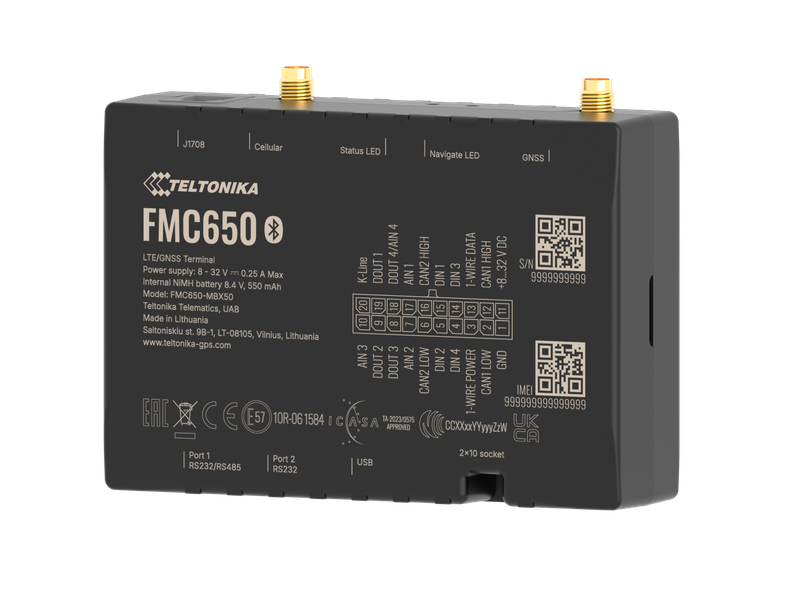
Teltonika FMC650
The telematics device — CANBUS, ignition, and the immobiliser output. RS232 to the screen. One per machine, hardwired by an auto-electrician.
See FMC650 spec sheet →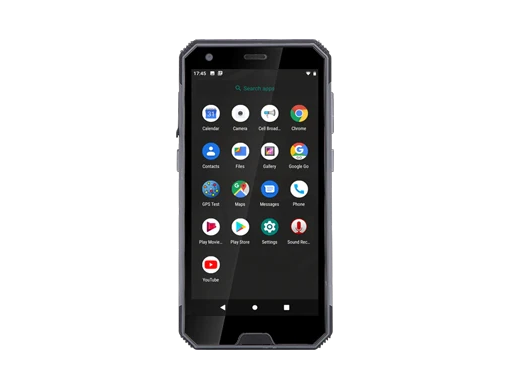
Topicon MDT665 — 5.7" handheld / cradle
Rugged 5.7" Android device, IP67. Cradle-mounted in the cab or carried between machines. $600 +GST, mounting kit + RS232 loom included.
See MDT665 spec sheet →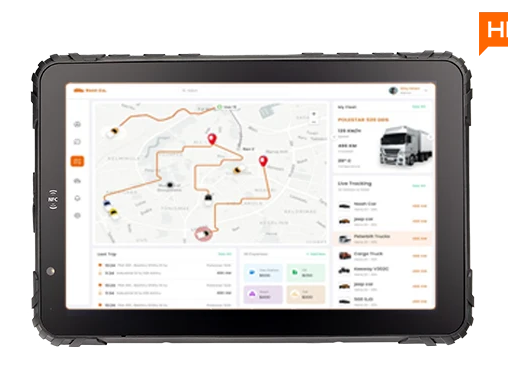
Topicon MDT865 — 10.1" cabin tablet
Rugged 10.1" Android tablet, IP65. Typical cabin install; removable for walk-arounds. $800 +GST, mounting kit + RS232 loom included.
See MDT865 spec sheet →How the pieces connect.
Teltonika FMC650 → RS232 → Topicon screen → Teletrack Android app. The FMC650 provides ignition, CANBUS, and the immobiliser output; the screen runs the pre-start UI and operator sign-in. The two talk directly — the pre-start gate on the immobiliser doesn't depend on a network round-trip.
The app
Teletrack's Android app.
Same app that runs on operator phones for yard walk-ups and trailer inspections — now on a cabin-grade screen wired into the machine.
On the screen
What the operator sees.
Machine-specific PROSTART®
The pre-start loaded on the screen is the one built for that machine class in the platform. Excavator questions on an excavator; forklift questions on a forklift. No wrong-form errors.
Photo + comment on faults
Operators photograph faults straight from the screen. The image and comment land on the pre-start record in the platform, and route to the maintenance queue automatically.
Live from the FMC650
Because the screen is wired to the tracker, ignition state, engine hours, and CANBUS fault codes are available on-screen without a network hop.
Operator session record
Sign-in / sign-out is timestamped against the asset. Timesheets, PROSTART®, and asset hours all draw from the same session.
Pricing — hardware upfront, no per-screen subscription.
Screens are a one-off hardware purchase — MDT665 $600 +GST, MDT865 $800 +GST, each including the mounting kit and RS232 loom to the FMC650. The Telematics subscription ($31.90 / asset / month) is what unlocks the pre-start workflow itself — there's no separate per-screen fee.
PROSTART® screens FAQs
Can I use PROSTART® without a screen?
Yes. The standard PROSTART® workflow runs on the operator's phone via the Teletrack Android or iOS app. Screens are for operators who don't carry a phone, sites where a phone isn't practical (mining pit, wash bay), or fleets that want a fixed sign-in station per asset. Same subscription, same PROSTART® module — just a different device.
Do I need an FMC650, or will another tracker do?
The screen pairs specifically with the Teltonika FMC650 over RS232. The FMC650 provides the CANBUS-capable telematics device and the immobiliser output; the screen runs the pre-start UI. If you're on a different tracker (Digital Matter, Ruptela, TrakaX®), the standard phone-based PROSTART® workflow is the right fit.
How does the sign-in work day-to-day?
The operator taps their PIN, iButton, or RFID card on the screen. Sign-in binds their session to the asset the screen is allocated to. When they finish the shift they sign out — or the session auto-ends on ignition-off after a configurable idle window. Multiple operators can share the same asset across a day; each sign-in / sign-out cycle is its own record.
Who manages the PINs?
Admins issue the initial PIN when the operator is added to the platform. The operator can then change their PIN from the screen itself — same as a bank card. If a PIN is forgotten, an admin resets it from the Teletrack platform and hands the new one to the operator.
Is the screen permanently mounted, or removable?
Either. Both the MDT665 and MDT865 ship with a cradle mount and RS232 loom. Most cabin installs leave the screen cradled and hard-wired for power; the operator can still pop it out for a walk-around inspection if they want to. Screens can also be moved between machines when the platform assignment is updated.
What happens if the network drops?
The screen and the FMC650 talk over RS232 — no network in between. The pre-start runs, the immobiliser releases (or holds) on the local outcome, and the app queues completed records locally. When the FMC650 gets signal again, the records sync to the platform.
What does a typical install look like?
An auto-electrician from our install network fits the FMC650 (power, CANBUS, immobiliser output) and runs the RS232 loom to the cradle location, usually near the operator's line of sight. The screen clicks into the cradle. Install is quoted per site — Teletrack refers the installer; the installer invoices you directly.
See a PROSTART® screen on your machine.
30-minute demo, live platform + screen walkthrough. If it's a fit we'll quote hardware and refer an installer.
Mobile
Install the Teletrack app on the screen.
Same app your operators run on their phones. Install it on the Topicon screen straight from the Play Store.
Ready to see PROSTART® screens in action?